Physical Address
304 North Cardinal St.
Dorchester Center, MA 02124
Physical Address
304 North Cardinal St.
Dorchester Center, MA 02124

We found the 8 best t shirt printers for every setup, from budget heat presses to full DTF bundles. Find the right machine for your custom apparel business.
You have a design. You have a stack of blank tees. And you have about fifteen different ways to spend money, from a $13 pack of iron-on paper to a $3,300 printer that spits out full-color transfers ready to press. The problem is that the category people call "t shirt printer" is a mess of heat presses, sublimation printers, DTF machines, and consumables that all promise the same thing but deliver very different results. Pick the wrong one and you either outgrow it in a month or spend hours fighting clogged nozzles.
We sorted through what is available right now to find the best t shirt printers for every level of ambition. The range here covers automatic presses that could run a small production line, dedicated DTF bundles that handle full-color orders, a sublimation all-in-one for hobbyists, a classic clamshell heat press that never goes out of style, and even a pack of transfer paper that turns your home inkjet into a t-shirt printer for less than the cost of dinner. One of them is exactly where you should start.
TL;DR: The HTVRONT Auto Heat Press is the one to buy if you want to crank out transfers without hovering over the machine. The VEVOR 12×10 Clamshell is the best value for anyone starting out with a heat press. The KOMHOW R1390 DTF Printer is the most complete DTF starter package. The TransOurDream Transfer Paper is the cheapest way to print shirts if you already own an inkjet.
| # | Product | Type | Platen or Print Size | Best for | Price |
|---|---|---|---|---|---|
| 1 | HTVRONT Auto Heat Press | Automatic Heat Press | 15×15 inches | Hands-off batch production | $236.00 |
| 2 | VEVOR Heat Press | Clamshell Heat Press | 12×10 inches | Budget-friendly reliable press | $99.90 |
| 3 | WHUBEFY 5-in-1 Heat Press | Multi-function Heat Press | 15×12 inches + attachments | Versatility on a budget | $189.99 |
| 4 | Calogy Mini Heat Press | Mini Heat Press | 2.87×4.43 inches | Small crafts and touch-ups | $24.98 |
| 5 | Pinckney Sublimation Printer | Sublimation All-in-One | Up to 8.5×11 inches | Easy sublimation for beginners | $299.99 |
| 6 | KOMHOW R1390 DTF Printer | DTF Printer | A3 (11.7×16.5 inches) | Complete DTF starter package | $1,748.00 |
| 7 | Lancelot M1630 Pro DTF Bundle | DTF Pro Bundle | A3 Plus (13×19 inches) | Production-oriented DTF | $3,299.00 |
| 8 | TransOurDream Transfer Paper | Heat Transfer Paper | 8.5×11 inches (paper size) | Inkjet users making single prints | $12.97 |
Prices change in real time. The table reflects the listed price at the time of writing.
The best t shirt printers are not just the ones with the most features. We looked at what actually matters once the box is open.
Heat press vs. DTF vs. sublimation. Each approach serves a different workflow. A heat press requires a separate printer and transfer paper. A DTF machine prints and cures transfers that go onto any fabric. Sublimation printers need polyester or coated blanks. The right choice depends on the fabrics you use and the volume you need.
Platen or print size. A 15×15 inch platen covers most adult t-shirt designs. Smaller machines limit you to pocket logos or kids sizes. DTF printers with A3 or larger output let you print full back designs without piecing panels together.
Temperature control and heat distribution. Cheap heat presses drift by 20 degrees mid-cycle. Digital controllers with PID algorithms keep the plate within a few degrees of the set point. Dual-tube heating elements spread heat more evenly than single elements.
Ease of use and automation. Automatic pressure release, drawer slides, and preset modes save time and reduce burns. Clamshell presses require manual force but are simpler and cheaper to maintain.
Maintenance and ink systems. DTF printers with white ink circulation systems drastically reduce clogging. Sublimation printers with refillable tanks cut ink costs. Machines that require daily nozzle cleaning and ink purging will frustrate anyone who prints irregularly.
Bundle completeness. Some DTF printers ship with ink, film, powder, and an oven. Others require thousands of dollars in separate purchases. The total cost of getting to a first print matters more than the machine price alone.
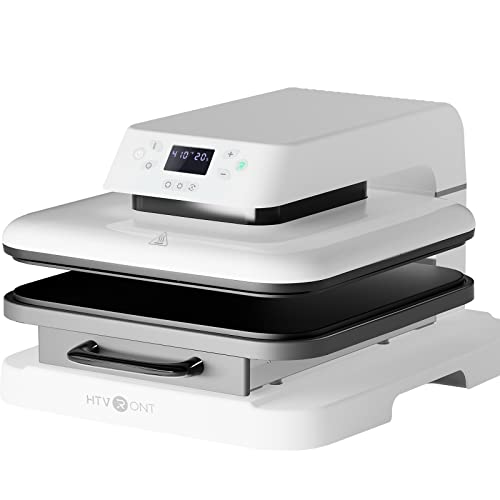
The HTVRONT Auto Heat Press is the kind of machine that makes you wonder why every heat press is not built this way. Instead of yanking down a handle and guessing whether you applied enough pressure, you load the shirt on a drawer, slide it in, and press a button. The machine presses down automatically, adjusts to the thickness of the material (up to one inch), and releases when the timer hits zero. You can walk away while it works.
The 15×15 inch platen covers most adult shirt designs in a single press. The heating plate reaches 320 degrees Fahrenheit in around four minutes, which is genuinely fast for a machine this size. Dual-tube heating and an NTC thermistor keep the temperature steady across the whole surface. The result is consistent transfers without the hot spots that plague cheaper presses.
Four fast modes, two custom presets, and a full auto mode cover everything from vinyl to sublimation to infusible ink sheets. The sliding drawer design keeps your hands away from the hot plate, and the machine shuts off automatically after fifteen minutes of inactivity. For a small shop that wants to produce transfer after transfer without standing over the machine, this is the one to beat.
Pros
Cons
Best for: Anyone running a production line of transfers who wants to press shirts while doing something else.
Check current price on Amazon →
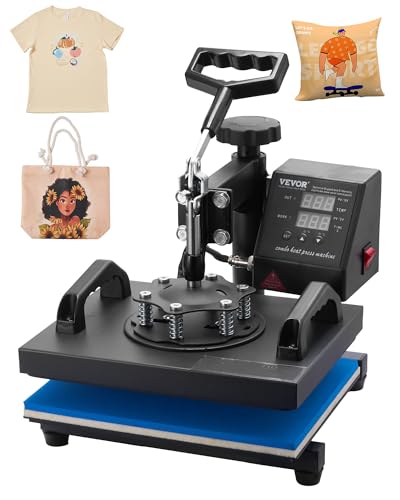
The VEVOR 12×10 Clamshell is the heat press that shows up in every starter kit for a reason. It is simple, cheap enough that you do not feel guilty about buying one, and capable of producing transfers that look identical to ones made on a $400 press. The clamshell design is as old as the category: you lift the top plate, position the garment, and pull the handle down. No motors, no software, no fuss.
A 650-watt heating element powers a 12×10 inch platen, which fits most standard chest prints and many front-and-center logos. The temperature range goes up to 480 degrees Fahrenheit, controlled through a digital LCD. You set the time and temp, wait for the beep, and press. The heating tube design is thicker than earlier VEVOR models, which helps reduce the temperature variation across the plate. A Teflon sheet on the heating plate prevents adhesive residue from building up.
The swing-away aluminum arm rotates 360 degrees, so you can position the press over awkward items like sleeves or pant legs. Pressure is adjustable with a knob under the handle. The whole thing weighs 23 pounds, light enough to move from a desk to a shelf when not in use. For a first heat press, or for someone who needs a second press to split colors, this is the obvious choice.
Pros
Cons
Best for: Beginners who want a heat press that works without spending more than $100.
Check current price on Amazon →
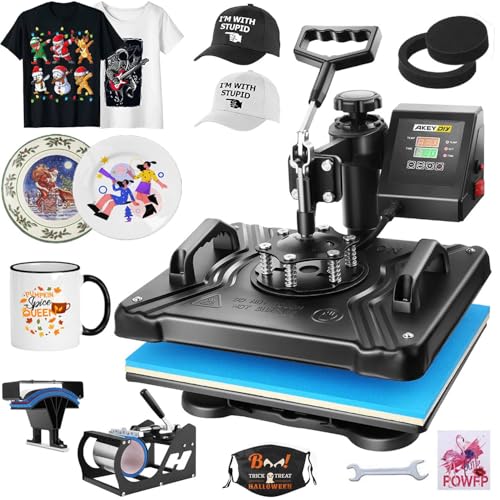
The WHUBEFY 5-in-1 Heat Press tries to be the only heat press you need, and for the price it comes surprisingly close. The main 15×12 inch platen handles shirts and flat items. Swap in the mug attachment, and you can press 11-ounce coffee mugs. The hat press wraps around caps. Two plate attachments cover 5-inch and 6-inch plates. It is a full sublimation workshop in one box.
The press uses 900 watts of power and reaches up to 450 degrees Fahrenheit. The LCD display shows both temperature and a countdown timer. You can switch between Fahrenheit and Celsius. The controller holds temperature within a degree or two, which matters for mug pressing where a swing of five degrees can ruin the print. Four layers of insulation on the housing keep the exterior surface around 50 degrees Celsius when the plate is at 200 degrees, a safety improvement over older multi-function presses that could burn you from the side.
The 360-degree rotation on the upper arm makes it easy to position the mug or hat attachments without twisting the whole machine. The Teflon-coated heat plate is non-stick and cleans with a wipe. The whole unit weighs about 40 pounds, so it stays put on the bench. For someone who wants to make custom mugs for a craft fair and print team shirts for the weekend, this is the most efficient single machine.
Pros
Cons
Best for: Home crafters who want to press shirts, mugs, hats, and plates without buying separate machines.
Check current price on Amazon →

The Calogy Mini Heat Press is not a machine you build a business around. It is a tool you keep in a drawer for small fixes, pocket logos, and the occasional hat or pillow that needs a single transfer. The heating plate measures 2.87 by 4.43 inches, roughly the size of a smartphone. It heats to 284 degrees Fahrenheit in about three minutes and offers three temperature levels: low (284°F), medium (320°F), and high (356°F).
What makes this mini press usable is the single-button control. One press raises the temperature, two presses lower it, three switches between Celsius and Fahrenheit. The LED display shows the real-time temperature. The power cord is removable, so you can store the press without a cable dangling. An insulated safety base prevents burns when you set it down hot.
The ergonomic handle is comfortable for short sessions, but you would not want to press fifty shirts with it. The auto shut-off kicks in after fifteen minutes of inactivity. The Calogy is not a replacement for a full-size heat press, but for anyone making small items or doing repairs on finished shirts, it saves the hassle of firing up a big machine.
Pros
Cons
Best for: Anyone who needs to press small transfers or touch up finished shirts without setting up a full heat press.
Check current price on Amazon →

The Pinckney Sublimation Printer is a converted Epson EcoTank all-in-one that comes pre-filled with sublimation ink. No cartridges, no syringe refills, no conversion kits. You open the box, fill the tanks with the included ink bottles (black, magenta, cyan, yellow), and print. The printer scans and copies too, which is unexpected bonus for an office that also makes transfers.
It prints up to 5760 by 1440 dpi, which is more resolution than most heat transfer applications need. The fine ink droplet size reduces clogging between prints. The printer supports paper sizes from A6 up to legal, and it can print on 8.5 by 47.2 inch banner paper for long designs. The auto-fill nozzle on the ink bottles fits the tank inlet perfectly, so you do not need syringes or worry about spills.
The sublimation ink bundle ships with 127 mL of black and 85 mL of each color, enough for hundreds of full-color transfers. Sublimation prints will look dull on paper but turn vivid after heat pressing. That is normal, but it catches new users off guard. A nozzle check and head alignment fix most print quality issues. The Pinckney is the simplest way to get into sublimation without learning how to convert a printer.
Pros
Cons
Best for: Hobbyists and small sellers who want the easiest route to making sublimation transfers at home.
Check current price on Amazon →
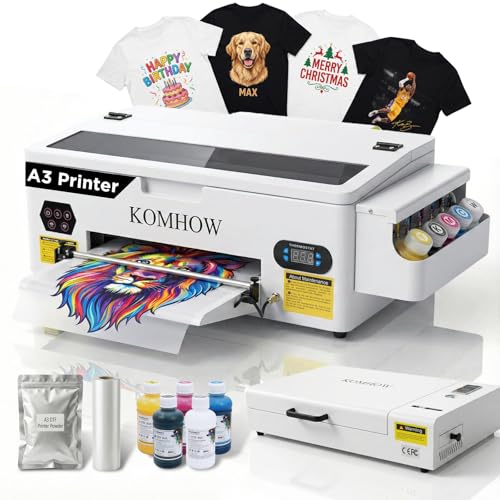
The KOMHOW R1390 DTF Printer is the kind of bundle that removes every excuse to delay starting a DTF business. The printer itself is an A3-sized machine with a white ink circulation system that mixes, circulates, and self-cleans to prevent the settling that clogs nozzles on cheaper direct-to-film printers. The package includes a curing oven, ink, DTF film, powder, and tools. You set it up, print your design, apply powder, cure it in the oven, and press it onto any fabric.
The white ink system is the highlight here. White ink is the reason DTF works on dark shirts, and it is also the reason many DTF printers spend more time in maintenance than in production. KOMHOWs circulation and self-cleaning functions keep the ink moving even when the printer sits idle for a day or two. The company says the design simplifies daily maintenance, and that matches what people who have owned earlier DTF machines say they needed.
Print quality on the R1390 produces sharp details, smooth gradients, and vibrant colors. It handles logos, illustrations, and complex multi-color graphics without banding. The printer connects to a Windows computer via RIP software. The setup guidance is one-on-one, with a support team that walks you through the first print after delivery. For someone who wants to offer full-color transfers on both cotton and polyester without pre-treatment, this is the right starting point.
Pros
Cons
Best for: Small apparel businesses that want to offer full-color prints on any fabric without a separate heat press and transfer paper workflow.
Check current price on Amazon →

The Lancelot M1630 Pro DTF Bundle is for the person who has already outgrown the idea of pressing one shirt at a time. It prints at double the speed of the common L1800 and R1390 DTF printers. The machine comes with a roll feeder and auto-cutting system, so you can load a roll of DTF film, print a queue of designs, and have each one cut automatically before it reaches the oven. The bundle includes a laptop preloaded with drivers and software, a curing oven, and consumables.
The patented Holiday Mode is a clever piece of engineering. It runs an automatic cleaning cycle during downtime to prevent the nozzle clogs that kill DTF printers left unused for a few days. The white ink circulation system is standard, but Lancelot claims their version extends print-head life by 40 percent compared to DTG-style machines. A waste ink alert helps save consumables by telling you when to change the waste bottle instead of waiting for a mess.
The upgraded film feeding system handles both single sheets and rolls, and it is designed to avoid the paper jams that plague many DTF printers when switching between feed modes. Compatibility is limited to Windows 7, 10, and 11. Lancelot provides remote support via WhatsApp after purchase. The whole bundle weighs over 160 pounds, so this is a permanent installation, not a desk accessory.
Pros
Cons
Best for: Full-time custom apparel businesses that need to produce high volumes of DTF transfers efficiently.
Check current price on Amazon →
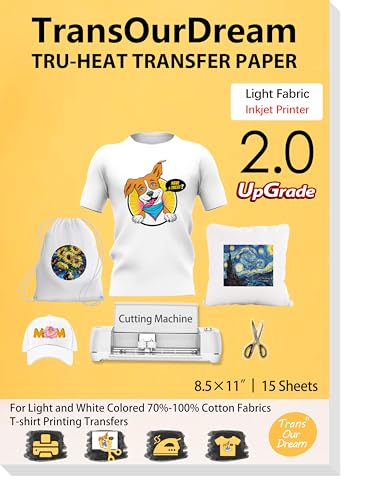
TransOurDreams upgraded heat transfer paper is not a machine, but it is the most accessible entry point into making custom shirts. If you already own an inkjet printer, a pair of scissors or a Cricut, and a household iron, you can make transfers with these sheets. The pack contains fifteen 8.5×11 inch sheets plus three reusable Teflon overlays for pressing.
This is the second generation of TransOurDreams light fabric paper. It works on white or light colored fabrics that are 70 to 100 percent cotton. You print your design with pigment or dye ink (sublimation ink will not work here), cut around it, place it face-up on the shirt, cover with the Teflon sheet, and press with an iron or heat press. The paper has a lower melting point than earlier versions, which means it bonds at a lower temperature and is less likely to scorch thin fabrics.
The transfers come out bright, stretchable, and durable enough to survive multiple washes if applied correctly. No mirror printing is needed, which removes one common source of confusion. The paper is also compatible with cutting machines for clean edges around text and logos. For a few dollars, you can test market a design without committing to any hardware.
Pros
Cons
Best for: Anyone who wants to make a few custom shirts with just an inkjet printer and an iron.
Check current price on Amazon →
The single most important decision when buying a t shirt printer is not which model or brand you pick. It is which technology you choose. Heat presses, DTF printers, and sublimation printers all print on shirts, but they work completely differently, and the wrong one will leave you stuck with a machine that cannot do what you need.
A heat press is not a printer. It is a heated plate on a lever or slide that bonds pre-printed transfers to fabric. You need a separate inkjet or laser printer and transfer paper (like the TransOurDream sheets) or heat transfer vinyl. Heat presses are cheap, simple, and versatile: they work with any transfer medium. But every transfer requires multiple steps: print, cut, weed, press. That is fine for small runs but slow for production.
DTF (direct to film) printers print full-color designs onto a special film, apply adhesive powder, and cure the image in an oven. The result is a transfer that you press onto any fabric, including dark cotton, without pre-treatment. DTF offers the best quality and fabric compatibility, but the machines cost from about $1,700 to over $3,000 and require careful maintenance of the white ink system.
Sublimation printers use special inks that turn into gas when heated and bond with polyester fibers. Sublimation is permanent and does not add any texture to the fabric. But it only works on polyester or polymer-coated items, and the base fabric must be white or very light for the colors to show. The Pinckney printer is a sublimation machine. Sublimation is great for sportswear, mugs, and phone cases, but useless for cotton t-shirts.
For heat presses, the platen size determines the maximum area you can transfer in one press. A 12×10 inch platen fits most chest logos. A 15×15 inch platen covers full front designs on adult shirts. For DTF printers, the print area determines the maximum transfer size. A3 (about 11.7×16.5 inches) is enough for most shirts, but A3 Plus (13×19 inches) allows larger designs or multiple prints per sheet.
A simple rule: if you plan to print back designs or oversized front graphics, go with a 15×15 heat press and an A3 or larger DTF printer. If you mostly do pocket logos or kids shirts, a 12×10 heat press and the Pinckney printer are fine.
The best heat presses use PID (proportional integral derivative) controllers that hold the set temperature within a couple of degrees. Cheaper machines drift by 10 to 20 degrees over the course of a press, which can cause undercured transfers that peel after washing, or overheated ones that scorch the fabric.
Dual-tube heating elements spread heat more evenly across the plate than single-element designs, reducing cold spots at the edges. The HTVRONT and VEVOR both use improved heating element layouts for this reason. If you see complaints about the center being hotter than the corners, look for a dual-tube or higher-wattage model.
Clamshell presses require you to pull the handle down with consistent force every time. The pressure depends on your arm strength and the adjustment knob. Drawer-style presses like the HTVRONT automate the pressing process, so the pressure and timing are the same for every shirt. That matters if you plan to produce more than twenty shirts in a session.
For DTF printers, the biggest ease-of-use factor is the white ink system. Machines with active circulation and self-cleaning modes (like the KOMHOW and Lancelot) require far less hands-on maintenance than older models where white ink settles and clogs nozzles within hours of sitting idle.
DTF printers demand the most maintenance. White ink is thick and settles quickly. Even with circulation systems, you need to run cleaning cycles and print a nozzle check pattern regularly. The Lancelot Holiday Mode helps if you skip a weekend, but it is not a substitute for regular use.
Sublimation printers like the Pinckney are lower maintenance, but sublimation ink can still clog print heads if the printer sits unused for weeks. Printing a nozzle check every few days keeps the ink flowing.
Heat presses have almost no maintenance. The Teflon coating on the heating plate wears over time and may need replacement. Pressure adjustment knobs can loosen.
The table gives the machine prices, but the real cost includes what you need to make a first print.
Transfer paper route: $13 for paper plus a heat press (or use a household iron). Heat press costs from $25 for a mini to $200 for a full-size. Total under $50 for iron users, around $125 for a VEVOR press plus paper.
Sublimation route: $300 for the Pinckney printer plus a heat press (you need one to press the transfer). The printer includes ink, so total is around $400 to $500.
DTF starter route: $1,748 for the KOMHOW bundle includes everything. No additional purchases needed. $3,299 for the Lancelot bundle includes a laptop.
Heat press only: $100 for a VEVOR or $190 for a WHUBEFY, plus transfer paper or HTV. No printer needed.
The DTF routes cost more upfront but produce higher quality prints on any fabric, and the per-print cost drops significantly at volume.
If you own a computer and want to print at home with the least investment, start with heat transfer paper and a mini or standard heat press. That gives you a working setup for under $130. If you know you want to print on dark or colorful shirts and sell them, a DTF printer bundle is the better long-term investment. Sublimation is a middle path if you mainly print on polyester sportswear or personalized gifts.
Yes, if the printer uses pigment or dye ink and you buy compatible heat transfer paper. Avoid laser printers for this purpose, because the toner reacts differently and requires different transfer papers. The TransOurDream paper works with any inkjet printer. Sublimation ink will not work with standard transfer paper; it needs special sublimation paper and a printer converted for sublimation ink.
A 15×15 inch heat press can handle most adult front designs in one press. The Pinckney Sublimation printer prints up to 8.5×11 inches, which limits designs to chest area size. The KOMHOW R1390 DTF printer prints up to A3 (11.7×16.5 inches), enough for front and smaller back designs. The Lancelot M1630 prints up to A3 Plus (13×19 inches) and includes a roll feeder for long or bulk prints.
Yes. DTF printers produce transfers on film that must be pressed onto fabric with a heat press. The bundles from KOMHOW and Lancelot include the printer and oven but not a heat press. You will need a heat press to complete the process. Any of the heat presses on this list works well for DTF transfers.
The cheapest route is transfer paper and a household iron for under $20. A dedicated heat press plus transfer paper costs around $100 to $130. A sublimation printer plus a heat press runs about $500. A DTF starter bundle with a heat press will cost around $2,000 total. Running costs are low for heat presses and sublimation, but DTF requires ink, film, and powder, which add up over time.
Heat transfer paper and vinyl work well on cotton, cotton-poly blends, and some synthetics with lower heat tolerance. Sublimation works only on polyester or polyester-coated items. DTF works on any fabric, including 100 percent cotton, nylon, and blends. If you print on a variety of fabrics, DTF is the most flexible.
DTF prints are durable and can last for many washes if applied correctly, but they are not as abrasion-resistant as screen printing. The adhesive layer in DTF transfers can crack or peel after repeated washing in hot water or aggressive drying. Screen printed designs bond directly with the fabric fibers and generally outlast DTF. For most custom apparel that is not washed professionally, DTF provides a good balance of durability and full-color capability.
The best t shirt printer for you depends entirely on what you want to make. If you want the easiest path to a finished shirt with the least upfront cost, buy the TransOurDream transfer paper and a VEVOR heat press. That combination costs about $115 and will make perfectly good transfers.
If you want automatic operation and consistent results for a growing business, the HTVRONT Auto Heat Press is the obvious choice. Pair it with the Pinckney Sublimation Printer if you work with polyester, or with the KOMHOW R1390 DTF printer if you need to print on every fabric. The HTVRONT takes the human error out of the pressing step, which is where most beginners ruin their work.
If you are already printing volume and need a production machine, the Lancelot M1630 Pro Bundle is the fastest DTF option available at the moment. It costs more than a used car, but it will pay for itself if you are moving hundreds of transfers per week.
Do not overthink the entry point. Buy the cheapest setup that lets you make one good shirt. After that, you will know exactly what you need to upgrade.
This article contains Amazon affiliate links. We may earn a small commission on qualifying purchases at no extra cost to you.


