Physical Address
304 North Cardinal St.
Dorchester Center, MA 02124
Physical Address
304 North Cardinal St.
Dorchester Center, MA 02124

We pick the 10 Best Roku TVs in 2026, from compact 32-inch sets to a 75-inch Mini-LED flagship. Find the right screen for every room and budget.
You know the feeling: you plug in a new TV, and within minutes you’re buried in a clunky smart platform that slows down after a year. Roku built its reputation on the opposite approach — simple, fast, and regularly updated. The company now sells its own TVs, and the 2026 lineup covers everything from a 32-inch 720p set for the guest room to a 75-inch Mini-LED QLED behemoth with Dolby Vision and Dolby Atmos. But Roku also licenses its platform to other manufacturers, and a few third-party sets earn a spot here too. We’ve sorted through the options to find the 10 Best Roku TVs in 2026, including one streaming stick for anyone who wants the Roku experience without buying a new screen.
The selection spans a wide set of use cases. The 55-inch Select Series 4K QLED is the one most people should buy — great picture, full-featured remote, and a size that works in most living rooms. If you need something smaller, the 40-inch 1080p set is a perfect bedroom or kitchen companion. And if you want the absolute best picture Roku can deliver, the 75-inch Plus Series with Mini-LED backlighting and AI-powered picture processing is a genuine home theater contender. We also cover a Hisense 720p set for tight spaces, an Insignia Fire TV for those who prefer Alexa’s ecosystem, and the Roku Streaming Stick HD for travelers or anyone with a dumb TV they want to keep.
TL;DR: The Roku 55-inch Select Series 4K QLED is our top pick: excellent color, solid sound, and the enhanced voice remote. The Roku 50-inch Select Series 4K QLED is nearly as good and fits tighter spaces. The Roku 32-inch Select Series 1080p is the best small screen for sharp detail. The Roku 75-inch Plus Series Mini-LED is the flagship for cinephiles.
| # | Product | Screen Size | Resolution | Key Feature | Best For |
|---|---|---|---|---|---|
| 1 | Roku 55" Select Series 4K QLED | 55" | 4K QLED | Enhanced voice remote, QLED color, HDR10 | Most households |
| 2 | Roku 50" Select Series 4K QLED | 50" | 4K QLED | Same QLED engine, frameless design | Smaller living rooms, apartments |
| 3 | Roku 43" Select Series 4K HDR | 43" | 4K HDR | HDR10 with Smart Picture | Compact 4K viewing |
| 4 | Roku 40" Select Series 1080p | 40" | 1080p Full HD | Bright LED, Bluetooth headphone mode | Bedrooms, kitchens |
| 5 | Roku 32" Select Series 1080p | 32" | 1080p Full HD | Full HD on a small screen | Small rooms, dorms |
| 6 | Roku 32" Select Series 720p | 32" | 720p HD | Lightest option, same Roku OS | Guest rooms, kids' rooms |
| 7 | Roku 75" Plus Series Mini-LED QLED | 75" | 4K Mini-LED QLED | Dolby Vision, Dolby Atmos, AI picture | Home theater |
| 8 | Hisense 32" A4 Series HD 720p Roku TV | 32" | 720p HD | Slim bezel, Alexa/Google Assistant | Ultra-compact secondary TV |
| 9 | INSIGNIA 50" F50 Series 4K UHD Fire TV | 50" | 4K UHD | Fire TV platform, DTS Virtual:X | Fire TV fans, Alexa households |
| 10 | Roku Streaming Stick HD | n/a | HD streaming | Pocket-sized, powers from USB | Travel, upgrading an old TV |
These are the criteria that actually matter when choosing a Roku TV:

Pros
Cons
Best for: Anyone who wants a great-looking 4K TV with the best Roku experience, without stepping up to the Plus Series premium.
Check current price on Amazon →
This is the TV most people should buy. The 55-inch size is the most popular in the US for a reason — it fills a typical living room wall without dominating it, and the 4K QLED panel delivers genuinely vibrant colors. The QLED layer uses quantum dots to boost brightness and color volume, which means grass looks green and skin tones look natural even in a sunlit room. HDR10 support helps with compatible content, but there’s no Dolby Vision; that’s reserved for the pricier Plus Series. Still, for streaming Netflix, watching sports, or playing a console, the picture is excellent for the category.
The enhanced voice remote is a real step up from the standard one. You can say “find my remote” and the TV chirps the remote’s location — genuinely useful when it slips between couch cushions. You can also program personal shortcuts to launch a specific app or channel with one button. The remote has a headphone jack too, but the TV also supports Bluetooth Headphone Mode, so you can use wireless cans.
Sound quality is better than most built-in TV speakers — Roku tuned them for clear dialogue, which makes a difference during quiet scenes. You won’t get deep bass or surround effects, but it’s listenable without a soundbar. If you have the space for a 55-inch TV and want the best balance of picture quality, smart platform, and features, this is the pick.

Pros
Cons
Best for: Apartment dwellers and anyone whose TV stand won’t fit a 55-inch.
Check current price on Amazon →
The 50-inch version of the Select Series 4K QLED is essentially the same TV in a slightly smaller chassis. That’s good news — you get the same quantum-dot color, the same enhanced voice remote, the same Bluetooth Headphone Mode, and the same Roku Smart Picture processing. The difference is purely about fit. If your wall or media console has a width limit around 44 inches, the 50-inch model (43.7 inches wide) will squeeze into spots where a 55-inch (48.3 inches) cannot.
The picture quality is nearly identical. The 50-inch panel still uses QLED with HDR10, and the color saturation is vivid. However, because the screen is smaller, you don’t need to sit as far back to see all the detail — a comfortable viewing distance is about six to eight feet. That makes it a great choice for apartments or bedrooms where a 55-inch would feel overwhelming.
One small drawback: the 50-inch might not have the same level of local dimming as larger models. In practice, that means black levels in a dark room aren’t quite as deep. But for a room with ambient light — which is most living rooms during the day — it’s barely noticeable. If you’re tight on space but still want QLED color, this is the right size.

Pros
Cons
Best for: Viewers who want 4K resolution in a smaller package, such as a bedroom or office.
Check current price on Amazon →
At 43 inches, this is the smallest 4K TV in the Select Series. It uses a standard LED panel with HDR10 rather than the QLED tech of the 50- and 55-inch models, so colors are less saturated and the panel can’t get as bright. But the 4K resolution still delivers noticeably sharper text and finer detail than 1080p, especially when you’re sitting close — say, on a desk or at the foot of a bed.
The remote is the standard voice model, not the enhanced one. You can still use voice to search across apps like Netflix, Hulu, and YouTube, but you don’t get the lost-remote finder or shortcut buttons. That’s a reasonable trade-off for a smaller, lower-tier TV.
Sound follows the same design as the rest of the Select Series — clear dialogue, decent volume, but limited bass. Bluetooth Headphone Mode is here too, which is great for watching late at night. If you need 4K but don’t have room for a 50-inch plus, this is the sweet spot.

Pros
Cons
Best for: Secondary rooms where the viewer doesn’t sit close enough to benefit from 4K.
Check current price on Amazon →
The 40-inch Select Series is a 1080p set, and that’s exactly right for a bedroom or kitchen. From eight or ten feet away, you won’t see individual pixels, and 1080p is still the standard for most cable and streaming content anyway. The panel gets reasonably bright, and Roku Smart Picture does a decent job of cleaning up compressed signals from live TV or slower internet connections.
This TV is light enough to be wall-mounted with a basic VESA bracket, and the slim bezels keep it looking modern. Voice control works with the standard remote — just press the microphone button and say the title or actor you want. The TV also supports Apple AirPlay, so you can cast from an iPhone or iPad.
The audio is the same tuned speaker system as the rest of the Select Series: clear voices, not much bass. Bluetooth Headphone Mode remains a standout feature for this size class, letting you watch late without disturbing anyone. If you don’t need 4K for a secondary room, this is an easy recommendation.

Pros
Cons
Best for: Dorms, offices, and any space that needs a small but sharp TV.
Check current price on Amazon →
The 32-inch 1080p Select Series hits a great middle ground. Most 32-inch TVs are stuck at 720p, which looks soft when you’re sitting six feet away watching text-heavy content like news crawls or sports scores. This set gives you full 1080p resolution, so menus and on-screen graphics look crisp. The panel is an LED with decent brightness for a small screen — fine for a bedroom with curtains or an office with overhead lighting.
The Roku OS runs as smoothly as ever. The home screen loads quickly, apps launch within a second or two, and automatic updates keep everything current. Voice search works via the remote, though you have to hold the button and speak — no hands-free wake word here.
The small size means the built-in speakers are less powerful than the 40-inch or larger models. They’re adequate for dialogue but thin for music or action scenes. Bluetooth Headphone Mode is a smart way around that if you have wireless headphones. Overall, this is the best 32-inch Full HD TV you can buy with Roku built in.

Pros
Cons
Best for: Guest rooms, kids’ rooms, or any space where screen time is occasional and budget is the priority.
Check current price on Amazon →
The 720p version of the 32-inch Select Series is the most affordable way to get a genuine Roku TV. The resolution is a step down — you can see the individual pixels if you sit within four feet, and fine text looks fuzzy. But for a TV that will live in a guest room where someone watches the evening news or a kids’ play area where shows like Bluey are the main draw, 720p is perfectly functional.
What you don’t give up is the smart platform. The same Roku OS runs here, with the same 500-plus free live TV channels, the same voice search, and the same auto-updates. Bluetooth Headphone Mode works exactly as it does on the 4K models. The remote is the standard voice model — no lost-remote finder, but it does have a microphone button and a 3.5mm headphone jack.
The trade-off is picture quality. Brightness is lower than the 1080p model, and color accuracy is middling. But for occasional viewing in a non-primary room, the savings are real. If you know the room will never be a main viewing spot, this is the right play.
Pros
Cons
Best for: Cinephiles and sports fans who want a premium Roku experience with the biggest possible screen.
Check current price on Amazon →
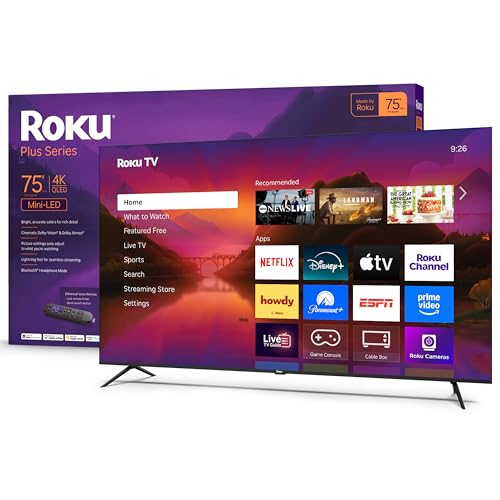
The 75-inch Plus Series is Roku’s statement television. It uses a Mini-LED backlight — thousands of tiny LEDs behind the QLED panel that can dim individually — which gives it far better black levels and contrast than the Select Series. That makes HDR content from Dolby Vision look spectacular: bright highlights punch through dark scenes, and shadow detail stays visible. The QLED quantum dots cover a wide color gamut, so Dune looks as good here as on any midrange Sony or Samsung.
Audio is also a major step up. The Plus Series includes a built-in subwoofer and supports Dolby Atmos. Dialogue stays clear, and action scenes have real weight — you can feel explosions and rumbling. It still won’t match a separate soundbar system, but it’s the best TV audio Roku has ever put in a set.
The Smart Picture Max processing uses AI to analyze incoming content and adjust color, sharpness, and contrast in real time. It works well with compressed streaming video, reducing artifacts and making skin tones look more natural. The enhanced voice remote is included, with lost-remote finder and programmable shortcuts.
The main downsides are size and weight. At nearly 54 pounds, this is a two-person job to set up. It has a VESA 400×400 pattern, but you’ll need a heavy-duty mount. And the premium features carry a premium cost, so this is only for buyers who prioritize picture quality and size above all else.
Pros
Cons
Best for: Anyone who wants a tiny, inexpensive Roku TV with voice assistant control through a separate smart speaker.
Check current price on Amazon →
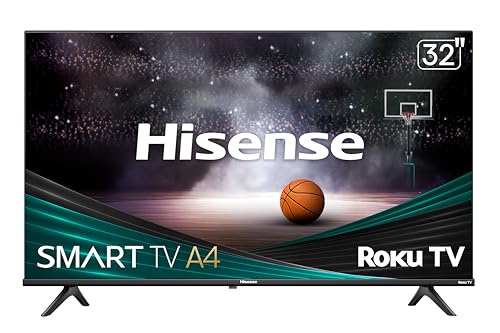
Hisense has been making Roku TVs for years, and the A4 series is their entry-level 32-inch model. It’s a 720p panel with an LED backlight, and the slim bezel makes the screen feel a bit bigger than it is. The big selling point here is smart home integration: you can pair the TV with an Amazon Echo or Google Nest hub and use your voice to turn it on, change channels, or launch apps. That’s not possible with the standard Roku Select Series unless you use Apple HomeKit or Siri.
Dolby Audio processing gives the small speakers a little more presence than the Roku Select 720p model — dialogue sounds slightly fuller, though there’s still no bass to speak of. The remote is basic: no microphone, no headphone jack, and no voice search. You’ll rely on on-screen keyboard typing or your assistant device.
This is a fine choice for a kitchen counter or a workshop where you want a TV that disappears visually and responds to voice commands from across the room. But if you need voice search from the remote or Bluetooth headphones, the Roku Select 720p model is a better fit.

Pros
Cons
Best for: Amazon Prime households and anyone who already uses Alexa throughout their home.
Check current price on Amazon →
This Insignia TV is on the list because many shoppers looking for “Roku TVs” also consider other smart platforms. It’s a Fire TV, not a Roku — so the interface is Amazon’s, with a strong emphasis on Prime Video, Alexa voice control, and the Fire TV Channels free content. If you’re already deep in the Amazon ecosystem, the Fire TV experience is seamless: you can say “Alexa, play The Boys” and it just works.
The picture quality is solid for the category. The 4K panel handles HDR10 well, and the DTS Virtual:X processing does a surprisingly good job of widening the soundstage through the built-in speakers. It’s not true surround, but it beats the flat sound of many budget 4K sets. Connections include three HDMI ports — one with eARC — plus USB, optical, and composite inputs.
The main drawback for Roku fans is the OS. Fire TV is ad-heavy and slower than Roku’s lean interface. You can install all the same apps, but the home screen pushes Prime Video content and sponsored channels. If you want a pure, ad-light experience, stick with a real Roku TV. But if you live in Alexa’s world, this 50-inch set delivers a lot of screen for the space.
Pros
Cons
Best for: Travelers, dorm residents, or anyone who wants to upgrade an older TV without replacing it.
Check current price on Amazon →
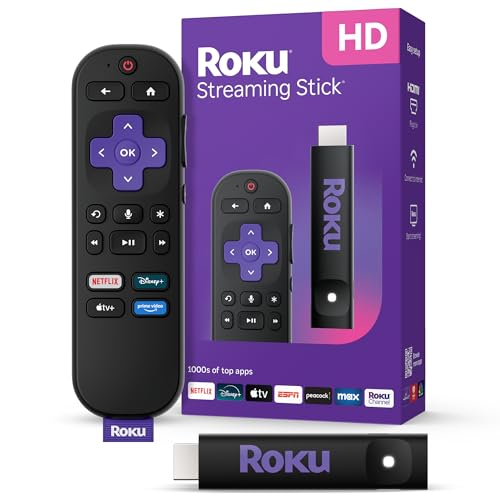
Not a TV, but the most flexible way to get the Roku experience on any display. The Streaming Stick HD plugs into an HDMI port and draws power from the TV’s USB port — no extra cables, no clutter. It’s small enough to leave permanently attached to a hotel TV or take with you on a trip. Setup takes about two minutes: plug in, connect to Wi-Fi, and you’re watching.
The stick runs the same Roku OS as the TVs, with the same free live TV channels, the same app selection, and the same voice remote. The remote even controls power and volume on compatible TVs, so you can ditch the original remote. The only feature missing is Bluetooth Headphone Mode — the stick doesn’t have Bluetooth for audio output.
Performance is snappy for HD streaming. Menus feel quick, and apps load in a few seconds. The stick maxes out at 1080p, so it’s not for 4K TVs that you want to use at full resolution. But for an older 1080p TV in a guest room or for travel, it’s the perfect companion.
The hardest part of picking a Roku TV is deciding how much screen and picture quality you actually need. The platform is the same across every model, so your choice comes down to size, resolution, and a few key features.
Size is the single most important decision because you can’t change it. Measure the space where the TV will go, including the width of your stand or the wall space you can dedicate. Then consider how far you’ll sit from the screen. A 55-inch TV is comfortable at eight to ten feet; at five feet it will feel overwhelming. A 32-inch TV works at six feet or closer, but looks tiny in a large room. The sweet spots: 50- and 55-inch for living rooms, 40- and 43-inch for bedrooms, 32-inch for kitchens, dorms, and guest rooms. If you can, use a tape or a painter’s tape on the wall to mock up the size before you buy.
Resolution matters most when you sit close. If your viewing distance is less than six feet, 4K is noticeably sharper than 1080p — you can see the fine weave of a fabric or the individual letters in on-screen text. At eight feet or more, the difference between 4K and 1080p becomes very hard to spot. And for a 32-inch screen used as a secondary TV, 720p is perfectly watchable from normal distances. The rule of thumb: for a main living room TV, get 4K. For a bedroom or kitchen, 1080p is great. For a guest room or kids’ room, 720p saves money with no real penalty.
QLED stands for Quantum Dot LED. The technology adds a layer of nanocrystals between the backlight and the screen, which produces more saturated colors and higher peak brightness. The difference is most noticeable with HDR content — a QLED TV makes sunlight look blindingly bright and neon signs pop. Standard LED (used on the 43-inch Select Series and all 1080p/720p models) still looks fine in a moderately lit room, but it can’t match the color volume of QLED. If you watch a lot of nature documentaries, HDR movies, or sports in a bright room, QLED is worth the step up.
Roku ships two remotes. The enhanced voice remote (included with the 55- and 50-inch QLED models, and the 75-inch Plus Series) has a lost-remote finder — you say “Hey Roku, find my remote” and the TV beeps it. It also has programmable shortcut buttons for your favorite apps. The standard voice remote (on the 43-, 40-, and 32-inch models) still has a microphone for voice search, but no finder and no shortcuts. Both let you control power and volume on your TV. If you often misplace the remote, the enhanced version is a genuine quality-of-life improvement.
Every Roku Select Series and Plus Series TV has Bluetooth Headphone Mode — you pair wireless headphones and the TV sends audio to them while the speakers go silent. It’s a fantastic feature for late-night viewing or for anyone who shares a space. The sound quality of the built-in speakers varies by size. The 75-inch Plus Series has a subwoofer and Dolby Atmos for a real cinematic feel. The Select Series speakers are tuned for clear dialogue but lack bass. For any TV, a separate soundbar will improve sound, but for casual watching the built-in speakers are adequate.
Hisense, TCL, and Sharp all make Roku TVs. The Hisense A4 series covered here is a fine budget option, but it lacks Bluetooth Headphone Mode and a voice remote. TCL’s Roku TVs (not included in this roundup) are also popular and often offer better picture quality per dollar than Roku’s own Select Series — you’ll just miss the enhanced remote and direct Roku support. And if you’re not committed to Roku’s OS, the Insignia Fire TV gives you a 4K screen with Alexa control. The choice comes down to which smart home ecosystem you use most.
Yes. The Roku Streaming Stick HD or Roku Express plug into any TV with an HDMI port and give you the full Roku interface. It’s the same software, same 500-plus free channels, same voice remote. You just use the TV as a display and let the stick handle the streaming.
Only the Roku Select Series and Plus Series TVs have Bluetooth Headphone Mode built in. Third-party Roku TVs like the Hisense A4 do not. If private listening is important, make sure the TV is a first-party Roku model from the Select or Plus line.
Yes. Select Series and Plus Series TVs support Roku Voice, Siri, Alexa, and Google Assistant. The voice assistant works through the remote or your smart speaker. The Hisense A4 also works with Google Assistant and Alexa. The Insignia Fire TV is designed specifically for Alexa.
No, the Streaming Stick HD is capped at 1080p. If you need 4K streaming on a non-Roku TV, get the Roku Streaming Stick 4K or Roku Ultra. The stick in this roundup is the HD version, which is fine for older 1080p TVs.
All the 2026 Select Series and Plus Series TVs support HDMI 2.0b, which handles 4K at 60Hz with HDR. They do not have HDMI 2.1 ports for variable refresh rate or 4K/120Hz gaming. If you plan to play a PlayStation 5 or Xbox Series X, these TVs will work but can’t take full advantage of the console’s advanced gaming features.
Some do. The enhanced voice remote on the 55- and 50-inch QLED models and the Plus Series has a 3.5mm headphone jack on the side. The standard voice remote on the 43-, 40-, and 32-inch models also has a headphone jack. The basic remote on the Hisense A4 does not.
Most Roku Select Series TVs have three HDMI ports. The 32-inch models have two. The Insignia Fire TV has three. If you plan to connect a cable box, game console, and soundbar, three is the minimum. If you only need one or two, the smaller sets work fine.
Yes. All Roku Select Series and Plus Series TVs support Apple AirPlay 2, so you can cast videos, music, or mirror your iPhone or Mac screen. The Hisense A4 and Insignia Fire TV do not support AirPlay.
The Roku 55-Inch Select Series 4K QLED is the best all-rounder because it delivers vivid QLED color, a smart remote with lost-remote finder, and Bluetooth Headphone Mode at a size that fits most living rooms. If your space is tighter, the 50-inch QLED gives you the same picture in a smaller frame. For a bedroom or kitchen, the 40- or 32-inch 1080p models are the right call. And for a true home theater, the 75-inch Plus Series Mini-LED QLED is as good as Roku gets.
If you’re still unsure, start with the room. Measure the distance between the screen and the couch, then pick the Select Series model that matches the size and resolution you need. The Roku OS is the same on every one. That consistency is what makes the lineup easy to navigate. The 10 Best Roku TVs in 2026 cover every scenario, from a 32-inch 720p guest set to a 75-inch Mini-LED beast — there’s a Roku for every room, and every viewer.
This article contains Amazon affiliate links. We may earn a small commission on qualifying purchases at no extra cost to you.


