Physical Address
304 North Cardinal St.
Dorchester Center, MA 02124
Physical Address
304 North Cardinal St.
Dorchester Center, MA 02124

The 8 best T-shirt printing machines in 2026, from $25 mini presses to pro DTF bundles. Expert picks for beginners, crafters, and small businesses.
A bad heat press forgives nothing. Uneven temperature means patchy transfers. Too much pressure on a thin fabric scorches it. Too little and your design peels off after one wash. The machine matters more than the materials, yet most buyers default to whatever looks like a bargain.
The best T-shirt printing machines range from a $25 handheld iron that fits in a desk drawer to a $3,000 DTF bundle that rivals commercial print shops. These eight picks cover that full spectrum: auto-release presses for side hustlers, 5-in-1 combos for craft sellers, a Cricut ecosystem bundle for vinyl lovers, and a complete DTF setup for anyone serious about production volume.
TL;DR: The HTVRONT Auto Heat Press is the best T-shirt printing machine for most people: it presses automatically, releases on its own, and heats evenly across the full 15×15 platen. The Calogy Mini is the best sub-$30 option for small patches and tight spaces. For a full design-to-press workflow with vinyl and HTV, the Cricut Maker 4 Bundle gets you there out of the box.
| # | Product | Platen Size | Price | Best For |
|---|---|---|---|---|
| 1 | HTVRONT Auto Heat Press | 15×15 in | $236.00 | Best overall auto press |
| 2 | HTVRONT Auto Heat Press 2 | 15×15 in | $349.99 | Adjustable pressure, heavy items |
| 3 | Calogy Mini Heat Press | 2.87×4.43 in | $24.98 | Budget beginners, small patches |
| 4 | VEVOR Heat Press 12×10 | 12×10 in | $99.90 | Mid-range, compact workspace |
| 5 | OIIEE 5-in-1 Heat Press | 15×15 in | $219.99 | Shirts, mugs, hats, and plates |
| 6 | Topdeep 8-in-1 Heat Press | 15×15 in | $194.90 | Best value multi-attachment combo |
| 7 | Cricut Maker 4 Bundle | EasyPress SE | $599.99 | Vinyl/HTV design-and-press system |
| 8 | Lancelot M1630 Pro DTF Bundle | A3 Plus roll | $2,969.10 | Pro DTF production printing |
Prices change frequently. Check the links for current deals.
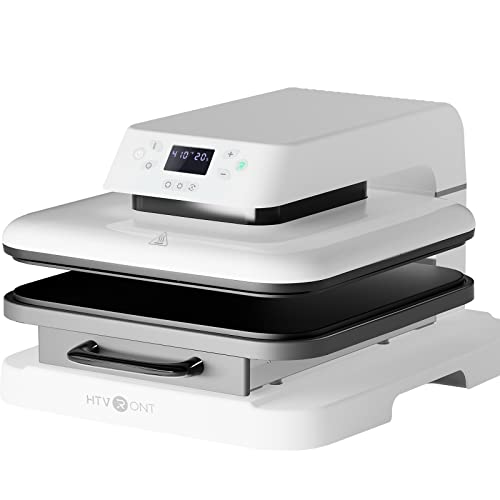
The HTVRONT's drawer-slide design is the practical detail that separates it from a clamshell press: you load the shirt on the tray, slide it in, and press "R." The machine presses down, auto-adjusts to project thickness up to one inch, and releases when the timer ends. No hovering, no burned designs. Dual-tube heating reaches 320°F in about four minutes, and it handles wood signs and ceramic coasters in addition to fabric. Compared to the HTVRONT Auto 2 below, you give up adjustable pressure but save over $100.
Pros:
Cons:
Best for: Home-based sellers and crafters who want a set-it-and-forget-it 15×15 press without a steep learning curve.
Check current price on Amazon →

Where the original HTVRONT caps out at one inch of clearance, the Auto 2 reaches 1.77 inches, which means hoodies and thick sweatshirts are finally within range. The pressure goes up to 170 lbs of adjustable force, making it capable for DTF transfers that demand a firmer press than standard vinyl. The seven-angle tiltable screen is a small but genuine ergonomic win for taller setups. This is the one to buy if your product range extends past standard tees.
Pros:
Cons:
Best for: Sellers doing both HTV and DTF transfers on heavyweight garments who need pressure control.
Check current price on Amazon →

The Calogy Mini is roughly the size of a smartphone and weighs about 1.4 lbs. It is not a replacement for a full press; the 2.87×4.43-inch platen is built for patches, pocket logos, and hat branding on sections where a full 15×15 would be overkill. Three temperature levels (284°F, 320°F, 356°F) cover most HTV materials. One-button operation and a removable cord make it as simple as kitchen appliances get. At this price point it is the most capable T-shirt printing tool you can slip into a bag.
Pros:
Cons:
Best for: Beginners, students, and crafters pressing small patches, pocket prints, or hat logos without a dedicated workspace.
Check current price on Amazon →
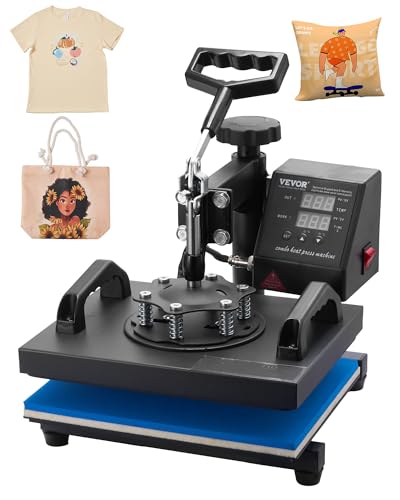
The VEVOR 12×10 sits at the intersection of affordability and capability for buyers not quite ready for a full 15×15. The 650W swing-away design keeps hands clear during loading, and the Teflon-coated platen heats up to 480°F, which covers sublimation, HTV, and vinyl transfers on cotton, linen, poly, and blends. At 23 lbs it is noticeably lighter than the HTVRONT options, which matters if your workspace doubles as something else. The smaller platen is the honest trade-off: youth shirts work fine, but adult XL graphics can be tight.
Pros:
Cons:
Best for: Crafters and Etsy sellers who press smaller items frequently and work on a compact desk.
Check current price on Amazon →
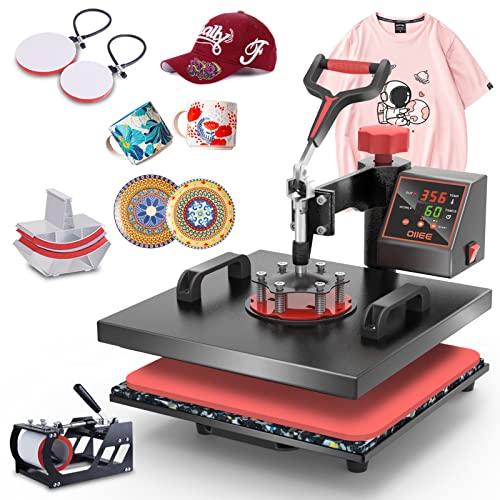
The OIIEE packs a 15×15 shirt press, a mug press for 11 oz mugs, a hat press, and two plate attachments into a single machine. The 360-degree swing-away heating element moves fully out of the way when you are swapping attachments, and the slide-out base provides a stable, clean surface. Double-tube heating with two layers of insulation cotton delivers consistent results across transfers. Sellers looking to offer personalized mugs and hats alongside shirts get genuine versatility here without buying four separate machines.
Pros:
Cons:
Best for: Small-business sellers who want to offer custom shirts, mugs, hats, and plates from one machine.
Check current price on Amazon →
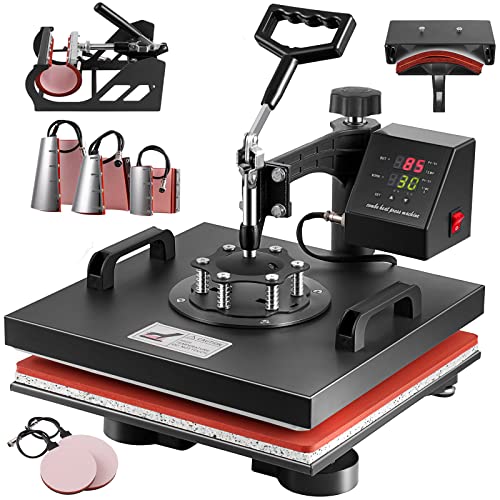
The Topdeep goes one step further than the OIIEE by including six-ounce and 17-ounce cone latte mug presses in addition to the standard 11-ounce mug attachment, which matters for sellers targeting specialty coffee merchandise. Eight attachments total at a price below the OIIEE makes it the value leader in this group. The 360-degree swing-away with a bottom guide rail keeps attachment swaps smooth, and the LCD control box displays time and temperature in Fahrenheit or Celsius across a 30-450°F range. Two bonus Teflon sheets are included.
Pros:
Cons:
Best for: Sellers who want maximum attachment variety for the least spend, especially those targeting custom drinkware.
Check current price on Amazon →

This bundle solves a problem the other presses leave for you: creating the design itself. The Maker 4 cutting machine pairs with the EasyPress SE and includes vinyl and HTV materials, so the full workflow from design to finished shirt happens without buying anything extra. For pure pressing power the other 15×15 machines win; the EasyPress is not a production workhorse. But for a hobbyist or small Etsy seller who wants to cut intricate designs in HTV, the Cricut ecosystem's software and precision cutting are genuinely hard to replicate another way. The premium price reflects the bundle content, not just the hardware.
Pros:
Cons:
Best for: Hobbyists and Etsy sellers who want a seamless design-to-finished-shirt experience with vinyl and iron-on materials.
Check current price on Amazon →

DTF (direct-to-film) printing works differently from heat transfer vinyl: you print a full-color design onto film, powder it, cure it, and press it. The result adheres to fabrics that confound HTV, including polyester blends and dark fabrics, with colors that pop without pre-treatment. The Lancelot M1630 Pro bundles everything needed to run that workflow: the printer itself, an oven for curing, a laptop pre-loaded with drivers and software, and consumables. The patented white-ink circulation system prevents the nozzle clogs that kill cheaper DTF printers on weekends. This is a business investment, not a craft purchase, and it only runs on Windows.
Pros:
Cons:
Best for: Apparel business owners who need full-color production printing on a range of fabrics and are ready to operate a DTF workflow.
Check current price on Amazon →
The right machine depends on what you are pressing, how often, and on what materials. Here is what separates a smart pick from a regretted one.
Heat press machines (all the presses on this list except the Lancelot) apply pre-made transfers or vinyl. DTF printers produce the transfer film themselves. If you want full photographic prints on dark fabrics in volume, a DTF setup is the correct tool. For HTV, sublimation, and vinyl on light-to-medium fabrics in a home or small studio, a heat press is faster to learn and much cheaper to start.
A 15×15-inch platen covers adult shirt graphics comfortably and is the standard size for reason. A 12×10-inch press works for small items and youth shirts but requires repositioning for larger designs. The Calogy Mini's 2.87×4.43-inch platen is purpose-built for patches and pocket prints only; do not buy it expecting to do full-chest designs.
With a manual clamshell press you hold the handle down for the full press time, then manually open it. With an auto-release press (both HTVRONT models), the machine handles that for you. For anyone pressing more than a handful of shirts at a time, the auto-release is not a luxury; burned projects and hand fatigue are real costs of a manual press over a long session.
Mug, hat, and plate attachments add genuine product line options for sellers. The trade-off is bulk and setup time between jobs. If you know you will only ever press shirts, a dedicated 15×15 auto press is faster and simpler. If you want to sell custom mugs alongside shirts, a combo press earns its keep quickly.
The HTVRONT Auto Heat Press is the strongest all-round starting point: it handles the pressing and releasing automatically, which eliminates the most common beginner mistakes. If budget is the primary constraint, the Calogy Mini at under $25 lets you practice with HTV transfers on small items before committing to a full-size press.
Yes. All the full-size presses on this list work with sublimation, HTV vinyl, and standard heat-transfer paper. Sublimation works best on polyester fabrics and coated hard substrates. HTV and screen-print transfers work across cotton, poly, and blends. The key variables are temperature and time, both adjustable on every press here.
A 15×15-inch press typically reaches a working temperature of around 320°F in three to five minutes. The HTVRONT original reaches that temp in about four minutes; the VEVOR 12×10 heats similarly. If you are pressing multiple shirts back-to-back, the machine stays hot and each subsequent press is immediate.
They are different tools rather than competing ones. A DTF printer (like the Lancelot bundle) produces the transfer film from your design, allowing full-color prints on virtually any fabric with no pre-treatment. A heat press applies transfers you have already sourced or cut with a machine like the Cricut. DTF is better for volume and fabric flexibility; a heat press with HTV is better for beginners and smaller operations.
For most people shopping for the best T-shirt printing machines, the HTVRONT Auto Heat Press is the right answer: it is the most popular option in the category, the auto-release workflow genuinely reduces ruined transfers, and it handles everything from HTV vinyl to sublimation and wood signs. Sellers who need pressure control for DTF or need to press hoodies regularly should step up to the HTVRONT Auto Heat Press 2. If your goal is a complete design-to-shirt system using vinyl and iron-on materials, the Cricut Maker 4 Bundle is a one-box solution that earns its price tag. If you are still undecided, start with the platen size: match the press to the largest project you will press regularly, then let that narrow the field.
This article contains Amazon affiliate links. We may earn a small commission on qualifying purchases at no extra cost to you.


