Physical Address
304 North Cardinal St.
Dorchester Center, MA 02124
Physical Address
304 North Cardinal St.
Dorchester Center, MA 02124

Best Wireless Mechanical Keyboards (November 2026): 10 picks from AULA and Logitech, from hot-swap gaming boards to quiet low-profile typing for the office.

Most disappointing wireless keyboard purchases come from mismatched basics rather than build quality. A clicky board lands in a shared office and annoys everyone nearby. A Bluetooth-only model adds input lag in a fast game. A 75% layout arrives and the numpad is missing. A battery that needed charging every two weeks turns out to be the one you wanted to charge once a year. The Best Wireless Mechanical Keyboards depend on layout, switch feel, connection modes and battery life, in that order, and on how you weigh them against each other.
The short answer: the AULA F75 Pro suits desk-space-conscious players who want a knob and hot-swap sockets, the AULA F99 suits anyone who needs a numpad and an 8000mAh battery, and the Redragon K671 suits tinkerers who want a metal panel and eight spare switches in the box. The rest of the list covers clicky gaming boards, quiet office keyboards, a retro typewriter design and ultra-slim travel options.
TL;DR: top picks at a glance
- Best overall: the AULA F75 Pro, a 75% board with 81 keys, a multi-function knob and pre-lubed hot-swap Reaper linear switches.
- Best for numpad and battery life: AULA F99, a 99-key 96% layout with an 8000mAh battery and five-device pairing.
- Best for clicky gaming: ASUS ROG Strix Scope II 96 Wireless, with pre-lubed NX Storm clicky switches, a detachable wrist rest and up to 1,500 hours in 2.4GHz mode.
- Best for quiet office work: Logitech MX Mechanical, a low-profile tactile board with quiet switches, three-device Bluetooth and up to 15 days of battery with the backlight on.
| # | Product | Best for | Layout | Switch feel | Connection |
|---|---|---|---|---|---|
| 1 | AULA F75 Pro | Compact custom builds | 75% (81 keys) | Linear, hot-swap | Bluetooth, 2.4GHz, USB-C |
| 2 | AULA F99 | Big-battery numpad | 96% (99 keys) | Linear, hot-swap | Bluetooth, 2.4GHz, USB-C |
| 3 | Redragon K671 | Hot-swap with spares | Not listed | Linear (red), hot-swap | Bluetooth, 2.4GHz, USB-C |
| 4 | ASUS ROG Strix Scope II 96 Wireless | Full-size clicky gaming | 96% (96 keys) | Clicky (NX Storm), hot-swap | Bluetooth, 2.4GHz, USB |
| 5 | Redragon K710 Typewriter | Retro typewriter looks | Full-size (104 keys) | Clicky (blue) | Bluetooth, 2.4GHz, USB-C |
| 6 | RK Royal Kludge S98 | Display and knob | 96% (98 keys) | Linear (cream), hot-swap | Bluetooth, 2.4GHz, USB-C |
| 7 | Logitech MX Mechanical | Quiet office work | Full-size (104 keys) | Tactile quiet, low-profile | Bluetooth, Logi Bolt, USB-C charging |
| 8 | Redragon K556 Pro | Aluminum full-size | Full-size (104 keys) | Linear (red), hot-swap | Bluetooth, 2.4GHz, USB-C |
| 9 | Keychron K3 V2 | Slim portable typing | 75% (84 keys) | Low-profile Gateron red | Bluetooth 5.1, USB-C |
| 10 | Logitech Alto Keys K98M | Gasket clicky typing | 98 keys with numpad | Clicky (Marble), hot-swap | Bluetooth, Logi Bolt, USB-C |

Pros:
Cons:
Best for: Gamers and typists with a small desk who want a knob, hot-swap sockets and a heavy, planted feel.
Check current price on Amazon →
The AULA F75 Pro earns the top spot by combining the features that matter most in this category into one compact body. At 81 keys it drops the numpad and function-row extras but keeps arrows, which is the right trade for gaming. The knob is more useful than most, because it changes role depending on mode. In gaming mode it adjusts brightness and cycles lighting effects, and in office mode it controls volume and play/pause. The AULA F99 lists no knob, which is a real difference between the two siblings.
Typing feel is where the F75 Pro separates itself from cheaper boards. The pre-lubed Reaper linears and pre-lubed stabilizers are paired with an extended silicone pad, single-key PCB slotting and five dampening layers, which yields a deeper, softer sound than a bare-bones frame. Weighing about 2.2 lb, it stays put during fast mouse movements. Side-printed PBT keycaps let the RGB shine through the legends, and 16.8 million colours, 16 presets and macro programming through the driver are all supported. Pairing covers up to five devices across Bluetooth, 2.4GHz and USB-C.
It is the wrong choice for anyone who needs a numpad: the AULA F99 or Redragon K556 Pro fit that case. Anyone who wants audible clicks should look at the ASUS ROG Strix Scope II 96 Wireless, since the F75 Pro is linear only. Mac support is not specified, with the operating systems listed as Windows and Android, so Mac users are better served by the Keychron K3 V2 or Logitech MX Mechanical.

Pros:
Cons:
Best for: Spreadsheet-heavy users and gamers who want a numpad, long battery life and hot-swap sockets in one board.
Check current price on Amazon →
The AULA F99 is the answer when the F75 Pro feels too cut down. It adds the numpad and a larger frame, and the battery grows to 8000mAh, which is the largest capacity listed for any board in this roundup. Connection options match the F75 Pro: Bluetooth 5.0, a 2.4GHz dongle and USB-C wired, with pairing for up to five devices. Bluetooth stability is a frequently praised strength.
Build and sound are the other draws. The gasket-style structure with an extended silicone pad softens keystrokes, while five layers of filler between the PCB, plate and switches cut cavity noise. Double-shot PBT keycaps keep the legends from fading. The body is plastic, and at about 3.3 lb it is still substantial. Anyone who prefers a metal chassis should compare the Redragon K556 Pro, which uses brushed aluminum.
Choose elsewhere if desk space is tight, since the AULA F75 Pro is far narrower. Anyone wanting a clicky response should pick the Logitech Alto Keys K98M or ASUS ROG Strix Scope II 96 Wireless, because the F99 only offers linear switches. Check the AZERTY layout note carefully, as it is the most likely source of a wrong-board purchase.

Pros:
Cons:
Best for: First-time hot-swap users who want spare switches and a metal-panel board without extra accessories.
Check current price on Amazon →
The Redragon K671 is built around the idea that a first custom-style keyboard should arrive ready to modify. Eight extra switches and two red keycaps come in the box, so experimenting costs nothing beyond a puller. Macro editing and per-key lighting adjustments are supported, and the keys are rated for 500,000 presses. It also comes in a Deep Black version.
The physical connection switch on the back is a practical feature, since it removes guesswork when moving between a laptop and a desktop. Typing is smooth and relatively quiet thanks to the linear red switches. The unknowns matter, though. Battery capacity and exact key count are not specified, so those wanting precise runtime figures are better served by the AULA F99 (8000mAh) or AULA F75 Pro (4000mAh).
It is the wrong choice if reliability is your top concern, because dead keys and early failures appear more often here than on the top two. It is also the wrong pick for rich lighting control, where the RK Royal Kludge S98 offers a knob and screen for on-board adjustment instead.

Pros:
Cons:
Best for: Competitive PC gamers who want audible click feedback, a numpad and very long wireless battery life.
Check current price on Amazon →
The ASUS ROG Strix Scope II 96 Wireless is the most purpose-built gaming board on the list. Its body is only about 1 cm wider than a standard 80% layout, yet it retains the numpad, and the included wrist rest, spacebar keycap and USB extender make setup complete from day one. ROG SpeedNova 2.4GHz delivers low-latency wireless, and the 1,500-hour rating means charging rarely needs thinking about. Foam and switch-dampening pads reduce ping and echo. It also comes in White, and the ROG NX Snow linear option exists for those who prefer smoother switches.
Players who already run a Razer-heavy desk may want to browse Razer keyboards for matching software, but within this list the ROG offers the best mix of battery, wrist support and web-based customization. Choose the Logitech MX Mechanical instead for a quiet workplace, because the Storm clicky switches carry audible clicks. If you want linear switches on a 96% board, the AULA F99 does that with a larger battery capacity, though it lacks the wrist rest and the dedicated game-bar keys.

Pros:
Cons:
Best for: Typists who love the sound and look of a typewriter and use the board where noise is not an issue.
Check current price on Amazon →
The Redragon K710 Typewriter is the most distinctive board here. It trades the sleek, low-key designs of its rivals for round keycaps and a clicking sound that really does resemble an old machine. The 104-key layout, a 4000mAh battery and tri-mode connectivity make it fully usable day to day, and it comes in Green and White as well as Black.
The compromise is customization. Unlike the Redragon K556 Pro or AULA F75 Pro, hot-swap sockets are not listed, so changing switches is not designed for. The clicky blues are also the loudest in the list, ahead of even the ASUS ROG Strix Scope II 96 Wireless. For a similar retro clicky feel with a gasket mount and a more refined design, the Logitech Alto Keys K98M is the better pick.

Pros:
Cons:
Best for: Desk users who want on-board feedback and a knob instead of memorized key shortcuts.
Check current price on Amazon →
The RK Royal Kludge S98 brings a feature few rivals offer: a screen. Instead of deciphering blinking lights, you read battery status and connection mode directly. A knob reinforces the control-first approach. The top-mount design delivers a firm, consistent feel, and the stacked foam produces a deeper, creamier sound. It also comes in Clay Green and Eclipse Black.
It is not the right pick if battery transparency matters, since capacity is not listed, whereas the AULA F99 gives a clear 8000mAh. For a quieter, more office-focused experience, the Logitech MX Mechanical is the better match. Anyone who just wants the knob without the screen can save desk weight with the AULA F75 Pro.

Pros:
Cons:
Best for: Office workers who switch between laptop, desktop and tablet and need a quiet, low-profile mechanical board.
Check current price on Amazon →
The Logitech MX Mechanical is designed for work rather than gaming. Its metal-built full-size layout and low-profile switches reduce wrist angle, and the quiet tactile action keeps noise down. It is the most platform-flexible board here, supporting macOS 13 and later, Windows, Linux and ChromeOS, and it ships with a Logi Bolt receiver for stable connections.
The backlight is the battery's main enemy: up to 15 days with lights on versus up to 10 months with them off. Plan accordingly. It is the wrong choice for gamers who want 2.4GHz latency tuning and RGB, where the ASUS ROG Strix Scope II 96 Wireless fits better. Anyone who wants to modify switches should pick the Redragon K556 Pro or AULA F99. A slimmer compact alternative is the Keychron K3 V2.
Pros:
Cons:
Best for: Players and typists who want a sturdy full-size aluminum board with a numpad and hot-swap sockets.
Check current price on Amazon →
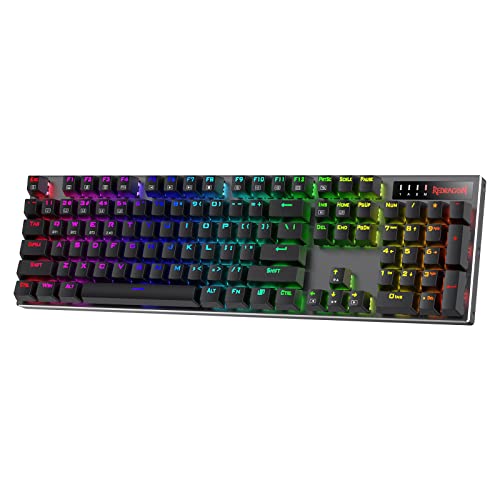
The Redragon K556 Pro is the full-size, metal option for people who want no compromises on layout. It combines brushed aluminum, quiet linear reds and tri-mode connectivity at about 2.4 lb. It comes in Gradient Gray, Gradient Blue, Black and Black with Pink.
The missing battery rating is the weak spot, and reliability complaints appear more often than for the top two. For a plastic but better-documented battery, choose the AULA F99. If you want a quieter tactile feel, choose the Logitech MX Mechanical. For a less bulky body, the AULA F75 Pro cuts the numpad.

Pros:
Cons:
Best for: Mac and Windows users who want a slim, portable mechanical board for work and travel.
Check current price on Amazon →
The Keychron K3 V2 is the portable pick. Its 75% layout is similar in size to the AULA F75 Pro, but it weighs about half as much and sits at nearly half the height. QMK firmware and the Keychron Launcher make remapping simple, and the Mac-first layout avoids the compromises that Windows boards force on macOS users. It also comes in a Keychron Brown Switch version.
Gamers should look elsewhere, as Bluetooth-only wireless lacks the dongle that the ASUS ROG Strix Scope II 96 Wireless offers. Users wanting an easily modded board should choose the AULA F75 Pro, since hot-swap support is not listed here. For more office-friendly sound with multi-OS support, the Logitech MX Mechanical is a close alternative.

Pros:
Cons:
Best for: Typists who like a clicky, cushioned feel and want a compact numpad layout with long battery life and a strong warranty.
Check current price on Amazon →
The Logitech Alto Keys K98M targets typists rather than gamers. Its transparent top case, off-white finish and concave keycaps give a distinct look, while the gasket mount provides a softer feel than the firm top-mount frame of the RK Royal Kludge S98. Action Keys can be programmed through Logi Options+, and the board works with Windows and macOS.
The lack of RGB and the loud clicks keep it out of competitive gaming, where the ASUS ROG Strix Scope II 96 Wireless is stronger. For a quieter Logitech experience, the Logitech MX Mechanical is the sensible choice. If the numpad is unnecessary, the AULA F75 Pro offers a more compact body and RGB.
The core trade-off is between features and footprint. Larger boards such as the Redragon K556 Pro give you a numpad and room for a big battery, but they take desk space. Compact boards such as the Keychron K3 V2 and AULA F75 Pro are easier to move and pair with a mouse, but they cut keys. Switch feel and connection mode then decide whether the keyboard suits gaming, typing or shared spaces.
Before choosing, check these project details:
A 75% board such as the AULA F75 Pro (81 keys) or Keychron K3 V2 (84 keys) keeps arrows and function keys while dropping the numpad. A 96% board such as the AULA F99 (99 keys), ASUS ROG Strix Scope II 96 Wireless or RK Royal Kludge S98 (98 keys) keeps the numpad in a smaller frame. Full-size boards such as the Logitech MX Mechanical and Redragon K710 Typewriter have 104 keys.
Size also affects weight. The Keychron K3 V2 is about 1.1 lb, while the AULA F99 and S98 are around 3 lb and tend to stay put on the desk. Check layout labels too: the AULA F75 Pro and F99 are specified as QWERTZ and AZERTY respectively.
Linear switches, used in the AULA F99, Redragon K671 and Redragon K556 Pro, travel smoothly and quietly, which suits gaming. Tactile switches such as the quiet ones in the Logitech MX Mechanical give a bump without a click. Clicky switches, as in the Redragon K710 Typewriter, ASUS ROG Strix Scope II 96 Wireless and Logitech Alto Keys K98M, give an audible click that suits typing at home.
Anyone who prefers shorter travel can look at a low profile mechanical keyboard such as the Keychron K3 V2 or Logitech MX Mechanical, which sit lower and reduce wrist extension. Internal foam, gasket mounting and lubed switches matter as much as switch type, which is why the F75 Pro sounds deeper than its price suggests.
Bluetooth is convenient for pairing with phones, tablets and laptops, but a 2.4GHz dongle offers lower latency for gaming. Tri-mode boards such as the AULA F75 Pro, AULA F99 and Redragon K556 Pro cover both plus USB-C wired. The Keychron K3 V2 is Bluetooth only, and the Logitech MX Mechanical and Alto Keys K98M rely on Bluetooth or the Logi Bolt receiver.
Battery capacity is listed in different ways. The AULA F99 has an 8000mAh cell, the AULA F75 Pro and Redragon K710 have 4000mAh, and the ASUS ROG offers up to 1,500 hours in 2.4GHz mode. The Logitech boards quote days or months, and the MX Mechanical drops to 15 days with the backlight on. Not every product lists capacity, so treat missing figures as unknowns.
Hot-swap sockets let you replace switches with a puller instead of a soldering iron. The AULA F75 Pro, AULA F99, Redragon K671, ASUS ROG Strix Scope II 96 Wireless, RK Royal Kludge S98, Redragon K556 Pro and Logitech Alto Keys K98M all support it. Several include spare switches and a puller.
Hot-swap sockets are the lowest-effort route into a custom mechanical keyboard, because you can change the feel without modifying the board. Software matters too: the Keychron K3 V2 uses QMK and the Keychron Launcher, the ROG uses browser-based Gear Link, and the Logitech boards use Logi Options+.
Yes, provided the board has a 2.4GHz dongle or wired mode. The ASUS ROG Strix Scope II 96 Wireless uses ROG SpeedNova and the AULA F75 Pro offers 2.4GHz with N-key rollover. Bluetooth-only boards such as the Keychron K3 V2 are better suited to typing.
The Logitech MX Mechanical is the quietest, with tactile quiet low-profile switches. The Redragon K556 Pro uses quiet linear reds, and the RK Royal Kludge S98 adds layered dampening foam. Avoid the clicky Redragon K710 Typewriter if you share a room.
It means the switches plug into sockets rather than being soldered. You can pull them with a puller and install a different type, such as swapping linear for tactile. The AULA F99 and Redragon K671 both include spare switches for this.
It depends on the backlight and connection mode. The ASUS ROG Strix Scope II 96 Wireless is rated for up to 1,500 hours in 2.4GHz mode, and the Logitech Alto Keys K98M for up to 12 months. The Logitech MX Mechanical gets up to 15 days with the backlight on and up to 10 months with it off.
Yes, if macOS support is stated. The Keychron K3 V2 has a Mac layout with extra keycaps for both systems, and the Logitech MX Mechanical supports macOS 13 and later. Mac support is not specified for the AULA F75 Pro, whose compatible systems are listed as Windows and Android.
Choose 75% if desk space matters and you rarely use a numpad, as with the AULA F75 Pro. Choose 96% if you enter numbers often, as with the AULA F99 or ASUS ROG Strix Scope II 96 Wireless. The difference in width is real, but both keep arrow keys.
Best Wireless Mechanical Keyboards for most buyers start with AULA F75 Pro: an 81-key 75% layout with a multi-function knob, pre-lubed Reaper linear switches, hot-swap sockets, tri-mode connectivity and a 4000mAh battery. It is compact, solid and well dampened. Its main weakness is a short 6-month warranty and occasional reliability complaints, along with a QWERTZ layout you should verify.
For alternatives by use case, the AULA F99 is the choice if you need a numpad and the largest battery at 8000mAh. The Redragon K671 suits those who want eight spare switches and a metal panel to experiment with. The RK Royal Kludge S98 gives on-board feedback with a smart display and knob, and the Redragon K556 Pro gives a full-size aluminum frame with hot-swap sockets.
For specialist needs, the ASUS ROG Strix Scope II 96 Wireless is the competitive gaming choice with clicky switches and long battery life, and the Redragon K710 Typewriter delivers retro looks and loud clicks. The Logitech MX Mechanical fits quiet offices, the Keychron K3 V2 fits travel and Mac use, and the Logitech Alto Keys K98M fits typists who want a cushioned clicky feel. If you are still undecided, pick the layout first, then match switch sound to where you will use the board.


