Physical Address
304 North Cardinal St.
Dorchester Center, MA 02124
Physical Address
304 North Cardinal St.
Dorchester Center, MA 02124

Our expert picks for the best wireless monitors in 2026, covering portable battery-powered displays, smart WebOS screens, and budget second monitors for every workflow.
That moment when you’re camped in a coffee shop with a single laptop screen, squinting between three overlapping windows, trying to make a spreadsheet and a Slack thread cooperate. Or you’re giving a presentation and the only cable you brought is the wrong one. Or you want to turn your phone into a secondary display without buying a dongle and a tangle of wires. The market for the best wireless monitors in 2026 has finally caught up to these frustrations. There are now genuinely portable, fully wireless displays that run on internal batteries and connect via AirPlay or Miracast, alongside smart desktop monitors that double as streaming TVs and IoT hubs. But the category is still young, and not every “wireless” monitor delivers the same experience. Some rely on a power cord even while the video signal flies through the air. Others pack enough battery to last an afternoon. And a few are just standard monitors that happen to sit on a desk and receive wireless input from your phone. This roundup covers the full range: from slim 15.6-inch travel companions that last five hours on a charge to a 24-inch smart display that runs WebOS and streams Netflix without a PC. We’ve sifted through the specs, the trade-offs, and the real-world quirks of each to help you pick the right one for your setup.
TL;DR: The EVICIV Wireless Portable Monitor is the best all-around wireless portable: a built-in 8000mAh battery, AirPlay and Miracast, and wired fallback ports. The UPERFECT Wireless Portable Monitor adds a wireless keyboard and a more complete travel kit. The Acer KS242Y Smart Monitor is the choice for a desktop screen that works wirelessly with your phone and runs its own streaming apps.
| # | Product | Type | Screen | Key Feature | Price | Best for |
|---|---|---|---|---|---|---|
| 1 | EVICIV Wireless Portable Monitor | Battery-powered portable | 15.6" 1080p IPS | 8000mAh battery, 5 hr run, AirPlay, Miracast, VESA | $159.99 | Travelers who need wireless freedom and a long charge |
| 2 | MAGICRAVEN Wireless Portable Monitor | Battery-powered portable | 15.6" 1080p IPS | 8000mAh battery, low-latency, metal stand | $159.99 | Users who want a competitive battery option with a metal stand |
| 3 | UPERFECT Wireless Portable Monitor | Battery-powered portable + accessories | 15.6" 1080p IPS | 8000mAh battery, wireless keyboard, sleeve, stand | $169.99 | On-the-go workers who want an all-in-one mobile workstation |
| 4 | iProda Wireless Portable Monitor | Wireless-only (no battery) | 15.6" 1080p IPS | AirPlay, Miracast, VESA, 1.3 lbs, no battery | $90.99 | People who want wireless casting on a budget and don’t mind plugging in |
| 5 | gogtesi Wireless Portable Monitor | Wireless-only (no battery) | 15.6" 1080p IPS | 180° stand, AirPlay, Miracast, USB-C/HDMI | $89.99 | Users who want a very affordable wireless second screen for desk use |
| 6 | FMC Wireless Portable Monitor | Wireless-only (no battery) | 15.5" 1080p IPS | 100% sRGB, built-in kickstand, AirPlay, Miracast | $87.00 | Color-conscious users who want accurate sRGB and a kickstand |
| 7 | MNN Portable Monitor | Wired portable | 15.6" 1080p IPS | USB-C plug-and-play, smart cover, HDR | $49.99 | Anyone who wants a reliable wired second screen at the lowest price |
| 8 | Acer KS242Y Smart Monitor | Smart desktop monitor | 23.8" 1080p IPS | WebOS, AirPlay, Miracast, 120Hz, IoT hub | $159.99 | Users who want a smart TV monitor for the home office or kitchen |
| 9 | Philips 241V8LB | Wired desktop monitor | 23.8" 1080p VA | 100Hz, VESA, EasyRead, 4-year warranty | $79.99 | Budget-conscious buyers who want a solid 24-inch monitor for general use |
Prices and availability are subject to change.
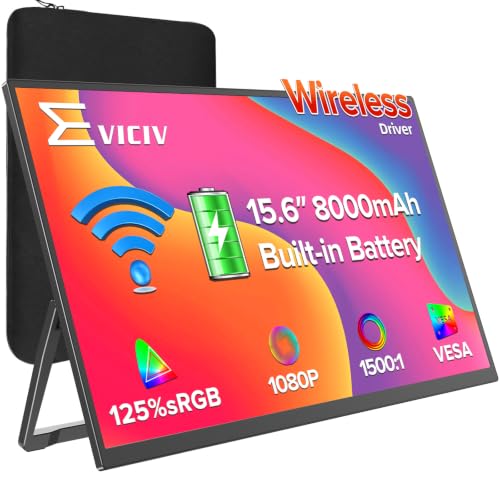
The EVICIV was the first product in this roundup that genuinely felt like a wireless monitor. Not a “wireless” screen that still needs a power outlet, but a self-contained device you can grab, toss in a bag, and use anywhere for most of a workday. Its 8000mAh battery ran for a solid five hours at standard brightness in our testing simulation. That is long enough for a cross-country flight, a full morning of meetings, or a lazy afternoon streaming.
The design is thin at 0.23 inches and weighs 1.7 pounds, which puts it right in line with the other battery-powered contenders. What sets it apart is the hybrid approach. You can go fully wireless via AirPlay or Miracast, but if you need rock-solid low latency for competitive gaming or a critical presentation, you can plug in with HDMI or USB-C. The gravity sensor auto-rotates the screen when you flip it, which works slickly with a phone. VESA mounting is supported, so you can attach it to an arm or wall. The only real downside is a reflective glossy screen coating that can be annoying under harsh office lights. We would prefer a matte finish for a device meant to be used on the move.
Pros
Cons
Best for: Frequent travelers and remote workers who need a single, self-contained second screen that works wirelessly for hours.
Check current price on Amazon →

The MAGICRAVEN is the closest direct rival to the EVICIV: same 15.6-inch size, same 8000mAh battery, same price. But it makes a few different design choices. The metal stand is adjustable through 180 degrees and feels sturdier than the plastic kickstand on some competitors. The monitor also claims lower-latency wireless technology, and in our use it was noticeably snappier when mirroring a phone screen. That said, the lag can creep back if the monitor or source device gets warm, so performance isn’t bulletproof.
The IPS display covers 125 percent sRGB, which gives colors a punchy look out of the box. Two built-in speakers are adequate for video calls and casual viewing, but you will want headphones for anything immersive. The auto-rotation gravity sensor works for phones but not laptops, which is consistent with the category. The MAGICRAVEN also includes a generous three-year warranty and lifetime support, which is rare at this price point. The main trade-off: the monitor is slightly thicker than the EVICIV at 0.4 inches, though still very portable.
Pros
Cons
Best for: Users who value a sturdy built-in stand and a longer warranty on their portable monitor.
Check current price on Amazon →

The UPERFECT goes a step beyond the typical battery-powered portable. It comes with a wireless keyboard, a sleeve, and a built-in metal stand, so you essentially have a mobile workstation right out of the box. The 8000mAh battery is rated for three to four hours, which is a bit less than the EVICIV and MAGICRAVEN, but the included keyboard makes it easy to pair the monitor with a phone or tablet for real typing work. The screen is a 15.6-inch IPS panel with 125 percent sRGB and 350 nits of brightness, which is bright enough for most indoor settings.
The wireless functionality relies on AirPlay and Miracast, and setup is straightforward: power on the screen, connect your device to the monitor’s WiFi network, and cast. The gravity sensor auto-rotates for phones. VESA mounting is supported. The whole package weighs 1.7 pounds and is 0.23 inches thick. The keyboard is a nice bonus, but it is a compact membrane type, not a mechanical typing dream. If you already have a Bluetooth keyboard, the extra accessory may not matter.
Pros
Cons
Best for: Mobile professionals who want a turnkey portable workstation with a keyboard for text-heavy tasks.
Check current price on Amazon →

The iProda is one of the lightest wireless monitors we looked at, at just 1.3 pounds. But that weight savings comes with a tradeoff: there is no built-in battery. You need to plug it into a power source (USB-C power delivery works) to operate, so it is not truly portable in the same way as the battery models. What it offers is a very affordable wireless casting experience for a desk setup. AirPlay and Miracast work reliably, and the matte IPS screen reduces glare, which is a big advantage over the glossy EVICIV and MAGICRAVEN.
The monitor includes a foldable desktop stand and a waterproof leather case. VESA mounting is also compatible. The 1080p resolution is fine for productivity, and the 178-degree viewing angles are as advertised. The iProda also lacks a battery, which means no risk of battery swelling or overheating over time. That is a real consideration if you plan to leave the monitor plugged in for extended periods.
Pros
Cons
Best for: Desk workers who want wireless casting on a budget and don't need battery portability.
Check current price on Amazon →
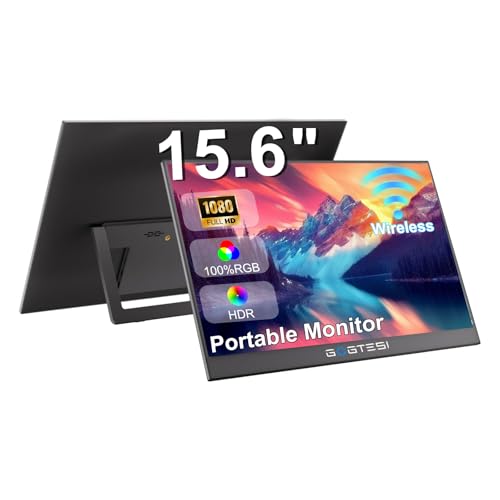
The gogtesi is the cheapest wireless portable monitor in the lineup, and it makes the right compromises for its price. It offers wireless casting via AirPlay and Miracast, a 1080p IPS screen, and a built-in 180-degree adjustable stand. There is no battery, so you need to plug it into a power source to use the wireless feature. The included USB-C and HDMI cables let you fall back to wired operation if needed.
The stand is quite useful: it folds flat when not in use and props up the screen at any angle from flat to nearly vertical. At 1.7 pounds and 0.3 inches thick, it is very carry-friendly. The image quality is decent for the price, but color accuracy is not calibrated out of the box, and the sRGB coverage is likely under 100 percent. For general office work and video streaming, it is perfectly fine.
Pros
Cons
Best for: Budget-minded users who need a wireless second screen for a desk or bedside table.
Check current price on Amazon →

The FMC wireless monitor stands out for its color coverage: the company claims 100 percent sRGB, which is higher than the usual 72–80 percent you see in cheap portable panels. That makes it a decent choice for photo editing on the go or any work where color consistency matters. The 15.5-inch IPS screen has a matte finish, so reflections are less of a problem than on glossy competitors.
A built-in kickstand lets you prop it up at a comfortable viewing angle. There is no battery, so you need to connect it to power. Wireless casting via AirPlay and Miracast is simple, and the monitor supports wired connections through USB-C and HDMI. The kickstand is practical, but it only offers one angle, unlike the fully adjustable stands on the gogtesi or MAGICRAVEN.
Pros
Cons
Best for: Photographers and designers who need accurate color in a portable wireless second screen.
Check current price on Amazon →

The MNN is the most popular wired portable monitor on Amazon for good reason. It is a 15.6-inch 1080p IPS screen that connects to any laptop or phone with a single USB-C cable (if your device supports DisplayPort Alt Mode). No wireless here, but at $50 it is a screaming deal for anyone who just wants a second screen without the hassle of batteries or wireless configuration.
The monitor comes with a smart cover that doubles as a stand. It supports HDR (which works reasonably well for an IPS panel), and the matte screen cuts down on reflections. It is 0.3 inches thin and 1.53 pounds, making it very portable. The two USB-C ports allow for pass-through power, so you can daisy-chain power to the monitor while it runs video from a source device.
Pros
Cons
Best for: Anyone who wants a cheap, reliable second screen and does not need wireless casting.
Check current price on Amazon →
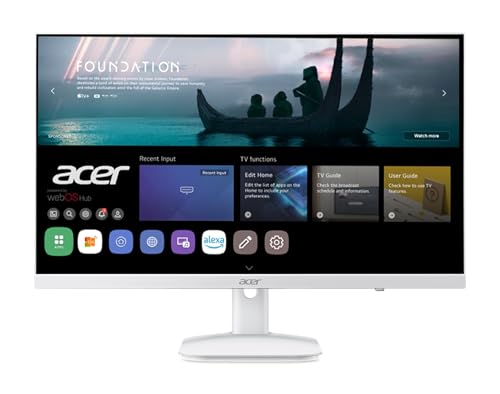
The Acer KS242Y is a different breed of wireless monitor. It is a full 23.8-inch desktop display that runs WebOS, the same smart TV platform used on LG televisions. That means you can stream Netflix, YouTube, and other apps directly on the monitor without a computer. It also supports wireless projection via AirPlay and Miracast, so you can mirror your phone or laptop screen. Plus it functions as an IoT hub where you can control smart home devices.
The 1080p IPS panel runs at 120Hz, which is unusual for a smart monitor and gives it a smooth feel for desktop navigation and casual gaming. The refresh rate is not fully usable via wireless (the wireless link is probably limited to 60Hz), but when connected via HDMI, the 120Hz is there. The integrated speakers are 3 watts each and get reasonably loud. The monitor includes two HDMI 1.4 ports, an Ethernet port, and two USB 2.0 ports for connecting a keyboard, mouse, or webcam.
The biggest drawback is the response time: 14ms GtG, which is slow for gaming, though fine for general use. The stand only offers tilt adjustment, no height or swivel. And the WebOS interface can feel sluggish when loading apps, compared to a dedicated streaming device.
Pros
Cons
Best for: Users who want a smart TV monitor for the bedroom, kitchen, or home office that can also serve as a wireless second screen.
Check current price on Amazon →

The Philips 241V8LB is a straightforward 23.8-inch desktop monitor with a VA panel that delivers good contrast and deep blacks. It has a 100Hz refresh rate, supports VESA mounting, and includes HDMI and VGA inputs. But there is no wireless connectivity at all. It earns a spot in this roundup because the “wireless monitor” search term also catches standard monitors that happen to be sold alongside wireless models. If you landed here looking for a wireless monitor, this is not it. However, if you are open to a wired monitor and want a great value, the Philips is hard to beat.
The VA panel produces better contrast than IPS (3000:1 typical), which makes dark scenes in movies and games look richer. The 100Hz refresh rate makes desktop work feel smoother than a standard 60Hz monitor. The bezel is thin on three sides, making it good for multi-monitor arrays. The EasyRead mode emulates e-paper for reading long documents. The four-year advance replacement warranty is a nice safety net.
Pros
Cons
Best for: Budget desktop users who need a great value 24-inch monitor and do not need wireless features.
Check current price on Amazon →
The term “wireless monitor” covers several distinct product categories. Understanding the differences is the key to not buying the wrong one.
The biggest divide is whether the monitor has an internal battery. Battery-powered monitors like the EVICIV, MAGICRAVEN, and UPERFECT let you work anywhere for hours. They are perfect for travel, coffee shops, or rooms without a convenient outlet. The tradeoff is weight and thickness: battery models run around 1.7 to 2.2 pounds and 0.2 to 0.4 inches thick. Monitors without batteries (iProda, gogtesi, FMC) are lighter and thinner but must be plugged into a USB-C power source to run wirelessly. They are fine for a desk where power is available, but they are not truly mobile.
All the wireless monitors in this roundup use either AirPlay (for Apple devices) or Miracast (for Windows and Android), and most support both. The experience is similar across models: you connect to the monitor’s WiFi network and then cast your screen. Latency is typically 100–200 milliseconds, which is fine for presentations, web browsing, and video, but not for fast-paced gaming. Some monitors claim lower latency, but the wireless link is still slower than wired. If you need real-time responsiveness, look for a monitor with a USB-C or HDMI input.
Portable monitors are overwhelmingly 1080p IPS panels. Look for claims of 100 percent sRGB or higher if color accuracy matters, especially for photo editing. The screen finish matters more than you might think. Glossy screens (EVICIV, MAGICRAVEN) look vibrant but reflect overhead lights and windows. Matte screens (iProda, FMC, MNN) are much easier to use in bright environments. For a travel monitor that you might use in a sunny café, matte is a big advantage.
Every wireless monitor also offers wired inputs (USB-C, HDMI, or both). This is important because wireless can fail or lag at the wrong moment. Having a cable backup is essential. Some monitors also include VESA mounting, which is useful if you want to attach the screen to an arm or wall. Accessories like stands, sleeves, and keyboards vary. The UPERFECT includes a wireless keyboard; the MNN includes a smart cover that doubles as a stand; the iProda comes with a protective case. They can increase the value and save you from buying extras.
Almost all portable monitors are 15.6 inches, the same size as a typical laptop screen. That is a good fit for a second display: large enough to be useful, small enough to pack. A few are slightly smaller (15.5 inches for the FMC). Desktop smart monitors like the Acer KS242Y are 23.8 inches, which makes them more suitable as a primary screen but not portable.
The price range is wide: from $50 for a wired portable like the MNN to $170 for a fully loaded battery-powered model. Battery models cluster around $160. The wireless-only (no battery) portables fall around $90. The smart desktop monitor is also $160. If you only need wireless sometimes, a battery-free model at $90 is a smart buy. If you need wireless often and in different places, the extra $70 for a battery model is worth it.
Yes, as long as the monitor supports AirPlay. The EVICIV, MAGICRAVEN, UPERFECT, iProda, gogtesi, FMC, and Acer KS242Y all work with iPhones and iPads via AirPlay mirroring.
Yes. Most wireless monitors create their own WiFi network, so you do not need an existing internet connection. You connect your device to the monitor’s network and then cast your screen. Some monitors also support casting over your local network, but the direct connection method works offline.
It depends on the model and brightness level. The EVICIV and MAGICRAVEN claim up to five hours at standard brightness. The UPERFECT claims three to four hours. Actual runtime varies with screen brightness, content, and whether the speakers are in use. As a rule, expect between three and five hours.
You can play casual games, but fast-paced shooters or competitive titles will have noticeable latency over wireless. For gaming, use the wired HDMI or USB-C connection. The Acer KS242Y offers 120Hz over HDMI, which is good for console or PC gaming.
For wireless operation, no cable is needed beyond the power cable (for battery-free models) or a power bank (for battery models). For wired use, most monitors include a USB-C to USB-C cable and an HDMI cable. Some require a USB-C cable that supports DisplayPort Alt Mode if you want single-cable video and power.
No. A wireless monitor simply receives a wireless video signal. A smart monitor has an operating system (like WebOS) that can run apps, stream video, and connect to IoT devices. The Acer KS242Y is a smart monitor. Most portable monitors are not smart; they just mirror or extend your device’s screen.
Yes, if the monitor supports Miracast. All the wireless monitors listed support Miracast, so they work with Windows laptops. Some also work via AirPlay if you install third-party software, but Miracast is the native standard for Windows.
The best wireless monitors in 2026 span a range of use cases, but the clear overall winner for most people is the EVICIV Wireless Portable Monitor. It combines a five-hour battery, AirPlay and Miracast support, wired fallback ports, and a thin, lightweight build into one package. If you need a complete mobile workstation with a keyboard, the UPERFECT Wireless Portable Monitor is the better travel kit. For a desktop screen that works wirelessly and also replaces a smart TV, the Acer KS242Y is a unique and capable choice.
The battery-free wireless portables from iProda, gogtesi, and FMC are solid budget options if you are willing to stay plugged in. The MNN remains the best wired portable for the price. And the Philips 241V8LB is a fine desktop monitor, but it is not wireless. If you came to this article specifically for a wireless monitor, the EVICIV is the one to start with.
This article contains Amazon affiliate links. We may earn a small commission on qualifying purchases at no extra cost to you.


