Physical Address
304 North Cardinal St.
Dorchester Center, MA 02124
Physical Address
304 North Cardinal St.
Dorchester Center, MA 02124

We found the 9 best fight sticks in 2026 for every budget and platform, from the compact HORI Mini to the premium Qanba Obsidian 2.
You show up to a local fighting game tournament with a stock controller and immediately feel the side-eye. In a genre where quarter-circle inputs and just-frame links can decide a match, the difference between a decent pad and a proper fight stick isn’t subjective opinion. It’s the difference between dropping a combo and landing a perfect punish. A good fight stick gives you tactile feedback, consistent button placement, and a lever that tells your fingers exactly where you are in the motion without looking down. A bad one feels loose, flexes under pressure, or doesn’t work with the console you actually own.
The category has never been more fragmented. You can spend $50 on a portable stick for quick sessions or $250 on a pro-grade slab loaded with Sanwa parts and swappable restrictor gates. Some sticks prioritize wireless convenience, others prioritize weight and stability. Our guide covers nine of the options you will actually find on Amazon in 2026, ranging from the smallest home-friendly stick to the heaviest tournament weapon. We have looked at every product’s build quality, component choice, platform support, and real-world comfort so you can decide which one fits your game.
TL;DR: The HORI Fighting Stick Alpha is the one most players on PlayStation should buy: tournament-ready with Hayabusa parts and easy modding. The 8Bitdo Arcade Stick is the value winner for Switch and PC players who want wireless freedom and moddability. The Qanba Obsidian 2 is the premium heavyweight for serious competitors, with a Sanwa lever and rock-solid chassis.
| # | Product | Key Specs | Price | Best for |
|---|---|---|---|---|
| 1 | HORI Fighting Stick Alpha | Hayabusa lever & buttons, wired USB-A, PS5/PS4/PC, top-panel art | $199.99 | Tournament players who want easy modding and official Sony license |
| 2 | PlayStation FlexStrike Wireless Fight Stick | Custom digital stick, mechanical-switch buttons, PS Link wireless/4ms latency, toolless gate swap, carrying case | $199.99 | Players who need low-latency wireless for home and competition |
| 3 | Qanba Obsidian 2 | Sanwa JLF lever, Qanba OBSF buttons, wired USB, PS5/PS4/PC, touchpad, headset jack | $199.99 | Serious competitors who want a heavy, stable stick with authentic Sanwa parts |
| 4 | NACON Daija Arcade Fight Stick | Sanwa lever & buttons, full button mapping software, 3 faceplates, headset jack, 3m detachable cable | $249.99 | Customization enthusiasts who want to change artwork and remap every button |
| 5 | 8Bitdo Arcade Stick | Sanwa-compatible mounting plate, wireless Bluetooth/2.4G/wired, USB-C, software macros, N Edition | $79.99 | Switch and PC players who want a wireless, moddable stick at a fair price |
| 6 | MAYFLASH F700 | Sanwa-compatible parts, Bluetooth/2.4G/wired, supports PS5 fighting games, headset, Turbo | $145.99 | Multi-platform players who need one stick for PS5, Switch, PC, and mobile |
| 7 | MAYFLASH F500 Flat | All-button layout, Sanwa-compatible buttons, wired USB, clear acrylic top plate, Turbo, headset | $79.00 | Players switching to an all-button fight stick on a budget, with broad console support |
| 8 | HORI Fighting Stick Mini | HORI V-cut lever, standard 8-button layout, compact white shell, wired USB, 8ft cable | $47.99 | Beginners, kids, or anyone who needs a tiny, lightweight stick for travel or small desks |
| 9 | Qanba Drone 2 | Qanba B30 buttons, OV7 OMRON lever, wired USB, touchpad, headset jack, PS5/PS4/PC | $99.99 | Players who want a full-size licensed PS5 stick at the entry level |
Prices shown are accurate at time of writing but change regularly. Check the links for the latest price.
Choosing a fight stick means balancing several factors that each affect your play style differently. Here is what we considered for every pick.
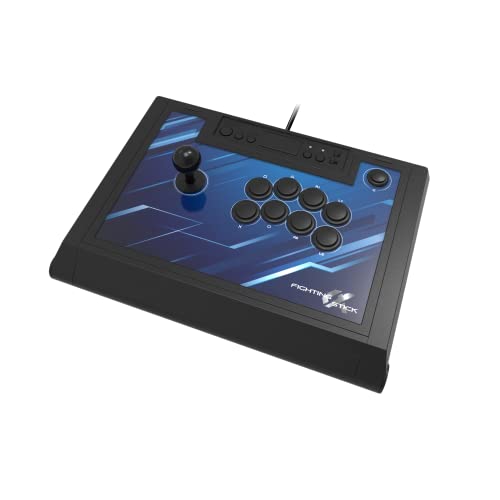
The HORI Fighting Stick Alpha has become the default recommendation for anyone playing Street Fighter 6 or Tekken 8 on PS5, and for good reason. It uses HORI’s own Hayabusa lever and buttons, which feel slightly lighter than Sanwa parts but are just as responsive once you adjust to the shorter throw. The lever has a satisfying, quiet action that avoids the clacky noise of some budget sticks. The buttons are sensitive enough for double-tapping and piano techniques without accidental presses.
Where the Alpha really sets itself apart is its tool-less design. The top panel pops open with a simple latch, giving you direct access to the wiring, lever mounting plate, and button sockets. Swapping the artwork is just as easy: you slide out the clear top plate, insert a print, and snap it back in. That kind of moddability is rare at this price point. The stick sits low on the lap thanks to a slight taper, and the rubber base pad keeps it planted during extended sessions. The downsides are minor: the headphone jack is buried in the front panel instead of on the top edge, and the cable is not detachable, which limits travel convenience if you like to pack neatly.
Check current price on Amazon →

Sony’s official wireless entry into the fight stick space is the PlayStation FlexStrike, and it is the first stick to use the PlayStation Link wireless protocol. With latency figures as low as 4ms, this is a genuine alternative to wired sticks for players who hate tripping over cables. The custom digital stick has been tested for up to six million rotations, and the mechanical-switch buttons give a crisp, tactile click that some players prefer over standard membrane switches.
The FlexStrike comes with a surprisingly thoughtful carrying case that includes a lever gap to protect your stick during transport. Inside the case, you will find storage compartments for the included restrictor gates (square, circle, and octagon) and the PlayStation Link wireless adapter. The gate swap is toolless, which means you can switch between a square gate for most fighters and an octagon for easier execution on certain characters without digging for a screwdriver. The stick is not as heavy as the Qanba Obsidian 2, so it can move a bit on your lap if you are an aggressive player, but the rubber feet help. The big caveat is that this stick only supports PS5 and PC, and the wireless adapter must be plugged into the console. If you play on Switch or Xbox, this one is not for you.
Check current price on Amazon →

The Qanba Obsidian 2 is the follow-up to one of the most respected sticks in the competitive scene, and it improves on the original in nearly every way. It uses a genuine Sanwa JLF lever with swappable tops (ball and bat included) and Qanba’s own OBSF 30mm buttons, which are excellent clones of the Sanwa OBSF standard. The lever has that smooth, notch-perfect feel that Sanwa fans love, and the buttons respond consistently even after thousands of presses.
What makes the Obsidian 2 stand out is its weight and stability. At 7.4 pounds, it will not budge on your lap even when you are mashing super motions. The chassis is metal and plastic with a nice rubberized coating on the top surface. The control panel includes a touchpad (useful for PlayStation games), a 3.5mm headset jack with mute button, and a platform switch that lets you toggle between PS5, PS4, and PC. The cable is detachable, which is a small but appreciated detail for packing. The only real weakness is the price: it sits at the same $199.99 as the HORI Alpha, but it does not offer the same easy artwork swapping or tool-less access. Modding the Obsidian 2 requires unscrewing the bottom panel and dealing with a slightly more complex interior layout. If you never mod your stick, this is not a problem.
Check current price on Amazon →

The NACON Daija is the most feature-packed stick in this roundup, and it demands a premium for it. Starting at $249.99, it is the most expensive here, but you are getting genuine Sanwa lever and buttons, three included faceplates (plus a downloadable template for custom prints), full button mapping software for PC and Mac, and a locking function that disables the start/options buttons mid-match so you never accidentally pause during a ranked set. The textured palm rest is wide and comfortable, and the stick is deep enough to rest your whole wrist.
The Daija excels in connectivity options. It has a detachable 3-meter USB-A to USB-C cable, a 3.5mm headset jack, and the ability to create multiple game profiles on the software. The lever is a standard Sanwa JLF, but NACON includes two different ball tops so you can choose your preferred grip. The stick weighs 7.7 pounds, making it the heaviest in our selection, which is great for stability but a pain to carry in a backpack. The customization options are impressive, but the software is PC/Mac only and requires a bit of time to set up. For the money, you are paying for convenience and flexibility that most players will not use to its full potential. If you are the kind of player who wants to micromanage button layouts and swap faceplates every week, this is the stick. If you just want to plug in and play, the HORI Alpha or Qanba Obsidian 2 give you a similar experience for $50 less.
Check current price on Amazon →

The 8Bitdo Arcade Stick is the best cost-performance option in the entire category, especially if your primary consoles are Switch and PC. It comes in a charming N Edition color scheme that apes the retro Nintendo aesthetic, but the real draw is the features you get for under $80. It supports Bluetooth, 2.4G wireless (with a hidden compartment in the stick for the receiver), and wired USB-C. The 2.4G connection is rock solid and low-latency, more than adequate for local play and even online matches.
The stick itself uses an ultra-moddable universal mounting plate that fits standard Sanwa levers, meaning you can upgrade the stick and buttons down the line without soldering or drilling. Out of the box, the stock parts are a little mushy compared to the premium sticks, but they are perfectly serviceable for learning or casual play. The 8Bitdo also supports the Ultimate Software for button mapping and macros, letting you assign complex series of inputs to a single button. The layout is dynamic: when you switch modes (Switch or PC), the button labels change functionally and visually. The weight is modest at 4.6 pounds, so it slides around on metal desks if you do not use a lap pad, but it is light enough to toss in a bag. The biggest limitation is platform support: it only works natively with Switch and Windows. You cannot use it on PS5 or Xbox without additional converters.
Check current price on Amazon →

If you own half a dozen different consoles and want one stick that works on all of them, the MAYFLASH F700 should be your first stop. It supports PS5 (for specific fighting games only, as noted by the manufacturer), PS4, PS3, Switch, Switch 2, Windows, Apple devices (macOS/iOS/iPadOS), Android, SEGA Genesis Mini, Astro City Mini, NEOGEO Mini, Raspberry Pi, and Steam Deck. That is an absurd amount of compatibility, and it is achieved through a combination of native support and the ability to use an official wired controller as a passthrough for older consoles. The F700 connects via Bluetooth, 2.4G (with a hidden receiver compartment like the 8Bitdo), and wired USB-C.
The stick uses Sanwa-compatible parts out of the box, meaning you can drop in a genuine Sanwa lever and buttons without any soldering. The stock lever and buttons are good but not exceptional; they feel a notch below the Qanba Drone 2’s components. The F700 includes Turbo functions with adjustable speed settings and a headset jack for audio and chat on PS5 and PS4. The weight is 7.3 pounds, so it stays put during play. The downside is the PS5 compatibility is restricted to fighting games (Street Fighter 6, Tekken 8, Mortal Kombat 1, etc.) and does not work with other genres. Also, the F700 is not compatible with Xbox consoles; you have to buy the separate F700X for that. Setup can be a little fiddly for the less common platforms.
Check current price on Amazon →

The MAYFLASH F500 Flat is a departure from the traditional lever-based design. It is an all-button fight stick, meaning you play with buttons for movement instead of a joystick. This layout is increasingly popular among serious players, especially in Street Fighter 6, because it can simplify some inputs and reduce hand fatigue over long sessions. The F500 Flat uses Sanwa-compatible buttons arranged in a standard hitbox-style layout. The unit is slim (1.97 inches tall) and flat, making it easy to store in a backpack or on a desk.
Like other MAYFLASH sticks, the F500 Flat offers broad platform support: PS4, PS3, Xbox Series S/X, Xbox One, Xbox 360, Switch/Switch 2, PC, macOS, Android, Raspberry Pi, NEOGEO mini, and more. Getting native PlayStation or Xbox support requires plugging a wired official controller into the USB slot on the stick, which is a minor inconvenience but keeps the cost down. The stick includes Turbo functions and a headset jack. The top panel is a clear acrylic surface that you can pop off and replace with custom artwork using a downloadable template from the MAYFLASH website. That is a great feature for personalization. The stock buttons are not as crisp as premium buttons, but the 5.7-pound weight and slim profile make this a very comfortable all-button entry. The biggest caveat is that this is an all-button layout, so if you have never used one before, expect a steep learning curve for movement inputs. Also, the stick is not compatible with PS5 directly without additional adapters.
Check current price on Amazon →

The HORI Fighting Stick Mini is exactly what it sounds like: a shrink-rayed version of a traditional fight stick that fits in a small backpack compartment or a large purse. It measures roughly 8 by 6 inches and weighs just over a pound. The tiny form factor is both its greatest strength and its biggest compromise. The lever uses HORI’s original V-cut housing and has a shorter throw than a full-size stick, which can make circular motions feel cramped if you are used to standard Japanese levers. The buttons are the same 8-button layout but closer together, which might suit players with smaller hands.
For the $48 price, you get an officially licensed Sony product that works on PS5, PS4, and PC right out of the box. The 8-foot cable is generous, and the white shell is pleasant to look at. The stick is not very stable on a lap because of its light weight, but it works fine on a desk or table. This is not a tournament tool. It is a travel companion, a training stick for kids, or a spare for couch co-op sessions. If you are a serious player looking for your primary stick, skip this and start with the 8Bitdo or a used Qanba Drone 2. But if you need something that fits in a glovebox and costs less than a new game, this is the one.
Check current price on Amazon →

The Qanba Drone 2 is the cheapest full-size fight stick that is officially licensed for PlayStation 5. At $99.99, it undercuts the 8Bitdo on platform support (it works natively on PS5, PS4, and PC without any dongles) but does not offer wireless connectivity. It uses Qanba’s own B30 30mm buttons and an OV7 joystick with OMRON switches. These parts are a definite step up from the bare-bones components in the HORI Mini, but they lack the refinement of Sanwa or Hayabusa. The lever has a bit more dead zone in the neutral position, and the buttons feel a little stiff out of the box, but they break in after a few sessions.
The Drone 2 includes a full control panel with a touchpad, a 3.5mm headset jack, and a mute button. The chassis is all plastic but reasonably sturdy for the price. At 3.9 pounds, it is light enough to carry around but not so light that it slides off your lap entirely. The cable is non-detachable, which is a minor annoyance. The stick lacks any means of easy modding: you have to open the case with a screwdriver and the interior is not designed for quick swaps. That said, for $100, you get a proper PS5 stick that you can take to a local and play without any adapter or compatibility worry. If you are on a tight budget but need full-size performance, this is your pick.
Check current price on Amazon →
Deciding which fight stick to buy means weighing what matters most in your specific setup. Here are the factors that separate a good purchase from a regret.
The lever and buttons are your primary interface with the game. The best levers, like the Sanwa JLF and HORI Hayabusa, use microswitches that activate with a clean tactile click and last for millions of rotations. Cheaper sticks use rubber dome switches that feel spongy and lose accuracy over time. Buttons come in 30mm (standard) and 24mm (used for the four action buttons on some layouts). Most premium sticks use 30mm buttons for the main eight. If you plan to keep your stick for years, look for Sanwa, Hayabusa, or Qanba’s OBSF buttons. If you are on a budget, know that you can usually upgrade the stick and buttons yourself if the mounting plate is standard.
Heavier sticks stay put on your lap, which matters during frantic gameplay. Lighter sticks are easier to carry but require a tabletop or a lap pad to avoid sliding. Weights range from 1 pound (HORI Mini) to nearly 8 pounds (NACON Daija). A good rule: for lap play, aim for at least 5 pounds. For tabletop play, 3 to 5 pounds is fine. Some sticks add rubber feet to improve grip, but nothing beats mass.
Not all sticks work on all consoles. Official licensing matters for PS5 and Xbox because those platforms block third-party controllers. The sticks we recommend all have native support for the platforms listed. If you play on multiple consoles, a stick like the MAYFLASH F700 or the NACON Daija (with its wide compatibility) can simplify your setup. Remember that some sticks require a wired controller passthrough to work on certain platforms, which adds a small cable mess.
Tournament rules typically require wired connections for consistency. For home play, wireless is convenient. The PlayStation FlexStrike uses low-latency PS Link, and the 8Bitdo and MAYFLASH sticks support 2.4G, which is much better than Bluetooth for gaming. Avoid Bluetooth-only sticks for fighting games; the added latency can mess with your timing.
Modding a stick means swapping the lever, buttons, restrictor gate, or artwork. The HORI Alpha and MAYFLASH F500 Flat are exceptionally easy to mod. The Qanba Obsidian 2 and NACON Daija require more disassembly. If you like to tinker, prioritize a stick with a standard mounting plate (Sanwa-compatible) and easy access to the interior.
Most modern fight sticks with official Sony licensing work on PS5 for PS4 and PS5 fighting games. Sticks without a license may still work with a converter, but not all games support them. Check the product description for explicit PS5 compatibility.
Fight sticks use a joystick and large arcade-style buttons instead of thumbsticks and triggers. They offer precise directional inputs, dedicated buttons for each attack, and a more ergonomic layout for long sessions. Many players find they reduce hand strain and improve execution consistency.
Yes. Almost all fight sticks work on PC as an XInput or DirectInput device. Some sticks have a mode switch for PC compatibility. The 8Bitdo, MAYFLASH, and wired sticks from HORI and Qanba are all PC-ready.
Sanwa Denshi is a Japanese manufacturer of arcade components. Their JLF lever and OBSF buttons are the industry standard for quality, feel, and durability. Many premium sticks use genuine Sanwa parts, and aftermarket upgrades are widely available.
If you play in tournaments or want the lowest possible latency, choose wired. If you play at home and dislike cable clutter, a stick with 2.4G wireless (like the 8Bitdo or MAYFLASH F700) offers a strong compromise. Bluetooth-only sticks can introduce noticeable delay.
Small sticks like the HORI Mini are easy to carry but sacrifice lap stability and lever feel. For regular play, a full-size stick (around 14 to 19 inches wide) is more comfortable. If you travel frequently, consider the 8Bitdo or MAYFLASH F700, which are lighter than premium sticks and come with detachable cables.
Moddable sticks have an accessible interior with standard mounting plates. You can unscrew the top panel (or open a latch) and swap the lever, buttons, restrictor gate, or artwork. The HORI Alpha and MAYFLASH F500 Flat are the most user-friendly examples.
The HORI Fighting Stick Alpha is our top recommendation for most PlayStation players. It combines tournament-ready Hayabusa parts, a tool-less modding design, and a price that undercuts the competition with similar features. If you want a wireless option that does not compromise on latency, the PlayStation FlexStrike is a strong, well-packaged choice for PS5 and PC. For players on Switch and PC who want value and upgrade potential, the 8Bitdo Arcade Stick delivers an incredible experience at a third of the cost of premium sticks.
If you are a serious competitor who prefers a heavy, stable platform with authentic Sanwa components, the Qanba Obsidian 2 is the default. And if you need one stick that works across every console in your closet, the MAYFLASH F700 is the most versatile option money can buy. No matter your budget or play style, there is at least one stick in this list that will make your next round feel like an arcade cabinet again. The best fight sticks are the ones you actually want to bring to your desk and use every day.
This article contains Amazon affiliate links. We may earn a small commission on qualifying purchases at no extra cost to you.


