Physical Address
304 North Cardinal St.
Dorchester Center, MA 02124
Physical Address
304 North Cardinal St.
Dorchester Center, MA 02124

We found the 9 best 2k monitors for every need and budget, from budget office screens to high-refresh gaming rigs. Find your perfect QHD display here.
You saved up for a GPU that can handle 1440p. You cleared desk space for a 27-inch (or 32-inch) panel. Now you are staring at a wall of listings all promising "2K QHD" and wondering which one actually delivers. The problem with picking a 2k monitor today is that the spec sheet arms race has made everything look good on paper, but the real-world differences between a $95 panel and a $190 panel are enormous.
We sorted through the current crop to find the 9 best 2k monitors across every realistic use case. Whether you need a blur-free 240Hz screen for competitive shooters, a color-accurate display for creative work, or a cheap second monitor that still looks sharp, this list has a pick with the right trade-offs.
TL;DR: The Samsung Odyssey G55C is the most immersive pick thanks to its 1000R curve and 165Hz speed. The AOC Q27G41ZE is the speed king at 240Hz with a razor-sharp IPS panel. The Acer Nitro KG271U offers the best color accuracy for creative work. The Sceptre E275W-QPT is the budget standout at 75Hz with solid sRGB coverage.
| # | Product | Panel / Size | Refresh Rate | Price | Best For |
|---|---|---|---|---|---|
| 1 | Samsung Odyssey G55C | VA / 32" Curved | 165Hz | $189.99 | Immersive gaming and media |
| 2 | AOC Q27G41ZE | IPS / 27" | 240Hz (oc 260Hz) | $169.99 | Competitive esports |
| 3 | Gawfolk 27" IPS 75Hz | IPS / 27" | 75Hz | $94.99 | Absolute budget |
| 4 | Sceptre E275W-QPT | IPS / 27" | 75Hz | $109.97 | Budget office / light gaming |
| 5 | ViewSonic VS2725-2K | LED / 27" | 100Hz | $139.99 | Home office with smooth motion |
| 6 | Acer Nitro KG271U | IPS / 27" | 180Hz | $179.99 | Color-critical gaming and design |
| 7 | KTC H27T27S | HVA / 27" | 144Hz | $139.99 | Budget high-refresh gaming |
| 8 | AOC Q27G4XN | VA / 27" | 180Hz | $159.99 | Well-rounded gaming with height adjust |
| 9 | KTC H27T22C-3 | Fast IPS / 27" | 200Hz (oc 210Hz) | $161.30 | High-refresh IPS on a budget |
Prices and availability change frequently. The above reflects the data at time of writing.
Every buyer has a different weight for the same specs. We focused on five factors that separate a good 2k monitor from a bad buy:

The Samsung Odyssey G55C stands apart from the rest of this list the moment you sit in front of it. That 1000R curve is aggressive. It wraps the 32-inch screen around your peripheral vision in a way that flat panels cannot match, and it makes games like racing sims and open-world RPGs feel genuinely enveloping. The VA panel gives it a native contrast ratio that IPS monitors here can't touch, so blacks in dark scenes actually look black instead of gray.
At 165Hz with a 1ms MPRT response time, this display is fast enough for all but the most obsessive competitive players. AMD FreeSync keeps the image clean when your framerate dips. The QHD resolution on a 32-inch screen still looks sharp from a normal viewing distance, and the HDR10 support adds some extra punch to highlights. Samsung's Eye Saver mode cuts blue light without making everything orange, which matters if you game for hours.
The biggest catch is the size. A 32-inch curved screen demands a deep desk or a wall mount, and the stand only tilts. It cannot be raised or swiveled. The lack of height adjustment is the Odyssey's real weakness for ergonomic setups. The 165Hz refresh rate is also capped via HDMI, and the monitor only includes HDMI 2.0 and DisplayPort 1.2, which is fine for 1440p at 165Hz but not future-proof.
Pros: Deep 1000R curve for true immersion; excellent VA contrast with rich blacks; 165Hz is smooth enough for most gaming; built-in eye care features work well.
Cons: No height adjustment or swivel; 32-inch size won't fit all desks; HDR brightness is modest; no built-in speakers.
Best for: Gamers who play single-player titles and want a cinematic experience with deep blacks, and who have the desk space to accommodate a large curved panel.
Check current price on Amazon →

If your game is Valorant, Overwatch, or Apex and you are chasing every millisecond, the AOC Q27G41ZE is the monitor that will keep up. It runs at 240Hz out of the box and can overclock to 260Hz via DisplayPort, which puts it at the very top of this list for raw motion clarity. The 0.3ms MPRT response time is among the fastest you can buy at this price. Combined with an IPS panel, you get both speed and color consistency, a rare combo at $170.
The frameless three-sided design makes it easy to set up side-by-side for a dual monitor rig. Adaptive-Sync works with both G-Sync and FreeSync GPUs, so screen tearing is not an issue with either brand. The 300-nit brightness and 1000:1 contrast are standard for IPS, but the wide viewing angles mean the image stays accurate even if you are not dead center.
AOC includes a 3-year zero-bright-dot warranty, which covers dead pixels that would normally be ignored. That is a genuine bonus for anyone worried about panel lottery. The monitor only tilts and does not swivel or pivot, and there are no built-in speakers. The OSD menu is a bit clunky, but you set it once and forget it. For pure competitive gaming at 1440p, this is the best 2k monitor on the list.
Pros: 240Hz (260Hz overclock) is buttery smooth; 0.3ms MPRT eliminates motion blur; IPS colors with good viewing angles; zero-bright-dot warranty adds peace of mind.
Cons: Stand only tilts (no height adjust); no built-in speakers; OSD navigation is dated; 260Hz overclock may vary per unit.
Best for: Competitive gamers who need the highest refresh rate and fastest response time at 1440p, and who already have a good GPU.
Check current price on Amazon →

The Gawfolk comes in at a price that would have bought you a decent 1080p monitor a few years ago. For under $100 you get a genuine 27-inch IPS panel with 2560×1440 resolution, 100% sRGB coverage, and 1.07 billion colors. The 75Hz refresh rate is a step up from standard 60Hz office monitors, making general use feel snappier. Adaptive Sync is included, which helps reduce the tearing you might see in lighter games.
The built-in speakers are usable for YouTube and video calls, though they lack bass. The 320 cd/m² brightness is higher than many monitors at this price, so the image holds up well in a bright room. The 178 degree viewing angles are what you expect from IPS.
The weak spot is the 1ms response time, which is listed as MPRT (Motion Picture Response Time). Real-world pixel response is likely slower, meaning fast motion will show some ghosting. This is fine for office work and strategy games, but it is not a gaming monitor for shooters. The stand is basic with only tilt adjustment, and the build feels a bit light.
Pros: Very low price for a 1440p IPS panel; decent sRGB coverage; built-in speakers; high brightness for the price.
Cons: 75Hz limits gaming potential; response time is not competitive; stand lacks height adjustment; build feels a bit hollow.
Best for: Budget-conscious users who want 1440p resolution for work and media, with occasional light gaming.
Check current price on Amazon →

The Sceptre E275W-QPT has been around for a while, and it keeps selling because it nails the basics. It is a 27-inch IPS panel with 99% sRGB coverage, which means the colors are accurate out of the box. The 75Hz refresh rate makes scrolling through documents feel smooth, and it includes built-in speakers that are good enough for conference calls. The edgeless design gives it a clean look on a desk.
Sceptre includes FPS and RTS game modes, which tweak the gamma and contrast for different genres. They are not a substitute for a proper gaming monitor, but they are a nice addition for casual play. The blue light shift mode is effective for reducing eye strain during long sessions.
The monitor only has two HDMI ports and one DisplayPort. There is no USB-C or USB hub, which is a shortcoming for modern work setups. The stand is sturdy but only tilts, and the built-in speakers are quiet compared to dedicated ones. At 75Hz and with a standard response time, it is not a pick for fast-paced gaming.
Pros: Reliable IPS panel with 99% sRGB; built-in speakers save desk space; edgeless design looks clean; good price for the feature set.
Cons: 75Hz refresh rate is limited for gaming; no USB-C or USB hub; speakers are underpowered; stand has no height adjustment.
Best for: Office workers and students who need a crisp, color-accurate 1440p monitor for productivity and occasional media consumption.
Check current price on Amazon →

ViewSonic has a strong reputation for reliable office monitors, and the VS2725-2K carries that forward with a 100Hz refresh rate. That extra 40Hz over standard 60Hz panels makes everything from cursor movement to video playback feel noticeably smoother. The 1440p resolution gives you plenty of screen real estate for spreadsheets and multiple windows.
The frameless design is genuinely close to edge-to-edge, which makes it a great candidate for a dual monitor setup. Variable Refresh Rate (VRR) support helps with occasional light gaming, though this is not a dedicated gaming display. Eye care features include flicker-free backlight and a blue light filter that does not ruin color too badly.
At 7.9 pounds, it is light enough to wall mount on a standard VESA arm. The lack of built-in speakers is a genuine omission at this price, especially since the monitor is aimed at home offices. The stand only tilts, and the connectivity is limited to one HDMI and one DisplayPort with no USB ports.
Pros: 100Hz refresh rate makes everyday use fluid; frameless design great for multi-monitor; light weight; eye care features work well.
Cons: No built-in speakers; limited connectivity (no USB); stand lacks height adjustment; not suitable for serious gaming.
Best for: Home office users and professionals who want a smooth desktop experience and a clean, bezel-less setup.
Check current price on Amazon →

The Acer Nitro KG271U is the monitor that straddles the line between gaming and creative work better than any other on this list. The IPS panel covers 95% DCI-P3, which is the color space used in film and video production. Combined with HDR10 support, it produces rich, accurate colors that still look punchy in games. The 180Hz refresh rate (via DisplayPort) and 0.5ms GtG response time are more than enough for fast-paced gaming.
AMD FreeSync works seamlessly, and the 2560×1440 resolution balances sharpness with performance. The zero-frame design maximizes screen space. The OSD includes gaming crosshairs and dark boost features, though you will likely set them once and forget them.
The biggest downside is the stand. It only tilts and has a large footprint. There is no height adjustment or swivel. The 12.1 pound weight makes it solid on a desk but heavy for wall mounting. The built-in speakers are weak and tinny, and the HDR implementation is entry-level with limited peak brightness.
Pros: Outstanding 95% DCI-P3 color coverage; 180Hz refresh rate is fast and smooth; 0.5ms response time eliminates ghosting; good for both gaming and creative work.
Cons: Stand has no height adjustment; built-in speakers are poor; HDR brightness is modest; no USB hub.
Best for: Gamers who also edit photos or video and want a single monitor that does both well, with accurate colors and high refresh.
Check current price on Amazon →

KTC is a brand that has been gaining traction by offering good specs at aggressive prices. The H27T27S uses an HVA panel, which is a VA variant that improves viewing angles while keeping the high contrast ratio. At 4000:1 contrast, blacks are significantly deeper than any IPS panel here. The 144Hz refresh rate and support for both G-Sync and FreeSync make it a solid entry-level gaming monitor.
The frameless design looks modern, and the 16:9 aspect ratio is standard. The 129% sRGB coverage (8-bit) is fine for gaming and general use, though creative professionals will want a wider gamut. The monitor includes low blue light and flicker-free modes for eye comfort.
The stand is basic with only tilt adjustment. The HVA panel still does not match IPS for color consistency at extreme angles, though it is better than older VA panels. The included HDMI and DisplayPort ports are standard, but there is no USB-C. At this price, the compromises are acceptable.
Pros: Excellent 4000:1 contrast ratio for deep blacks; 144Hz is smooth for most games; frameless design; good value for the specs.
Cons: Color accuracy lags behind IPS panels; stand only tilts; no USB-C; viewing angles not as wide as IPS.
Best for: Budget-minded gamers who play dark-themed games and want good contrast without spending a lot.
Check current price on Amazon →

The AOC Q27G4XN is the most thoughtfully equipped monitor on this list for gamers who want a full ergonomic setup without spending extra on a VESA arm. It comes with a height-adjustable stand that also tilts and swivels, and it is the only monitor in the roundup with this level of ergonomics out of the box. The VA panel delivers a 127.8% sRGB color gamut, which oversaturates colors slightly but makes games pop.
The 180Hz refresh rate (via DisplayPort) and 1ms GtG response time keep motion clean. Adaptive-Sync works with both major GPU brands, and the HDR10 support adds some dynamic range. The 2K QHD resolution provides sharp detail. The three-sided frameless design makes multi-monitor setups clean.
The VA panel has better contrast than IPS but suffers from slower pixel response in dark transitions, which can cause a bit of black smearing in very fast games. The built-in speakers are mediocre, and the monitor is heavy at 18 pounds including the stand. Still, for a user who wants a complete package without buying an aftermarket mount, this is the one.
Pros: Height-adjustable stand with tilt and swivel (best ergonomics here); 180Hz is smooth; wide sRGB gamut makes games vibrant; good contrast from VA panel.
Cons: VA black smearing in dark scenes; heavy monitor; built-in speakers are weak; OSD is standard AOC (not great).
Best for: Gamers who want a complete, ergonomic solution out of the box and prefer vibrant colors and deep blacks.
Check current price on Amazon →
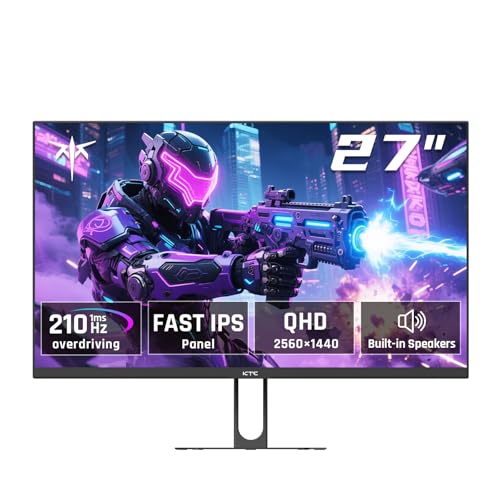
The second KTC on the list takes a different approach. The H27T22C-3 uses a Fast IPS panel that combines the color and viewing angle advantages of IPS with a pixel response that rivals TN panels. Out of the box it runs 200Hz, and overclocking via DisplayPort pushes it to 210Hz. That is the second-highest refresh rate on this list, behind only the AOC Q27G41ZE. The 1ms response time is genuine for an IPS panel, and motion clarity is excellent.
The HDR400 certification means it can reach 450 cd/m² peak brightness, which is higher than most monitors at this price. HDR content has more impact here, though it still falls short of proper HDR displays. The 99% sRGB and 1.07 billion colors produce a vibrant, accurate image.
The built-in speakers are 2W each and are acceptable for casual use. The stand only tilts, which is a letdown at this price. The included USB 2.0 port is for firmware updates only, which is odd. But for a high-refresh IPS panel with HDR400 at this price, it is a steal for competitive and visual gaming.
Pros: 200Hz (210Hz OC) with Fast IPS is incredibly smooth; HDR400 with 450 nits brightness; solid color coverage; built-in speakers.
Cons: Stand only tilts (no height adjust); USB port is firmware only; HDR400 is entry-level; overclock stability varies.
Best for: Gamers who want IPS color with high refresh and can't stretch to a 240Hz monitor.
Check current price on Amazon →
Before you buy, understand the trade-offs that define the 2k monitor category. Each spec matters differently depending on what you do.
1440p, or 2560×1440, is called QHD (Quad HD) and is also referred to as 2K. At 27 inches it hits a pixel density of about 109 PPI, which is sharp enough that individual pixels disappear at a normal viewing distance. 32-inch 1440p panels drop to about 93 PPI, which is still fine for gaming but less crisp for reading text. A 32-inch monitor also requires more desk depth (at least 30 inches) to avoid neck strain. Curved panels help with the large size, but they are harder to wall mount.
Refresh rate determines how many frames per second the monitor can display. 60Hz is standard for office work. 75Hz is a modest upgrade. 100Hz is where the desktop starts feeling fluid. 144Hz is the entry point for smooth gaming. 165Hz and 180Hz are the sweet spot for most gamers. 200Hz and above is for competitive players. Response time (GtG or MPRT) matters for motion blur. 5ms is fine for office use. 1ms is good for gaming. 0.5ms or 0.3ms is only noticeable in fast twitch shooters.
IPS panels offer wide viewing angles (178 degrees) and consistent color across the screen. They are the best choice for creative work and general use. VA panels have higher contrast (3000:1 to 5000:1) which makes blacks look black instead of gray. They are better for dark room gaming and movies. The downside is that VA has slower pixel transition times in dark areas, causing a black smearing effect. Fast IPS is a newer variant that improves response time to near TN levels while keeping IPS color and viewing angles. It costs more but offers the best all-around performance.
At minimum you need DisplayPort to run 1440p at high refresh rates. HDMI 2.0 can do 1440p at 144Hz, but HDMI 2.0 is usually limited to 144Hz. For 180Hz and above, you must use DisplayPort. USB-C with DisplayPort Alt Mode is increasingly common for laptops, but none of the monitors here include it. A height-adjustable stand is the single most important ergonomic feature. It lets you align the top of the screen with your eye level. Tilt alone is not enough. VESA mounting is standard (100x100mm) on all picks.
HDR on budget and mid-range monitors is a mixed bag. HDR10 only means the monitor accepts an HDR signal, it does not guarantee good brightness or contrast. HDR400 is the lowest tier of VESA certification and gives you moderate improvement in highlights. True HDR requires at least HDR600 and local dimming, which does not exist on monitors at this price. For color accuracy, look for 95% DCI-P3 or 99% sRGB. sRGB is the standard for web content. DCI-P3 is wider and used for video and HDR.
Yes, for most people. 2K (1440p) gives a sharper image without the performance hit of 4K. It sits in a sweet spot where mid-range GPUs like the RTX 3060 Ti or RX 6700 XT can run modern games at high settings with good frame rates.
For single-player and story games, 120Hz to 144Hz is plenty smooth. For competitive shooters like Valorant or Apex Legends, aim for 165Hz or higher. Make sure your GPU can actually push those framerates at 1440p.
You can, but you need a monitor with good color accuracy. Look for at least 95% DCI-P3 or 99% sRGB coverage, and ideally an IPS panel for consistent color. The Acer Nitro KG271U is a good pick for this.
Most modern GPUs support 1440p natively. Integrated graphics from Intel (12th gen and newer) or AMD can drive the desktop at 1440p but will struggle with gaming. For gaming, a dedicated GPU with at least 6GB VRAM is recommended.
They are used interchangeably. QHD stands for Quad High Definition, meaning four times the resolution of 720p. 2K is a looser term that originally referred to 2048×1080 but now generally means 2560×1440 in the consumer monitor market.
Curved monitors can improve immersion by filling your peripheral vision, especially at 32 inches and larger. The 1000R curvature is the tightest and most immersive. Flat panels are better for multi-monitor setups and color-critical work.
HDR on a budget monitor is a bonus feature, not a reason to buy. The HDR10 support on most of these monitors is a checkbox feature that adds a bit of extra vibrancy but does not compare to proper HDR on expensive displays. If HDR matters to you, look at the KTC H27T22C-3 with HDR400.
The Samsung Odyssey G55C is our top pick for the best 2k monitor if you want immersion and strong contrast. Its 1000R curve and 165Hz speed make it a great centerpiece for a gaming rig. The AOC Q27G41ZE is the king of speed at 240Hz and is the best choice for competitive players who need the fastest response. The Acer Nitro KG271U is the most versatile pick, combining 180Hz gaming with excellent DCI-P3 color that works for creative pros.
For buyers on a tighter budget, the KTC H27T27S at 144Hz with deep blacks is a fantastic value. If you need ergonomics out of the box, the AOC Q27G4XN with its height-adjustable stand saves you the cost of a VESA arm.
Spend your money on the panel type and refresh rate that matches your hardware and your eyes. A 2k monitor is a multi-year investment that transforms your daily experience more than almost any other component.
This article contains Amazon affiliate links. We may earn a small commission on qualifying purchases at no extra cost to you.


