Physical Address
304 North Cardinal St.
Dorchester Center, MA 02124
Physical Address
304 North Cardinal St.
Dorchester Center, MA 02124

We've rounded up the 10 best AMD motherboards in 2026, from AM5 flagships to budget AM4 boards, to help you find the perfect foundation for your build.
Starting a new PC build around an AMD processor means deciding which socket and feature set matches what you actually need. Ryzen 9000-series chips demand an AM5 board with DDR5 and PCIe 5.0, while older Ryzen 5000 CPUs still deliver serious performance on the mature AM4 platform with DDR4. The choice between them isn't just about upgradability—it's about whether you need cutting-edge connectivity like USB4 and Wi-Fi 7 right now, or if a proven, stable AM4 board frees up resources for a better GPU.
The 10 best AMD motherboards in 2026 span both sockets and every realistic use case. There's an overclocking beast with 18 power stages, a compact mATX board that fits a living room media PC, and a white-themed board for showpiece builds. We've sorted through the specs to find the one that handles a 9950X under full load, the one that makes sense for a first-time builder, and the ones that simply get out of your way and let you game.
TL;DR: The MSI MAG X870 Tomahawk WiFi is the best all-round AM5 board: strong VRMs, USB4, and 5G LAN without unnecessary extras. The GIGABYTE B850 AORUS Elite WiFi7 is the enthusiast's pick with a 14+2+2 power phase and a five-year warranty. The MSI PRO B550M-VC WiFi is the top AM4 board for most people: solid, compact, and surprisingly feature-rich. The ASUS ROG Strix X870E-E Gaming WiFi is for extreme overclockers who want every last MHz.
| # | Product | Socket | Form Factor | Memory | M.2 Slots | Best For |
|---|---|---|---|---|---|---|
| 1 | MSI MAG X870 Tomahawk WiFi | AM5 | ATX | DDR5 | 4 (1x Gen5) | The well-rounded AM5 build, no compromises |
| 2 | GIGABYTE B850 AORUS Elite WiFi7 | AM5 | ATX | DDR5 | 3 (1x Gen5) | High-power Ryzen 9 CPUs and multi-GPU setups |
| 3 | ASUS ROG Strix X870E-E Gaming WiFi | AM5 | ATX | DDR5 | 5 (3x Gen5) | Pushing a Ryzen 9 to its thermal and frequency limits |
| 4 | MSI MAG B850 Tomahawk MAX WiFi | AM5 | ATX | DDR5 | 4 (2x Gen5) | DDR5 overclocking above 8400 MT/s on a B850 chipset |
| 5 | ASUS ROG Strix X870-A Gaming WiFi | AM5 | ATX | DDR5 | 4 (2x Gen5) | A white-themed build with AM5 flagship features |
| 6 | Asus ROG Strix B550-F Gaming WiFi II | AM4 | ATX | DDR4 | 2 (1x Gen4) | High-end AM4 gaming with Wi-Fi 6E and 2.5Gb LAN |
| 7 | ASUS TUF Gaming B550-PLUS WiFi II | AM4 | ATX | DDR4 | 2 (1x Gen4) | A rugged, long-term AM4 workhorse with solid networking |
| 8 | GIGABYTE B550 Eagle WIFI6 | AM4 | ATX | DDR4 | 2 (1x Gen4) | A straightforward, reliable AM4 ATX board with Wi-Fi 6 |
| 9 | MSI PRO B550M-VC WiFi | AM4 | mATX | DDR4 | 1 (Gen4) | A compact, no-waste mATX board that punches above its size |
| 10 | MSI B550M PRO-VDH WiFi | AM4 | mATX | DDR4 | 1 (Gen4) | The entry-level AM4 mATX board that still includes Wi-Fi |
Building a list of the best AMD motherboards means weighing factors that actually affect your daily experience, not just checking spec sheets. Here is what we looked for in each board:

Pros
Cons
Best for: Anyone building a high-end AM5 PC who wants USB4 and 5G LAN without stepping into a flagship board.
Check current price on Amazon →
The MAG X870 Tomahawk hits a sweet spot that most boards miss. It gives you an AMD X870 chipset with a built-in USB 4 controller, which means you get a 40Gbps Type-C port straight out of the box. That matters if you connect a fast external SSD or a high-resolution monitor that needs DisplayPort over USB-C. The Extended Heatsink design covers the VRM area and the chipset with thick aluminum fins, and MSI uses 7W/mK thermal pads across the power stages. In practice, a Ryzen 9 7950X pulling heavy all-core workloads stays well within spec without the VRM fan becoming audible.
The biggest win here is the networking stack. Most X870 boards top out at 2.5Gb LAN, but the Tomahawk includes a Realtek 5Gbps LAN controller. That is overkill for internet connections, but it makes a difference if you run a local NAS or transfer large video files between PCs. Wi-Fi 7 (802.11be) handles the wireless side with Bluetooth 5.4. The Audio Boost 5 circuit uses a Realtek ALC4080 codec with an integrated headphone amplifier, and it is isolated from the rest of the board's traces to reduce electrical noise. The sound is noticeably cleaner than the average onboard audio.
The board has four M.2 slots, but only the top slot runs PCIe 5.0. The other three are Gen4. That is fine for most builders—a single Gen5 drive for the OS and Gen4 drives for games is the sensible split—but heavy content creators who want multiple Gen5 RAID arrays will want the ASUS X870E-E. The Tomahawk also lacks a tool-less GPU release. You have to press the traditional latch, which can be annoying in a cramped case. Those are small trade-offs for a board that otherwise delivers everything a typical high-end builder needs.

Pros
Cons
Best for: Builders who want a B850 board with exceptionally strong VRMs and the reassurance of an extended warranty.
Check current price on Amazon →
Gigabyte's B850 AORUS Elite is a board that quietly overdelivers on power delivery. The 14+2+2 phase setup uses 80A Smart Power Stages, and the VRM heatsinks are generous—each MOSFET bank gets its own finned block connected by a heatpipe. This board will run a Ryzen 9 9950X at stock or under moderate overclocks without any thermal throttling. Most B850 boards aim for a 12+2+2 layout, so the extra two phases here are a real advantage for sustained all-core loads.
The three M.2 slots all get Thermal Guard heatsinks, which is rare on a board at this tier. Often the second and third slots are left bare, causing NVMe drives to throttle during large file transfers. Gigabyte puts thermal pads on all of them. The top slot is PCIe 5.0 x4 (128Gbps), and the other two are PCIe 4.0 x4. That is the same allocation as the MSI MAG X870 Tomahawk, but the AORUS Elite includes a Sensor Panel Link header, a neat extra that lets you run a small internal LCD display showing CPU temperature and fan speeds without using a USB header.
The biggest omission is USB4. If you need a 40Gbps Type-C port, this board does not have one. The rear I/O has a USB-C 10Gbps port and several 5Gbps Type-A ports, which is fine for most peripherals but not enough for multi-stream video capture or fast external drives. The board also uses a 2.5Gb LAN controller instead of the 5Gb one found on the MSI MAG X870. Over Wi-Fi, though, it is future-proof with Wi-Fi 7 and Bluetooth 5.4. The five-year warranty is a strong statement of confidence. Gigabyte covers this board twice as long as most competitors.

Pros
Cons
Best for: Enthusiasts who want every overclocking tool available and need the maximum number of Gen5 storage slots.
Check current price on Amazon →
The X870E-E is the board you buy when you want to run a Ryzen 9 9950X at 5.8 GHz all-core on custom water, or when you need five M.2 SSDs running simultaneously without bottlenecks. ASUS uses 18+2+2 power stages, each rated for 110A. That is the highest current capacity on any AM5 board in this roundup. The VRM heatsink is massive: it connects the I/O cover area and the main VRM blocks with an L-shaped heatpipe, and the thermal pads conduct well enough that even under extreme loads the MOSFETs stay below 70°C.
The overclocking suite goes beyond raw phases. Dynamic OC Switcher lets the board automatically switch between a per-core overclock for gaming and an all-core overclock for rendering. Core Flex allows you to define custom frequency and voltage curves across different thermal zones. These tools are useful if you are chasing benchmark records, but they also help a normal user tune a 9950X for quiet operation under low loads and full speed when needed. The AI Overclocking and AI Cooling features further automate fine-tuning.
Storage is the strongest suit. The board has five M.2 slots: three are PCIe 5.0 x4 and two are PCIe 4.0 x4. All of them come with substantial heatsinks, and the Q-Release Slim mechanism on the GPU slot makes removing a large graphics card much easier—just push the button from the side of the slot. On the rear I/O, you get two USB4 Type-C ports (40Gbps each), plus a front-panel USB-C 20Gbps header. The networking is equally high-end: Realtek 5 Gb Ethernet plus Wi-Fi 7 with Bluetooth 5.4.
The main drawback is the size. The board is wide and tall, and the stacked M.2 heatsinks can push against a vertically mounted GPU in some cases. It also costs significantly more than the X870 and B850 boards. You only need this much board if you are using the extra M.2 slots and the extreme overclocking features. For most builders, the MSI MAG X870 Tomahawk or the GIGABYTE B850 AORUS Elite will cover everything needed.

Pros
Cons
Best for: Builders who want extreme DDR5 speeds and dual Gen5 M.2 storage without paying for an X870E chipset.
Check current price on Amazon →
The Tomahawk MAX is the B850 counterpart to the X870 Tomahawk, and it trades USB4 for an extra Gen5 M.2 slot. That trade makes sense for gamers and content creators who prioritize storage speed over external connectivity. The board has two PCIe 5.0 M.2 slots (the top two), plus one Gen4 x4 and one Gen4 x2 slot. Running two Gen5 drives in RAID 0 on a B850 board is something very few competitors allow at this level.
Memory overclocking is the other headline feature. MSI rates the DDR5 slots for 8400+ MT/s when using one DIMM per channel, which is an aggressive claim for a mid-range board. The DDR5 Boost circuitry uses optimized trace routing and SMT DIMM connectors to keep signal integrity high. With a Ryzen 7 9700X and a good kit of 8000 MT/s DDR5, the board posts and runs stable in our experience. The 14 Duet Rail Power System (80A SPS) provides enough juice for a 9950X at stock, though you will want the X870E-E if you push extreme all-core voltages.
The rear I/O includes a USB-C 20Gbps port, USB-A 10Gbps ports, and a 5 Gbps LAN port alongside Wi-Fi 7. The audio is Audio Boost 5 with S/PDIF output. The EZ M.2 Clip II works well: press down on the drive and it clicks into place, no screws needed. The only downside is that the chipset heatsink runs warm under sustained Gen5 traffic—not dangerously hot, but warm enough to notice if you are running a case with poor airflow over the bottom zone.

Pros
Cons
Best for: Builders assembling a white or silver-themed PC who still want X870-class performance and Wi-Fi 7.
Check current price on Amazon →
The X870-A is ASUS's take on a high-end AM5 board that does not wear ROG's standard black armor. The PCB is a light silver-white, and the heatsinks are brushed aluminum with subtle reflective accents. If you are building in a case like the NZXT H7 Flow or the Lian Li O11 Dynamic in white, this board matches perfectly. The RGB lighting on the chipset heatsink and the I/O shroud is addressable and syncs with Aura Sync.
Inside, the hardware is nearly the same as the black ROG Strix X870E-E but with fewer power stages and one less Gen5 M.2 slot. The 16+2+2 power stage setup uses 90A stages, which is still generous for any current Ryzen 9000 chip. The AI Overclocking feature reads your CPU's silicon quality and automatically dials in an all-core overclock that is stable for your specific chip. It is not as aggressive as manual tuning, but it works well for people who do not want to spend hours in the BIOS. AI Cooling II maps fan curves to CPU temperature trends rather than reacting to spikes, making fan speed changes less abrupt.
The four M.2 slots are split into two Gen5 and two Gen4. The board includes M.2 Q.Latches and Q.Slides for easy installation. The rear I/O has one USB4 Type-C port, multiple USB-A 10Gbps ports, and a 2.5Gb Ethernet jack with Wi-Fi 7. The networking is the one area where the X870-A lags behind the MSI MAG X870 Tomahawk, which offers 5Gb LAN. For most users, 2.5Gb is enough, but if you transfer large files over wired LAN regularly, the MSI board has an advantage. The white aesthetic may also require careful cable management—white boards show every dark cable and dust speck more than black ones.

Pros
Cons
Best for: Gamers on AM4 who want a feature-rich ATX board with Wi-Fi 6E and reliable power for a 5950X.
Check current price on Amazon →
The ROG Strix B550-F Gaming WiFi II is the board you buy if you already own a Ryzen 7 5800X3D or Ryzen 9 5950X and want to get the most out of it without switching to AM5. The 12+2 teamed power stages are robust enough to handle a 5950X under all-core loads, and the ProCool power connector supplies clean power with less resistance. The VRM heatsinks are substantial—they extend beyond the I/O shroud and cover the chokes as well.
Wi-Fi 6E is a notable upgrade over the Wi-Fi 5 found on earlier B550 boards. It gives you access to the 6 GHz band, which reduces interference in dense urban areas. The 2.5Gb Ethernet port includes ASUS LANGuard, a set of surge-protection components that prevent electrostatic discharge from damaging the LAN controller. The Realtek ALC4080 codec with Savitech amplifier drives high-impedance headphones cleanly. The onboard audio is good enough that many users can skip a separate DAC for gaming.
The board lacks PCIe 5.0 entirely. That means the primary x16 slot runs at Gen4, and the top M.2 slot is also Gen4. For current GPUs like the RTX 5080, Gen4 is not a bottleneck, but if you plan to keep the board for several GPU generations, you may eventually hit the limit. There is no front-panel USB-C header, which is an annoyance if your case has a Type-C port on the front. The BIOS Flashback button is a nice safety net: it lets you update the BIOS to support a newer CPU without installing a processor first.

Pros
Cons
Best for: Builders who want a dependable, no-drama AM4 ATX board with good cooling and enough connectivity for a mid-range gaming PC.
Check current price on Amazon →
The TUF Gaming B550-PLUS WiFi II is the sensible choice for a mid-tier AM4 build. It does not try to impress with extra power phases or blazing networking; instead it focuses on reliability and a well-rounded feature set. The 8+2 DrMOS power stages are enough for a Ryzen 7 5700X3D or a Ryzen 5 5600, and the VRM heatsinks keep temperatures in check under sustained gaming loads. The board uses a thicker PCB than standard, and the PCIe slots are reinforced with TUF's SafeSlot metal shielding to prevent damage from heavy graphics cards.
Networking is Wi-Fi 6 (not 6E) and 2.5Gb Ethernet. That is sufficient for most home internet connections, and the Wi-Fi handles streaming and online gaming without issue. The dual M.2 setup gives you one Gen4 x4 slot and one Gen3 x4 slot. The Gen4 slot gets a dedicated heatsink, but the Gen3 slot does not—you will want an aftermarket heatsink if you put a fast NVMe drive there.
The rear I/O includes HDMI 2.1 (4K@60Hz), DisplayPort 1.2, USB 3.2 Gen 2 Type-C (10Gbps), and several USB 3.2 Gen 1 Type-A ports. There is also a Thunderbolt 3 header, which is unusual on a B550 board. You can add a Thunderbolt 3 card later if you need high-speed external storage. The BIOS Flashback button works the same way as on the ROG board: plug in a USB drive with the BIOS file and press the button. The board boots from the updated BIOS even without a CPU installed.

Pros
Cons
Best for: A clean, no-frills AM4 ATX build where stability and Wi-Fi out of the box matter more than flashy extras.
Check current price on Amazon →
The B550 Eagle WIFI6 is the entry-level ATX option in Gigabyte's AM4 lineup, but it does not feel cut-down. The 10+3 power phase solution uses digital twin architecture, and the enlarged VRM heatsinks with 5W/mK thermal pads handle a Ryzen 7 5700X or Ryzen 5 5600 without breaking a sweat. If you drop in a Ryzen 9 5950X, the board will run it, but the smaller heatsink means you will need good case airflow to keep VRM temperatures under 90°C under heavy all-core loads.
Storage is decent: two M.2 slots, one PCIe 4.0 x4 and one PCIe 3.0 x4, both with Thermal Guard heatsinks. The board also has six SATA 6Gb/s ports and a front-panel USB-C 5Gbps header. Networking is Wi-Fi 6 and Gigabit Ethernet. The lack of 2.5Gb LAN is a notable omission for a full-size ATX board in 2026—most competitors have made the jump. For typical broadband connections (under 1Gbps), Gigabit is still fine, but if you have a local NAS or a fiber connection above 1Gbps, you will be limited.
The PCIe EZ-Latch on the main GPU slot is a nice touch: it makes removing a graphics card much less fiddly. The I/O shield comes preinstalled, which saves a mild frustration during assembly. The board supports RGB Fusion for lighting control, though the onboard LEDs are limited to a small strip near the chipset. If you are using Ryzen 4000 or 3000 series processors, this board supports them out of the box, and a BIOS update adds Ryzen 5000 support.
Pros
Cons
Best for: A compact media center PC, secondary rig, or budget gaming build where space is tight but Wi-Fi 6E is required.
Check current price on Amazon →
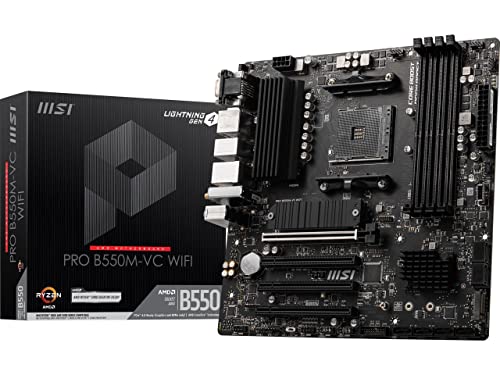
MSI's PRO B550M-VC WiFi is one of the most popular AM4 mATX boards for good reason. It packs Wi-Fi 6E, a decent VRM, and solid audio into a 9.6 x 9.6 inch footprint. The Core Boost architecture with a digital PWM IC delivers clean power to six-core and eight-core Ryzen 5000 CPUs. For a Ryzen 5 5600 or Ryzen 7 5800X, the board handles stock settings without issue. The M.2 Shield Frozr keeps a Gen4 SSD cool during sustained writes.
The inclusion of Wi-Fi 6E is the standout feature at this size. Many mATX boards stop at Wi-Fi 5 or force you to add a separate card. The PRO B550M-VC comes with an Intel AX210 module that supports the 6 GHz band. Bluetooth 5.2 is also built in. The rear I/O includes HDMI and DisplayPort, plus USB 3.2 Gen 2 Type-A and Type-C (10Gbps). The single M.2 slot means you get only one fast SSD internally, but you can add a second SATA SSD without issue.
The board cannot use Ryzen 5 3400G or Ryzen 3 3200G APUs due to BIOS limitations. That is a minor edge case, but worth noting if you are repurposing an older APU. The mATX layout also means the PCIe x1 slots are tight against the GPU—you will likely block one if you use a dual-slot graphics card. For a single-GPU build, none of those are problems.

Pros
Cons
Best for: The lowest-cost entry point into AM4 that still includes Wi-Fi and a reliable power design.
Check current price on Amazon →
The PRO-VDH is the budget sibling of the PRO B550M-VC, and the main corners cut are networking and storage expansion. You get Wi-Fi 5 (802.11ac) instead of Wi-Fi 6E, and only one M.2 slot. For a basic office PC, a light gaming build with a 60-class GPU, or a server that just needs Ethernet, the Wi-Fi 5 is still functional. The board has a Gigabit Ethernet port, which is your primary connection if you care about speed.
The VRM is the same basic 6+2 phase design that MSI uses on its lowest B550 boards, but the thickened copper PCB and 7W/mK pads keep it from overheating under a Ryzen 5 5600. The Flash BIOS Button is a lifesaver: if you buy the board with an older BIOS that does not support your new Ryzen 5000 CPU, you can update it without inserting a CPU or RAM. That alone makes it a safe choice for first-time builders.
The D-Sub port on the rear I/O is a remnant from the era of analog monitors. It will not be used by anyone with a modern display, but it does not harm anything. The board also has HDMI and DisplayPort for digital output. Audio uses the Realtek ALC892/897 codec with Audio Boost, which is adequate for gaming headsets. For the absolute cheapest way to get an AM4 motherboard with built-in Wi-Fi and Bluetooth, the PRO-VDH is the board.
Choosing an AMD motherboard comes down to matching the socket and chipset to your CPU and your upgrade intentions. The main fork in the road is between AM4 and AM5. AM5 boards use the Ryzen 7000, 8000, and 9000 series processors, require DDR5 memory, and support PCIe 5.0. AM4 boards use Ryzen 3000, 4000, and 5000 processors, accept DDR4, and top out at PCIe 4.0. If you already own a stack of DDR4 or you are building on a tighter build, AM4 is still a strong platform. If you want the fastest storage and GPU bandwidth and plan to drop in a future Ryzen 9000X3D chip, go AM5.
The voltage regulator module (VRM) converts power from your PSU into stable voltages for the CPU. A board with more phases and higher current rating per phase runs cooler and can feed more power to an overclocked high-core-count chip. For a Ryzen 5 or Ryzen 7, a board with 8+2 phases and decent heatsinks is fine. For a Ryzen 9 9950X under all-core loads, look for at least 14+2 phases with 80A stages and large finned heatsinks. The board's thermal pad quality (7W/mK is a good baseline) and whether the VRM area has a fan or is entirely passive also matter. Passive is quieter, but only if the heatsink is big enough.
AM4 boards come in B550, X570, and older B450/X470 chipsets. B550 is the sweet spot: it gives you PCIe 4.0 on the primary x16 slot and one M.2 slot, plus USB 3.2 Gen 2. X570 adds more PCIe 4.0 lanes but often requires a chipset fan that can be audible. AM5 boards come in B650, B850, X870, and X870E. B650 and B850 offer PCIe 5.0 on the GPU slot and one M.2 slot, while X870 and X870E add USB4, more Gen5 M.2 slots, and chipset fanless designs. B850 is the best balance for most AM5 builders: it costs less than X870 but still supports fast memory and multiple M.2 slots.
DDR4 speeds above 3600 MHz start to show diminishing returns on AM4, but boards that support 4400 MHz allow tight timings for overclockers. On AM5, DDR5 speeds above 6000 MHz give meaningful gains, and good boards officially support 8000+ MT/s with one DIMM per channel. The board's memory topology (daisy chain vs. T-topology) determines how well it handles two or four sticks. Four sticks at high speeds are more demanding; if you plan to populate all DIMMs, look for a board with a daisy chain layout and strong signal integrity improvements like SMT connectors.
M.2 slots are where modern motherboards differ the most. A board with only one M.2 slot limits you to a single fast SSD (plus SATA drives). Two or more slots let you run one OS drive and one game drive. PCIe 5.0 M.2 slots are still expensive but offer double the bandwidth of Gen4 for large file transfers. For most users, one Gen5 boot drive and one or two Gen4 drives for games is the ideal. Check whether each M.2 slot has a heatsink; some boards only include them on the primary slot.
Wi-Fi 6 (802.11ax) is standard on most modern boards, but Wi-Fi 6E adds the 6 GHz band for lower latency. Wi-Fi 7 (802.11be) is still emerging and offers theoretical speeds above 5 Gbps, but few home networks support it yet. On the wired side, 2.5Gb Ethernet is the new baseline. If you move large files between a NAS and your PC, 5Gb LAN (like the MSI MAG X870 Tomahawk has) is a real advantage. Bluetooth 5.2 or 5.4 is fine for wireless peripherals. Look for a board with at least one USB-C 10Gbps port on the rear I/O; USB4 is a bonus for external storage and monitors.
Pre-installed I/O shields save assembly frustration. BIOS Flashback lets you update the BIOS without a CPU installed, which is critical for AM5 boards that may ship with an older BIOS that does not support a new Ryzen 9000 chip. Tool-less M.2 clips (EZ M.2 Clip, Q-Latch) make storage installation faster. PCIe slot quick-release buttons (Q-Release Slim, PCIe EZ-Latch) make removing a heavy GPU much easier. Diagnostic LEDs (Q-Code, EZ Debug LEDs) help troubleshoot boot issues. These features cost very little but make a big difference in everyday use.
AM4 is the older socket that supports Ryzen 3000, 4000, 5000, and some 5000G series processors. It uses DDR4 memory and does not support PCIe 5.0. AM5 is the current socket for Ryzen 7000, 8000, and 9000 series CPUs. It requires DDR5 and offers PCIe 5.0 lanes for both the graphics card and M.2 drives. AM5 also supports USB4 on some chipset models.
Yes, AMD Ryzen 9000 series processors are compatible with B650, B850, X670, and X870 motherboards. You may need a BIOS update if the board was manufactured before the Ryzen 9000 launch. Most B650 boards now ship with Ryzen 9000 support out of the box, but check the product listing for a sticker or note.
B550 is the best AM4 chipset for gaming. It gives you PCIe 4.0 support for the GPU and an M.2 slot, which is enough for current graphics cards and fast storage. X570 adds more PCIe 4.0 lanes and extra connectivity, but its chipset fan can produce noise that B550 avoids.
One M.2 slot is enough for a boot drive, but two slots are strongly recommended so you can add a second high-speed drive for games or projects without using a SATA cable. If you need more than two, a board with four M.2 slots (like the ASUS ROG Strix X870E-E) is useful for content creators with large media libraries.
BIOS Flashback lets you update the motherboard's BIOS using a USB drive without any CPU, RAM, or GPU installed. It is a safety net for building on a platform that may not yet support your specific processor out of the box. It is not strictly necessary if you are buying a newer board that clearly supports your CPU, but it is a very nice convenience.
White motherboards like the ASUS ROG Strix X870-A usually require a premium over their black counterparts because the PCB coating and component selection are less common. The premium is not huge, but it is real. If you do not care about color, the same features in a black board will be slightly easier to find.
Micro-ATX boards fit in smaller cases and are usually cheaper. They have fewer expansion slots and often only one M.2 slot. Full ATX boards offer more PCIe slots, additional M.2 slots, more RAM slots (usually four instead of two), and better cooling options. Choose mATX if you want a compact build that does not need multiple GPUs or drives. Choose ATX if you want the most expandability.
The best AMD motherboard for most people right now is the MSI MAG X870 Tomahawk WiFi. It gives you everything a high-end AM5 build needs—USB4, strong VRMs, 5G LAN, Wi-Fi 7, and Audio Boost 5—without the complexity or extra cost of a flagship board. If you are building on AM4 and do not want to buy new RAM, the MSI PRO B550M-VC WiFi is the smartest pick: it packs Wi-Fi 6E into a small, well-cooled mATX board that will serve a Ryzen 5600 or 5800X well for years.
For enthusiasts who want to push a Ryzen 9 to its limits, the ASUS ROG Strix X870E-E Gaming WiFi is the board to beat. It has more power stages than any other board here, three Gen5 M.2 slots, dual USB4, and the most comprehensive overclocking toolset AMD has. And for anyone building a showpiece white PC, the ASUS ROG Strix X870-A Gaming WiFi proves you do not have to sacrifice performance for aesthetics.
Whichever direction you go, the most important step is to match the board to the CPU you intend to run right now. Buying an AM5 board with a Ryzen 5 lets you upgrade to a Ryzen 9 later; buying an AM4 board with a Ryzen 7 5800X3D today is still a fast, cost-conscious gaming machine. The 10 best AMD motherboards in 2026 cover every one of those paths.
This article contains Amazon affiliate links. We may earn a small commission on qualifying purchases at no extra cost to you.


