Physical Address
304 North Cardinal St.
Dorchester Center, MA 02124
Physical Address
304 North Cardinal St.
Dorchester Center, MA 02124

Looking for the best OLED monitors? We've tested 10 top picks from ASUS, LG, AOC, Samsung, and Alienware to find the right screen for every setup.
The first time you sit in front of a true OLED gaming panel, the contrast is physically startling. Blacks are not dark gray. They are off. The pixel simply stops emitting light. Against those true blacks, colors hit harder than any IPS or VA panel can manage, no matter how many nits the spec sheet claims. That gap is the whole reason OLED monitors command a premium, and it is a gap that does not close with time.
The market for the best OLED monitors has exploded over the past two years, and the range now spans from aggressive $369.99 QD-OLED gaming screens to $849 32-inch 4K panels that are genuinely strong contenders as creative workstations. Each of these products makes a different argument. Some prioritize outright speed (240Hz with 0.03ms response times that IPS panels cannot approach), others go for sheer resolution, and one goes sideways entirely with a 49-inch 32:9 aspect ratio that replaces two monitors.
Below are 10 OLED monitors across the full price and size spectrum, ordered from our strongest overall recommendation down through increasingly specialized picks. Whether your primary concern is competitive gaming at 1440p, color-critical creative work, or just upgrading a dual-monitor setup into one immersive screen, there is a pick here.
TL;DR: The ASUS ROG Swift PG32UCDM is our top pick, a 32-inch 4K QD-OLED running 240Hz that works equally well for gaming and creative work. The AOC Q27GAZD is the value standout at the same price as most LCD competitors. The Acer Predator X27U is the smart choice for competitive players who want maximum speed without overspending. The Alienware AW3425DW is the ultrawide to buy if you want to replace a dual-monitor setup.
| # | Product | Panel | Size | Refresh | Price | Best For |
|---|---|---|---|---|---|---|
| 1 | ASUS ROG Swift PG32UCDM | QD-OLED | 32" | 240Hz | $849.00 | Best overall, 4K gaming + creative |
| 2 | AOC Q27GAZD | QD-OLED | 27" | 240Hz | $369.99 | Best value 27" QD-OLED |
| 3 | Acer Predator X27U W1bmiipprx | QD-OLED | 26.5" | 240Hz | $369.99 | Competitive gaming, esports |
| 4 | AOC Q27GAZDV | QD-OLED | 27" | 240Hz | $379.99 | Best ergonomic stand + USB hub |
| 5 | LG 27GX704A-B | OLED (Glossy) | 27" | 240Hz | $459.99 | Glossy panel, peak brightness |
| 6 | ASUS ROG Strix XG27AQDMG | WOLED | 26.5" | 240Hz | $599.00 | Creators, burn-in protection |
| 7 | LG 27GS93QE | OLED | 27" | 240Hz | $551.76 | Proven OLED gaming performance |
| 8 | Samsung Odyssey OLED G5 G50SF | QD-OLED | 27" | 180Hz | $442.00 | Budget-tier entry into OLED |
| 9 | Alienware AW3425DW | QD-OLED | 34.2" | 240Hz | $799.99 | Ultrawide gaming, dual-monitor replacement |
| 10 | Samsung Odyssey OLED G9 G91SD | QD-OLED | 49" | 144Hz | $799.99 | Super ultrawide, multitasking powerhouse |
Prices fluctuate. Check the links for current Amazon pricing.
Choosing among the best OLED monitors requires weighing tradeoffs that the spec sheet does not resolve on its own. Here is what actually matters:

The ASUS ROG Swift PG32UCDM makes an argument that almost no other gaming monitor can match right now: 32 inches of 4K QD-OLED running at 240Hz with 0.03ms response times and 99% DCI-P3 color coverage. That combination puts it in a category of one for buyers who want to game at the top end and also do color-critical creative work on the same screen.
The 4K resolution at 32 inches puts the pixel density high enough that you are not sitting close enough to see individual pixels, but not so high that the GPU demands become unreasonable at 1440p quality settings. The QD-OLED panel delivers true 10-bit color with Delta E less than 2, which is the threshold where color inaccuracy becomes invisible to the human eye. ASUS also installs a custom heatsink and graphene film to manage OLED heat, which translates directly to better sustained brightness and reduced risk of image retention over time. The burn-in warranty covers three years including the panel itself, which is one of the stronger OLED guarantees available.
G-SYNC compatibility and the DisplayWidget Center software let you manage OLED care settings without diving into buried OSD menus. The 90W USB-C port means a laptop can be powered and displayed from a single cable. At this price level, you expect those conveniences, but it is worth noting that ASUS delivers on all of them without compromise. The one real caveat is that driving 4K at 240Hz asks a lot of a GPU. An RTX 4080 or RX 7900 XTX is the realistic minimum for gaming above 144Hz at native resolution.
Pros:
Cons:
Best for: Gamers who also do creative work, or anyone who wants a single monitor that performs at the top of both categories without compromise.
Check current price on Amazon →

The AOC Q27GAZD costs the same as many mid-range IPS gaming monitors and delivers a 27-inch QD-OLED panel with 240Hz refresh, 0.03ms response, HDR400 True Black certification, and 110.2% DCI-P3 color coverage. That price-to-panel quality ratio is genuinely difficult to argue against.
Where the AOC wins on paper, it also wins in use. The QD-OLED panel produces the kind of color saturation and contrast that IPS panels at twice the price cannot approach. HDR400 True Black is a meaningful certification on OLED because the True Black standard requires both peak brightness and deep black expression, and OLED panels hit the latter without any local dimming zones or haloing around bright elements in dark frames. G-SYNC compatibility and Adaptive-Sync support mean it works cleanly with both NVIDIA and AMD GPUs without needing a specific compatibility tier.
The trade-off AOC made at this price is connectivity breadth. You get DisplayPort and HDMI, which covers PC gaming and one console input, but the stand adjustments are more limited than the AOC Q27GAZDV listed below. If your desk setup is fixed and ergonomic fine-tuning is not a priority, the Q27GAZD is the sharper value. Console players with a PS5 should confirm HDMI 2.1 support covers their target refresh rate before committing.
Pros:
Cons:
Best for: Budget-conscious gamers who want real QD-OLED performance without paying the premium that most brands charge for the panel type.
Check current price on Amazon →

The Acer Predator X27U is a 26.5-inch QD-OLED built around the things that matter to competitive players: 240Hz refresh with 0.03ms gray-to-gray response, DCI-P3 99% color accuracy, and AMD FreeSync Premium to kill screen tearing when frame rates drop below the panel's ceiling. It is also the monitor on this list that most aggressively targets the esports tournament aesthetic, with a ZeroFrame bezel design that removes visual interruptions from the edges of the display.
At 26.5 inches, the X27U sits in a size that tournament organizers have leaned toward for years. It is close enough to fill your peripheral vision without requiring exaggerated mouse movements across screen edges. The QD-OLED substrate delivers HDR10 with Delta E less than 2 color accuracy, so the colors you see in-game are rendered correctly. That matters less in a pure first-person shooter context and more in games with complex environmental storytelling where color grading is part of the visual design.
The stand handles tilt, height adjustment, pivot, and swivel, which is the complete set and something not every monitor at this price includes. Two DisplayPort 1.4 and two HDMI 2.1 inputs give you enough connectivity for a dual-source setup. The image retention refresh feature runs automatically, protecting the OLED substrate during extended play sessions. Priced identically to the AOC Q27GAZD, the choice between them comes down to size preference and whether you need dual DP inputs or a stronger HDR certification.
Pros:
Cons:
Best for: Competitive gamers who want the speed benefits of OLED without the cost of stepping up to LG or ASUS premium tiers.
Check current price on Amazon →
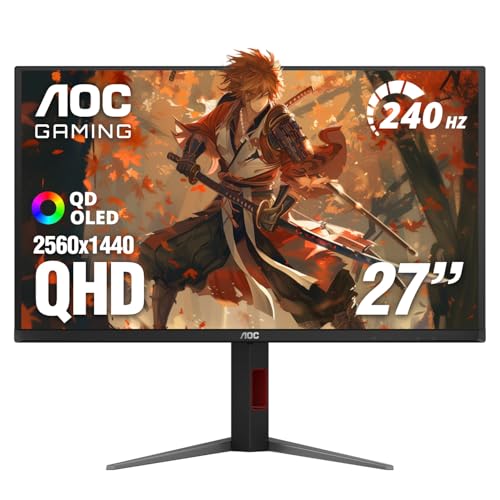
The AOC Q27GAZDV is the upgraded sibling of the Q27GAZD, sharing the same 27-inch QD-OLED panel at 240Hz and 0.03ms, but adding meaningful quality-of-life hardware: a height-adjustable, tilt, swivel, and pivot stand, a USB 3.2 hub built into the display, and a slight bump in asking price. For a desk with multiple peripherals plugged into a single monitor, the hub alone eliminates a USB-A splitter.
The panel specifications mirror the Q27GAZD almost exactly: 147% sRGB, 110% DCI-P3, HDR True Black, G-SYNC Compatible, Adaptive-Sync. The resolution is 2560×1440 at 27 inches, which gives a pixel density comfortable for long-session work alongside gaming. HDMI 2.1 is present for high-refresh console gaming. Flicker-free technology reduces eye strain over extended sessions, and VESA compatibility means you can migrate it to an arm or wall mount later.
The practical argument for choosing this over the Q27GAZD is straightforward: if your workstation already has a monitor arm, you gain nothing from the upgraded stand, and the Q27GAZD is the smarter value. If you work off the included stand and plug in multiple peripherals, the Q27GAZDV earns its premium in convenience immediately.
Pros:
Cons:
Best for: Desktop users who want to keep cable clutter minimal and need full stand adjustability for long work-and-game sessions.
Check current price on Amazon →

The LG 27GX704A-B is the only monitor in this roundup offering a glossy OLED finish, and that difference is not subtle. In a light-controlled environment, the absence of the anti-glare coating means colors and contrast appear richer and more saturated than on any matte OLED panel. LG rates it at 275 nits sustained with a 1,300-nit peak, and the glossy panel transmits that brightness without diffusion. The effect is the closest thing available to viewing an emissive display in a dark cinema.
VESA DisplayHDR True Black 400 certification and a 1.5 million to 1 contrast ratio back up the visual claims with industry-standard measurements. The color coverage reaches 98.5% DCI-P3. LG holds three UL certifications here simultaneously: Anti-Glare, Flicker-Free, and Low Blue Light, which sounds contradictory for a glossy screen until you understand that the anti-glare certification is measured differently from the coating type. The screen does reduce reflections through other means, but it will not handle a window directly behind your head the way a matte screen would.
Connectivity is strong for mixed desktop and console use: dual HDMI 2.1 ports, DisplayPort 1.4, and USB 3.2 ports upstream and downstream. NVIDIA G-SYNC Compatible and AMD FreeSync Premium Pro are both certified. The stand adjusts for swivel, tilt, height, and pivot. LG's on-screen OLED Care settings run automatic pixel refresh cycles during standby, and the Hexagon lighting on the back adds some visual personality without being garish. For a dark gaming room, this is arguably the best-looking panel on this list in raw perceptual terms.
Pros:
Cons:
Best for: Gamers with a light-controlled setup who want the most visually dramatic OLED experience possible at the 27-inch 1440p size.
Check current price on Amazon →

The ASUS ROG Strix XG27AQDMG is built on a third-generation WOLED panel, which is a different substrate from the QD-OLED panels in the Acer, AOC, and Samsung monitors. WOLED adds a white sub-pixel alongside the standard RGB arrangement, producing brighter full-screen white windows and noticeably sharper text rendering for desktop applications. If you spend eight hours a day reading documents and then game at night, WOLED is the more comfortable daily-use panel type.
The practical proof of that argument is in the feature list ASUS has built around it. A custom heatsink and advanced airflow design are integrated into the chassis specifically to manage OLED heat and reduce burn-in risk. ROG-exclusive OLED Anti-flicker technology addresses the flicker that standard OLED panels produce when refresh rates drop below peak. The optional uniform brightness setting locks luminance levels across the screen for more consistent color grading conditions. ASUS bundles three years of warranty coverage that explicitly includes burn-in, which is the single most consumer-friendly commitment on this list.
The cost of the WOLED approach relative to QD-OLED panels at the same resolution is real. The 99% DCI-P3 coverage is competitive, but the color volume at peak brightness does not match what QD-OLED manages. For color-critical professional work, the QD-OLED panels in the ASUS ROG Swift PG32UCDM or the Alienware ultrawide are stronger. For a mixed gaming and desktop workflow where text clarity and eye comfort matter, the ROG Strix makes a convincing case at this price.
Pros:
Cons:
Best for: Creative professionals who game and want a single 27-inch monitor that handles text-heavy work, color grading, and high-refresh gaming without compromise.
Check current price on Amazon →

The LG 27GS93QE predates the 27GX704A-B by about a year and carries a similar spec sheet: 27-inch QHD OLED, 240Hz, 0.03ms, DisplayHDR True Black 400, NVIDIA G-SYNC Compatible, AMD FreeSync Premium Pro, HDMI 2.1, and DisplayPort 1.4. The differences are in the surface details.
The 27GS93QE uses an anti-glare matte finish rather than the glossy panel in the 27GX704A-B. Its stand adjusts for height, tilt, and pivot. LG's OLED Care features run pixel refresh cycles during standby and offer game modes including FPS and RTS presets. The 98.5% DCI-P3 coverage and 1.5M:1 contrast ratio are carried over from the newer model. The sustained brightness is lower, and the panel generation is older, but the fundamental OLED performance is still substantially better than any IPS or VA panel at this resolution.
The reason to consider the 27GS93QE over the 27GX704A-B is price. If the newer model is priced meaningfully higher when you look, the 27GS93QE delivers the same core OLED experience on a matte screen that many buyers prefer for ambient light tolerance. It is the sensible choice for anyone who does not specifically want the glossy panel and finds the newer LG hard to justify at its current price point.
Pros:
Cons:
Best for: Buyers who want a brand-name LG OLED with matte coating and full adaptive sync certification at a somewhat lower cost than the newest panel.
Check current price on Amazon →

The Samsung Odyssey OLED G5 runs at 180Hz rather than 240Hz, and that single spec difference is the reason it sits here rather than further up the list. For the jump from IPS to OLED, 180Hz is still faster than the human visual system can fully resolve in most game contexts, and the QD-OLED panel underneath is the same class of technology as everything else on this list. The color accuracy is Pantone Validated, which is not a claim that any of the gaming-positioned panels above bother to make.
Samsung's OLED Safeguard includes a Thermal Modulation System that actively manages brightness based on predicted surface temperature, reducing heat buildup and burn-in risk as a byproduct. The Glare Free technology is Samsung's own anti-reflective treatment that sits between a standard matte coating and a fully glossy surface in terms of reflection handling. Auto Source Switch Plus allows automatic input switching when a second connected device wakes up, which is convenient in a shared console and PC configuration.
The G5 is the right choice for someone stepping into OLED gaming for the first time and not wanting to spend the full premium for 240Hz. The panel quality is real. The 180Hz ceiling is the actual limitation. If you game at competitive frame rates in fast-paced titles where the difference between 180 and 240Hz is tactile, this is not the monitor to settle for. If you primarily play RPGs, strategy games, or story-driven titles, the color and contrast advantages matter more than the 60Hz refresh rate difference.
Pros:
Cons:
Best for: OLED first-timers who prioritize color quality and panel longevity over maximum refresh rate, especially for single-player or strategy game libraries.
Check current price on Amazon →

The Alienware AW3425DW is a 34.2-inch WQHD (3440×1440) QD-OLED curved panel running at 240Hz with an 1800R curve. That combination resolves the core tension in ultrawide monitors: you want the width for immersion and peripheral coverage, but older ultrawide IPS and VA panels introduced compromises on color uniformity and contrast that made them feel like a step backward in image quality despite the size advantage. A QD-OLED ultrawide has none of those compromises.
The 1800R curve is well-matched to a 34-inch screen at typical desktop viewing distances, drawing the edges of the display into natural focus without requiring exaggerated head movement. The DCI-P3 99.3% coverage and Delta E less than 2 accuracy put it in professional color territory for the creative work that benefits from the wider canvas. VESA DisplayHDR TrueBlack 400 and 1,000 nits peak HDR brightness are legitimate certifications that place it above the entry-level HDR monitors that dominate this price range.
Adaptive sync covers all three major standards: NVIDIA G-SYNC Compatible, AMD FreeSync Premium Pro, and VESA AdaptiveSync. That means regardless of GPU vendor, adaptive sync works. The GPU requirements to run 3440×1440 at 240Hz are substantial but more manageable than 4K at the same frame rate. The Alienware brand history with OLED panels is good, and the AW3425DW is the best OLED monitor for someone who wants to permanently consolidate a dual 27-inch setup into one screen.
Pros:
Cons:
Best for: Gamers who want to replace two monitors with one immersive ultrawide panel and play titles with native 21:9 aspect ratio support.
Check current price on Amazon →

The Samsung Odyssey OLED G9 is a 49-inch Dual QHD (5120×1440) QD-OLED curved panel, and it is the most extreme product in this category by a significant margin. Two 27-inch QHD monitors placed side by side produce an identical horizontal resolution. The G9 replaces both of them with a single OLED panel, infinite contrast ratio, and no bezel interruption in the center. The 32:9 aspect ratio is not for everyone, but for the buyer who genuinely uses two monitors simultaneously and wants OLED quality across both, no other product on this list competes.
The 144Hz refresh rate is lower than the 240Hz panels above, which reflects the engineering reality of driving a 5120-wide panel at OLED speeds. At 144Hz, the G9 still substantially outpaces most IPS panels sold in the 100 to 165Hz range that dominated the market before QD-OLED became accessible. G-Sync compatibility, AMD FreeSync Premium Pro, and Samsung's full OLED protection suite (Thermal Modulation, Logo and Taskbar Detection for static element brightness reduction, and an automatic screen saver after ten minutes of inactivity) are present.
Picture-in-Picture allows a secondary source to share screen space without an external display. At 49 inches, the monitor weighs 28.4 pounds and requires a desk deep enough to sit at a comfortable viewing distance. The 1,800R curve is essential at this width; without it, the edges of a flat 49-inch screen would sit meaningfully farther from your eyes than the center and cause visible distortion. This is a workstation-scale purchase that changes how you use a desk, not a monitor upgrade.
Pros:
Cons:
Best for: Power users who run two simultaneous workflows or want to replace a dual-monitor setup with one seamless QD-OLED screen and can accommodate the physical footprint.
Check current price on Amazon →
The OLED panel type solves contrast in a way that no other display technology does. Once you understand the few real trade-offs of OLED, picking the right model becomes a question of size, resolution, and use case rather than panel quality.
QD-OLED uses a blue OLED light source and quantum dot color conversion to produce wider color gamuts and higher color volume than standard white OLED. Most of the monitors on this list use QD-OLED. WOLED, used in the ASUS ROG Strix, adds a white sub-pixel to the standard OLED array, producing brighter full-white windows and crisper text rendering for document and productivity work. The choice between them matters most if you split time between heavy reading and gaming. For pure gaming, QD-OLED has the stronger color case. For mixed productivity and gaming, WOLED is easier on the eyes during long text sessions.
The dominant format in this price tier is 27-inch 1440p (2560×1440), which delivers roughly 109 pixels per inch, a sharp and comfortable density for gaming at 60 to 100cm viewing distance. The 32-inch 4K option (the ASUS ROG Swift) doubles the pixel count and requires proportionally more GPU power to run at 240Hz. The 34-inch ultrawide and 49-inch super ultrawide are in their own category and require desk space, GPU budget, and game library compatibility with wider aspect ratios.
| Size and Resolution | Typical PPI | GPU Requirement for 240Hz |
|---|---|---|
| 27" 1440p | 109 ppi | RTX 4070 Ti / RX 7900 XT tier |
| 32" 4K | 138 ppi | RTX 4080 / RX 7900 XTX tier |
| 34" WQHD Ultrawide | 109 ppi | RTX 4070 Ti / RX 7900 XT tier |
| 49" 5120×1440 | 109 ppi | RTX 4080 at 144Hz target |
OLED burn-in is real but manageable. Static interface elements left on screen for extended periods, like desktop taskbars, game HUDs, or static logos, can cause permanent image retention. Every monitor on this list includes pixel shift and some form of automatic pixel refresh. The more capable implementations, like Samsung's Logo and Taskbar Detection and ASUS's graphene film thermal management, actively reduce the brightness of static elements in real time. If you primarily game with varied, dynamic content, the risk is low. If you use the monitor as a productivity display for eight or more hours a day with a visible taskbar, choose a model with the most comprehensive OLED care features.
240Hz with 0.03ms gray-to-gray is the standard across nine of the ten monitors on this list. The Samsung Odyssey G5 runs 180Hz. In competitive gaming titles where reaction time differences of single frames matter, 240Hz provides a measurable edge over 144Hz IPS panels. The response time advantage of OLED over IPS is also real: 0.03ms produces no visible motion blur or ghosting at 240Hz, where an IPS panel rated at 1ms or faster can still exhibit visible trailing on fast-moving objects. The 180Hz ceiling on the G5 is still excellent for most gaming, but it concedes ground in twitch-response titles.
HDMI 2.1 is the threshold for high-refresh console gaming. The PS5 and Xbox Series X both output up to 4K/120Hz or 1440p/120Hz through HDMI 2.1. On monitors that lack HDMI 2.1, those consoles are limited to 60Hz at their target resolution. Every monitor on this list should be checked for HDMI 2.1 spec confirmation before purchasing for console use, as some list HDMI without specifying the version clearly. DisplayPort 1.4 is the standard for PC gaming and handles 1440p at 240Hz or 4K at 240Hz without issues.
For contrast and HDR performance, yes, unequivocally. True blacks on an OLED panel are not achievable on IPS through any local dimming configuration. The response time advantage is also real. The trade-off is burn-in risk for static content, and the price premium. For pure gaming on a varied content library, OLED delivers an experience IPS cannot replicate at any price.
Burn-in is possible if static elements remain on screen for extended periods over months or years. Every modern OLED gaming monitor includes mitigation features including pixel shift, automatic pixel refresh cycles, and brightness reduction on detected static content. Gamers who play varied titles with dynamic content are at lower risk than people who use the monitor as an all-day productivity display with a fixed desktop environment.
Yes, with the right HDMI version. Consoles need HDMI 2.1 to run at 120Hz or higher at 1440p and above. Confirm HDMI 2.1 support on the specific model before purchasing. Most of the 27-inch QD-OLED panels on this list include HDMI 2.1, but always verify in the spec sheet.
240Hz is the current competitive standard. The perceptual difference between 144Hz and 240Hz is real in fast-paced titles and measurable in reaction time studies. The difference between 240Hz and 360Hz is smaller and meaningful only at the highest levels of play. For casual to mid-level competitive gaming, 240Hz on an OLED panel represents a significant step up from 144Hz IPS without diminishing returns.
Enable the monitor's built-in pixel shift and static element brightness reduction. Avoid leaving a fixed desktop interface or game HUD on screen for hours without use. Run the pixel refresh cycle during shutdowns, which most OLED monitors now do automatically. Use a screensaver or automatic sleep. With consistent habits, the risk over a 3 to 5 year ownership period is low for gaming-primary use.
1440p at 27 inches is the current performance sweet spot: sharp enough to look excellent on an OLED panel, and within the GPU budget of mainstream high-end cards. 4K on a 32-inch OLED is the premium option that demands a top-tier GPU to run at 240Hz, but delivers the sharpest desktop and gaming image available. The right choice depends on your GPU tier and whether the resolution improvement over 1440p is perceptible at your viewing distance.
Standard OLED uses white emitters filtered through a color array. QD-OLED uses blue OLED emitters combined with quantum dot color conversion to produce light directly, resulting in wider color gamut, higher color volume, and generally more saturated output. Most of the monitors on this list use QD-OLED. The LG 27GX704A-B uses LG's own OLED substrate, which in this generation is also close to QD-OLED in color performance.
If there is one screen worth putting at the center of your setup, the ASUS ROG Swift PG32UCDM makes the strongest case for the best OLED monitor overall: 32 inches, 4K, 240Hz, QD-OLED, with a burn-in warranty that backs up what ASUS claims about thermal management. For most buyers stepping into OLED gaming for the first time, the AOC Q27GAZD at $369.99 delivers QD-OLED panel quality at a price that was unimaginable two years ago. The Acer Predator X27U is the competitive gaming alternative at the same price point with a full stand and dual display inputs.
For anyone who games on an ultrawide or wants to consolidate two displays into one panel, the Alienware AW3425DW is the clearest choice in the 34-inch curved category, and the Samsung Odyssey G9 is for power users who have the desk and GPU to support 49 inches of continuous OLED canvas. The best OLED monitors span a wide range of prices and formats in 2026, which means the question is less "is OLED worth it" and more "which OLED fits my desk."
If you are genuinely undecided between two similarly-specified panels, prioritize the one with stronger burn-in protection features and the longer explicit warranty coverage. The panel technology is mature enough that build quality and long-term support now differentiate the strong picks from the rest.
This article contains Amazon affiliate links. We may earn a small commission on qualifying purchases at no extra cost to you.


