Physical Address
304 North Cardinal St.
Dorchester Center, MA 02124
Physical Address
304 North Cardinal St.
Dorchester Center, MA 02124

Find the 7 best mini LED monitors for gaming and creative work in 2026. We compare top picks from AOC, KTC, and INNOCN to help you choose the perfect display.
You know the frustration. You’re deep into a game and a dark cave looks like a washed-out gray mess. Or you’re editing a night scene and the blacks are crushed into a flat smudge. Standard IPS and VA panels have been fighting that battle for years. Mini LED backlighting changes the calculus by packing hundreds of tiny LEDs into independent dimming zones, giving you OLED-like black levels and searing HDR highlights without the burn-in risk. These are the best mini LED monitors you can buy in 2026, and they cover every budget and use case from competitive esports to color-critical creative work.
TL;DR: The AOC Q27G3XMN is our top pick for most gamers: 336 dimming zones and HDR1000 at a price that undercuts rivals. The KTC M27T6S edges ahead with 200Hz overclocking and a full ergonomic stand. The KTC Dual Mode is the one for players who want both 4K and high-speed 1080p. The INNOCN 32” 4K is the best choice for creative professionals who need a big, color-accurate canvas.
| # | Product | Size & Resolution | Refresh Rate | HDR Certification | Price |
|---|---|---|---|---|---|
| 1 | AOC Q27G3XMN | 27" QHD (2560×1440) | 180Hz (OC) | HDR1000 | $299.99 |
| 2 | KTC M27T6S | 27" QHD (2560×1440) | 200Hz (OC 210Hz) | HDR1000 | $349.99 |
| 3 | KTC 27" Dual Mode | 27" 4K/1080p switchable | 160Hz 4K / 320Hz 1080p | HDR1400 | $449.98 |
| 4 | INNOCN 32" 4K | 32" 4K (3840×2160) | 160Hz | HDR1000 | $499.99 |
| 5 | KTC M27T6 White | 27" QHD (2560×1440) | 180Hz | HDR1400 | $349.99 |
| 6 | AOC Q27G40XMN Renewed | 27" QHD (2560×1440) | 180Hz | HDR1000 | $199.00 |
| 7 | KTC Mini LED 27" Renewed | 27" QHD (2560×1440) | 180Hz | HDR1400 | $184.79 |
Prices and availability change in real time.

The AOC Q27G3XMN has been a staple in the mini LED conversation for a reason. It uses a VA panel with 336 local dimming zones, which sounds modest next to some 1152-zone competitors, but the VA panel’s native high contrast ratio means blooming is less noticeable than on an IPS panel with the same zone count. The result is a convincingly deep black level for a monitor that costs $300.
The 180Hz overclocked refresh rate (via DisplayPort 1.4) and 1ms GtG response time make it a legitimate option for competitive shooters. Colors out of the box are vivid thanks to the claimed 134% sRGB coverage, and the VESA DisplayHDR 1000 certification delivers bright, punchy highlights. The three-year zero-bright-dot warranty adds peace of mind.
The downside: only one HDMI 2.0 port (limited to 144Hz), no USB-C, and the stand offers tilt only. You will likely want to invest in a monitor arm or an aftermarket stand for a more ergonomic setup.
Pros
Cons
Best for: Gamers on a budget who want genuine HDR and smooth 1440p performance without breaking $300.
Check current price on Amazon →

The KTC M27T6S feels like a direct answer to the AOC: it takes a similar 27-inch QHD formula and improves on the parts people complain about. You get a full ergonomic stand with tilt, swivel, pivot, and height adjustment. The refresh rate overclocks to 210Hz from the base 200Hz, and the Fast IPS panel keeps motion clarity sharp with a 1ms MPRT response time.
Where this monitor really stands out is the dimming zone count. KTC packs 1152 zones into this panel, which means notably better local dimming control than the AOC. Blooming is reduced, and small bright details against dark backgrounds look tighter. The HDR1000 certification gives it the same peak brightness, so highlights pop equally. The 157% sRGB color gamut area and 1.07 billion colors add to the visual punch.
The panel is Fast IPS, which means excellent viewing angles and faster pixel response than VA, but native contrast is lower. In a dark room, you will see some IPS glow, though the mini LED backlight helps bring contrast back up. The built-in speakers are thin, but that is typical for monitors.
Pros
Cons
Best for: Gamers who want a smooth, high-refresh 1440p panel with strong HDR and a proper stand, and who prefer fast IPS motion over VA contrast.
Check current price on Amazon →
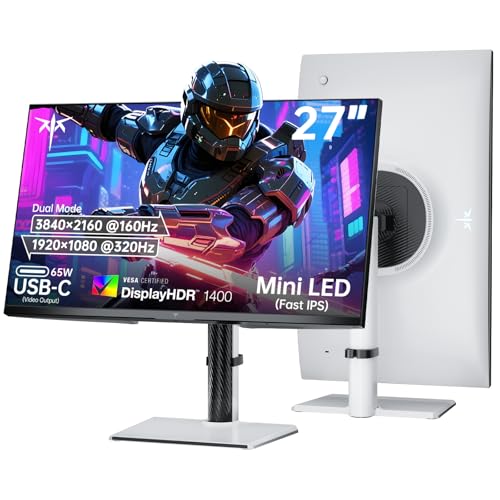
The KTC Dual Mode monitor is the most versatile pick in this roundup. It can run at a crisp 4K 160Hz for single-player immersion and then switch to 1080p 320Hz for competitive overdrive. That second mode is legitimate — 320Hz at 1080p with negligible motion blur makes a real difference in fast-paced shooters. The switching is straightforward, and the Fast IPS panel keeps up at both resolutions.
HDR performance is excellent. The monitor is rated HDR1400 with 1152 dimming zones, which puts it in the premium tier alongside monitors costing much more. Bright highlights are genuinely dazzling, and the deep blacks hold up well for an IPS panel thanks to the fine-grained zone control. The 145% sRGB color gamut and 1.07 billion colors ensure content looks vibrant across the board.
Connectivity is strong: two HDMI 2.1 ports (full 48Gbps), DisplayPort 1.4, and a USB-C port that delivers 65W power delivery. That means you can run a laptop on a single cable while using the monitor as a hub. The stand is fully adjustable (height, tilt, swivel, pivot), and the white finish stands out if your setup leans that way.
The only real trade-off is price. At $450, it is the second most expensive monitor here, and some people may not need both high-refresh 1080p and 4K. But if you play both sprawling RPGs and competitive shooters, this monitor replaces two separate displays.
Pros
Cons
Best for: Enthusiasts who play both graphically demanding single-player games and competitive shooters, and want one monitor to do it all.
Check current price on Amazon →

The INNOCN 32” is built for people who care about color as much as frame rate. It uses an IPS panel with a staggering 2304 dimming zones (the most in this list) and hits HDR1000. The zone count means blooming is almost invisible in real-world use, making it a strong alternative to an OLED for creative work like photo editing or video color grading.
Color accuracy is the headline here. Factory calibration with a report, 99% DCI-P3 and Adobe RGB coverage, and a delta E of under 2 out of the box. This is the only monitor in the roundup that you could confidently use for print proofing or client work without pulling out a calibrator. The 4K 160Hz combination is also excellent for gaming on a larger screen if you have the GPU to drive it.
Connectivity is generous: two HDMI 2.1 ports (full 48Gbps), DisplayPort 1.4, and USB-C with 65W power delivery. The stand offers height, tilt, swivel, and pivot adjustments. The built-in 5W stereo speakers are better than most monitor speakers, enough for desktop audio without external speakers.
The obvious catch is the price: $500 makes it the most expensive monitor here. And 32" at 4K means you need a powerful graphics card to push 160Hz in modern games. The 160Hz refresh is adequate but not class-leading for competitive play, though the dual-mode option from KTC is cheaper.
Pros
Cons
Best for: Creative professionals who need accurate color and also want to game, or anyone who wants a large 4K display with premium HDR.
Check current price on Amazon →

The KTC M27T6 is almost a mirror of our second pick, but with a few differences. It also uses 1152 dimming zones, but here they are paired with a VA panel and HDR1400 certification instead of the M27T6S’s IPS panel and HDR1000. The VA panel gives it deeper native blacks, which, combined with the dense zone array, produces some of the most convincing black levels in this list.
The refresh rate is 180Hz (no overclock to 210Hz), and the response time is 1ms GTG. For most players that is plenty. The color gamut is not quite as wide as the M27T6S (it covers 99% sRGB, and the product info doesn't mention a specific figure for P3), but the DeltaE under 2 calibration means it is still color-accurate.
The white chassis is the obvious visual differentiator. It looks clean in a bright setup. The stand is fully adjustable (height, pivot, swivel, tilt), and the bezels are thin. Connectivity includes two HDMI 2.0 ports (limited to 144Hz) and one DisplayPort 1.4 (full 180Hz), plus a USB 2.0 port for firmware updates or peripheral charging.
The limitation is the HDMI 2.0 ports, which cap at 144Hz. If you plan to connect a console that can push 120Hz at 1440p, that is fine, but a PC gamer using HDMI will miss the full 180Hz.
Pros
Cons
Best for: Gamers who prefer VA contrast and want a white monitor that looks great on a desk, with the option to use a VESA arm.
Check current price on Amazon →

If you want the mini LED experience but cannot swing the $300 for the Q27G3XMN, this renewed AOC offering cuts the price by a third while keeping the same core specs: 27-inch QHD, 180Hz, 1ms response time, and VESA DisplayHDR 1000. The main difference is that this is a renewed unit — Amazon Renewed certified, which means it is inspected and tested to work like new with a warranty.
The panel is likely the same Mini LED technology as the newer Q27G40XMN model, which promises "stunning clarity, vibrant colors, and richer contrast" with Mini LED. It includes Adaptive Sync for tear-free gaming. The stand is basic (tilt only), but at $200 you can put the savings toward a monitor arm.
The risk is that renewed products carry less certainty; the backlight may have minor uniformity issues or cosmetic blemishes. But for a mini LED monitor under $200, this is the cheapest way into the category.
Pros
Cons
Best for: Budget-conscious gamers who need a high-refresh, HDR-capable monitor and are comfortable with a certified renewed product.
Check current price on Amazon →

The renewed KTC monitor ($185) is the cheapest way to get a KTC mini LED on your desk, and it comes with a standout feature: HDR1400 certification and 1152 dimming zones. That is the same zone count and HDR rating as KTC’s new monitors, but at nearly half the price. The 2K QHD resolution, 180Hz refresh rate, and 1ms response time put it in line with our main picks.
The panel uses HVA technology (a VA variant from a major panel maker), which combines high contrast with fast response. The quantum dot layer pushes color coverage to 148% sRGB and 118% DCI-P3, which is impressive for any monitor, let alone a budget one. The white chassis matches the M27T6.
Being a renewed unit, you trade some consistency for the price. The condition is "Renewed" and sold by a third-party vendor (B2B RENEW). Still, the specs alone make it compelling for anyone willing to roll the dice.
Pros
Cons
Best for: Anyone who wants the highest HDR brightness and zone count for the lowest possible cost, and does not mind buying renewed.
Check current price on Amazon →
Mini LED monitors vary widely in zone count, panel type, and HDR performance. Here are the factors that separate the good from the great.
The number of local dimming zones determines how precisely the backlight can adjust brightness across the display. A monitor with 336 zones, like the AOC Q27G3XMN, can still show blooming around bright objects on a black background. Jump to 1152 zones, as on most KTC monitors, and blooming shrinks dramatically. The INNOCN 32” uses 2304 zones and nearly eliminates it. More zones cost more, and they require better firmware to avoid distracting flicker. A good rule: 1152 zones is the sweet spot for gaming; 2304 is best for HDR movies and creative work.
VESA DisplayHDR 1000 means the monitor can peak at 1000 nits, which is enough for convincing HDR. HDR1400 goes brighter and maintains light output over larger areas, giving you more punch in bright scenes. For a typical room, HDR1000 is sufficient. If you have a bright room or want every specular highlight to shine, spring for HDR1400. Certification is not just marketing: it guarantees minimums, though some unlisted monitors claim similar numbers without testing.
1440p at 180Hz is the sweet spot for PC gamers. 4K at 160Hz is demanding but glorious for single-player games. The dual-mode KTC gives you both, but you pay for it. 1080p at 320Hz is genuinely useful for competitive shooters, but only if you have the reflexes to notice. For most players, a stable 180Hz at 1440p with good local dimming is the best return on investment.
VA panels (used in AOC Q27G3XMN and KTC M27T6) have higher native contrast, so they need fewer dimming zones to achieve a convincing black level. IPS panels (KTC M27T6S, Dual Mode, INNOCN) offer faster pixel response and better viewing angles, but rely heavily on the dimming zones to produce blacks. In a dark room, a VA mini LED will look deeper; in a bright room, the IPS mini LED will retain color accuracy from more angles. Choose VA for contrast, IPS for speed and color.
If you do creative work, look for factory calibration (delta E under 2) and wide DCI-P3 coverage. The INNOCN 32” is the only monitor here to cover 99% DCI-P3 and Adobe RGB, making it suitable for print and video. The KTC monitors with quantum dot (the renewed model, and the M27T6) also offer wide gamut, though they lack factory reports. For pure gaming, sRGB coverage above 130% is more than adequate.
Height adjustment is the single most important ergonomic feature. The AOC Q27G3XMN and both renewed models lack it, forcing you to buy a stand or arm. USB-C with power delivery (65W on the KTC Dual Mode and INNOCN) simplifies laptop setups. HDMI 2.1 is essential for 4K 120Hz on PS5 or Xbox Series X. The KTC M27T6 and both renewed monitors only have HDMI 2.0, which caps at 144Hz at 1440p, still fine for consoles.
A mini LED monitor uses thousands of tiny LEDs (compared to the larger LEDs in traditional LCD backlights) arranged in an array of independently dimmable zones. This allows the monitor to dim areas of the screen that should be dark while keeping bright areas bright, dramatically improving contrast and HDR performance compared to standard edge-lit or fully backlit LCDs.
For a convincing HDR experience on a 27-inch monitor, 336 zones is the minimum you should consider. At 1152 zones you get much less blooming and finer control. At 2304 zones the local dimming approaches OLED quality. Below 336 zones, blooming becomes distracting in dark room viewing.
Mini LED can get brighter than most OLEDs (1000 to 1400 nits vs 800 to 1000 nits for a typical OLED), which makes HDR highlights more intense. Mini LED also has no burn-in risk, so it is better for mixed use with static UI elements. However, OLED has perfect black levels and zero blooming. If you play in a dark room and value contrast above all, OLED wins. If you need peak brightness, no burn-in worry, and a lower price, mini LED is the better choice.
Yes, but only if it has good factory calibration and wide color gamut. The INNOCN 32” is the best here for creative work. The KTC monitors with quantum dot can also be calibrated, but you will need a hardware calibrator to get them to full accuracy. Most gaming-focused mini LED monitors oversaturate colors, which looks exciting in games but is not trustworthy for editing.
HDR1000 means the monitor can maintain at least 1000 nits peak brightness across a sustained area. HDR1400 certifies 1400 nits peak. In practice, HDR1000 is already very bright; HDR1400 adds extra headroom for specular highlights like sun reflections or explosions. The difference is noticeable in side-by-side comparison, but either is a huge step up from a standard 300-400 nit display.
For PC gaming at 1440p 180Hz, DisplayPort 1.4 is sufficient. For 4K at 120Hz or higher on PS5 or Xbox Series X, you need HDMI 2.1. The KTC Dual Mode and INNOCN 32” both have HDMI 2.1. Monitors with only HDMI 2.0 are fine for 1440p 144Hz (or 1080p 180Hz) and console gaming at 60Hz.
Yes, especially if you play HDR titles. The high brightness and local dimming bring out details in dark scenes that standard monitors crush. Look for HDMI 2.1 to get 4K 120Hz on Xbox Series X and PS5. The KTC Dual Mode is excellent for consoles because you can switch to 1080p 240Hz for competitive titles that support higher frame rates.
The mini LED category has matured to the point where you do not have to spend flagship money to get genuine HDR and high refresh rates. For most people, the AOC Q27G3XMN remains the smartest buy at $300: it does the basics right with a solid zone count, 180Hz, and HDR1000. If you want a better stand and more zones, the KTC M27T6S is worth the extra $50.
The KTC Dual Mode is the most impressive piece of hardware here, giving you two monitors in one chassis for $450. Creatives should zero in on the INNOCN 32” 4K with its class-leading 2304 zones and factory calibration. And if your budget is tight, the renewed AOC or KTC models deliver surprising HDR performance for under $200.
Buy the monitor that matches how you actually use your screen. If you bounce between spreadsheets and shooters, prioritize zones and a good stand. If you edit video at night, go for the INNOCN. The best mini LED monitor is the one that solves your specific set of trade-offs.
This article contains Amazon affiliate links. We may earn a small commission on qualifying purchases at no extra cost to you.


