Physical Address
304 North Cardinal St.
Dorchester Center, MA 02124
Physical Address
304 North Cardinal St.
Dorchester Center, MA 02124

Find the best smart thermostat for your home in our in-depth guide. We cover 10 top models from Google Nest, ecobee, Honeywell, and more to help you stay comfortable and save energy.
You walk through the front door after a long day. The house is either a sauna or an icebox. You fumble with the wall unit, wait for it to catch up, and promise yourself you’ll remember to adjust it before leaving next time. You won’t. That’s the promise a smart thermostat is supposed to keep: your home, always the temperature you want, without you having to think about it. But with a dozen models on the market, each tied to a different voice assistant and each with its own wiring quirks, picking the right one can feel like a chore.
The Best Smart Thermostats in 2026 range from simple Wi-Fi replacements that just work to feature-packed hubs that learn your schedule, sense room occupancy, and integrate with every smart home platform. We’ve sorted through the lineup to find the ten that matter. Some are the most popular picks for a reason. Others are sleeper hits for specific situations. Below you’ll find the Google Nest for general-use reliability, ecobee’s advanced models for multi-room control, Honeywell’s colorful touchscreens for those who want style and substance, Amazon’s entry-level option for Alexa households, and Sensi’s DIY-friendly choices for renters and homeowners alike. Whatever your system, voice assistant, or comfort level with a screwdriver, one of these will fit.
TL;DR: The Google Nest Thermostat is the most popular all-rounder: no C-wire needed for most homes, works with Google Assistant and Alexa, and has a clean minimalist design. The ecobee Smart Thermostat Enhanced is the feature king: built in radar occupancy, supports all three major voice assistants, and works with room sensors for whole-home balance. The Amazon Smart Thermostat is the Alexa-only option that prioritizes simplicity and deep integration with the Alexa ecosystem.
| # | Product | Voice Assistants | C-Wire | Best for |
|---|---|---|---|---|
| 1 | Google Nest Thermostat Charcoal | Google Assistant, Alexa, Matter | Not required (most homes) | Best all-round smart thermostat |
| 2 | ecobee Smart Thermostat Enhanced | Siri, Alexa, Google Assistant | Power Extender Kit included | Best for advanced features and room sensors |
| 3 | Honeywell Home RTH9600WF | Alexa, Google Assistant, Cortana | Required | Best for customizable color touchscreen |
| 4 | ecobee Smart Thermostat Essential | Siri, Alexa, Google Assistant | Not required with PEK (sold separately) | Best entry-level ecobee |
| 5 | Amazon Smart Thermostat | Alexa | Required | Best for Alexa-only households |
| 6 | Honeywell Home RTH9585WF | Alexa, Google Home | Required | Best for traditional Honeywell feel |
| 7 | Emerson Sensi ST55 | Alexa, Google Assistant | Not required (most systems) | Best DIY installation experience |
| 8 | Sensi Lite ST25 Black | Alexa, Google Assistant | Not required (most systems), required for heat pump | Best budget simple control |
| 9 | Honeywell Home T5 RTH8800WF | Alexa, Google Assistant | Required | Best for geofencing and scheduling flexibility |
| 10 | Google Nest Thermostat Fog | Google Assistant, Alexa, Matter | Not required (most homes) | Same as Charcoal, different color |
Choosing a smart thermostat comes down to a handful of real-world decisions. Here are the factors we used to evaluate every model.

Pros
Cons
Best for: Homeowners who want a reliable, no-surprises smart thermostat that works with Google Assistant and Alexa and doesn't require rewiring.
Check current price on Amazon →
The Google Nest Thermostat in Charcoal is the thermostat most people end up buying, and for good reason. It’s the most popular model in its category, and it hits the sweet spot of affordability and capability. The design is a departure from Nest’s earlier Learning Thermostat: instead of a rotating ring and metal finish, this one uses a smooth plastic body with a mirrored display and a touch-sensitive strip on the right side. It looks modern without shouting for attention.
Installation is straightforward for anyone comfortable with basic home wiring. The Nest Thermostat is designed to work without a C-wire in most homes, which removes a huge barrier for older houses where the common wire is missing. If your system does need one (heating-only, cooling-only, or heat pump setups), you’ll need to check compatibility first, but the majority of users will be fine. The Google Home app guides you through step by step.
What you get after setup is a thermostat that learns your schedule and turns itself down when you leave. The HVAC monitoring feature is a nice bonus: it watches for signs of trouble in your heating and cooling system and sends you an alert if something seems off, along with maintenance reminders like filter changes. The Savings Finder scans your usage patterns and suggests adjustments you might not have thought of. It’s not a learning thermostat in the way the old Nest Learning Thermostat was, but for most people it’s more than enough.
The biggest trade-off is the input method. The display is not a touchscreen; you swipe and tap on the right side of the bezel to change temperature or navigate menus. It works fine, but it feels less immediate than a fully touch-based interface. And if you use Apple HomeKit, you’re out of luck. For everyone else, this is the one to beat.

Pros
Cons
Best for: Households with uneven temperatures between rooms, where one person is always too hot while another is freezing.
Check current price on Amazon →
The ecobee Smart Thermostat Enhanced is the thermostat that takes the “smart” part most seriously. Where many thermostats just follow a schedule or check your phone’s location, this one uses a built-in radar sensor to detect when someone is in the room. It preheats or precools before you walk through the door, and it adjusts based on which rooms are occupied if you add SmartSensors (sold separately). Combined with its support for all three major voice assistants, this is the most flexible smart thermostat on the list.
The hardware itself is solid. The display is a glossy black touchscreen that shows temperature, humidity, and system status. It’s slightly larger than the Nest, and the white wall plate stands out if your walls are not perfectly flat. But the real value is inside: the Enhanced model supports up to 2 heat/2 cool conventional systems and 3 heat/2 cool heat pumps, which covers nearly all residential setups. And if your home lacks a C-wire, ecobee includes the Power Extender Kit (PEK) in the box, so you don’t have to buy anything extra.
The ecobee app is well-regarded for its clarity. You can set schedules, monitor energy usage, and create comfort settings that apply only to certain times of day or certain sensors. The thermostat also learns your preferred temperature at different times and adjusts automatically. It’s not quite a full learning algorithm like the old Nest, but the combination of occupancy sensing and scheduling means you rarely have to touch the thermostat.
The catch is that the room sensor magic costs extra. A 2-pack of SmartSensors runs about $80, but they’re worth it if you have a two-story house or a bedroom that is always a few degrees off. Without them, the thermostat works fine but loses some of its edge. For most homes, the Enhanced is overkill. For those with temperature disparities, it’s a lifesaver.

Pros
Cons
Best for: Anyone who wants a thermostat that doubles as a nightstand-style weather display and matches their wall color.
Check current price on Amazon →
The Honeywell Home RTH9600WF is for the person who walks into a room and notices the thermostat clashes with the paint. This model lets you choose any color for the screen background, so you can match it to your wall or just pick your favorite shade. It’s a small thing that makes a surprisingly big difference in how the device feels on your wall.
Beyond the color gimmick, the display is genuinely informative. The home screen shows the indoor temperature and humidity, the outdoor temperature and humidity, and a daily weather forecast (pulled from the internet). You can tap into more detailed views without diving through menus. The touchscreen is responsive and bright, with good contrast even in direct sunlight.
Under the hood, the RTH9600WF is a seven-day programmable thermostat with remote control via the Honeywell Home app. It works with most forced air, hot water, steam, and heat pump systems, but it does require a C-wire. That’s the main limiter: if your home doesn’t have one, you’ll need to buy a power adapter or run a new wire. There’s no skip here, unlike ecobee’s included PEK or Nest’s C-wire-free design.
The app is functional but not as polished as Nest’s or ecobee’s. Scheduling is straightforward, and the monthly energy reports are a nice touch, but you don’t get geofencing or occupancy sensing. The RTH9600WF is a traditional smart thermostat with a very nice screen. That’s its strength and its weakness.

Pros
Cons
Best for: First-time smart thermostat buyers who want the ecobee ecosystem without paying for features they might not need.
Check current price on Amazon →
The ecobee Smart Thermostat Essential is a more recent addition to the lineup, positioned below the Enhanced model but still offering many of the same benefits. It has a smaller square touchscreen and a lower profile than its bigger sibling, and it lacks the built-in radar occupancy sensor. That means it relies on your manually set schedule or on the ecobee app’s preheat/precool logic rather than knowing when you’re actually home.
But for someone who just wants reliable programming and voice control across all platforms, the Essential is a smart choice. It supports the same SmartSensors as the Enhanced, so you can add room-by-room monitoring later. The scheduling is flexible, and the energy reports and tips are identical to what you’d get on the more expensive model. The C-wire situation is the same: the PEK is available but sold separately, so check your wiring before buying.
The trade-off is in the equipment coverage. The Essential handles 2-stage conventional systems and 2-stage heat pumps, but not 3-stage heat pumps or dual fuel setups. If you have a more complex system, you’ll need the Enhanced. For most single-family homes with standard forced air, the Essential is plenty. It’s the sensible way to get into the ecobee family without overspending.

Pros
Cons
Best for: Households already invested in Amazon’s smart home ecosystem, with Echo devices throughout the house.
Check current price on Amazon →
The Amazon Smart Thermostat is the most platform-specific option on this list, and that’s by design. If you live in an Alexa house with multiple Echos, a Ring doorbell, and Alexa routines, this thermostat feels like a natural extension. You can say “Alexa, set the living room to 72 degrees” and it just works. You can create routines that trigger the thermostat when you arm your Ring alarm or when a certain Echo detects you’re leaving.
The hardware is simple: a white square with a small LCD screen that shows the current temperature and a few icons. There’s no touchscreen; you control it primarily through the Alexa app or your voice. The installation process is handled entirely within the Alexa app, which shows you step-by-step instructions and even guides you through wiring. It’s the easiest app-based setup we’ve seen, assuming you have a C-wire.
One underrated aspect: Amazon partnered with Honeywell Home to build this thermostat, so the underlying hardware is based on technology that Honeywell has been refining for decades. It’s reliable, and the thermostat communicates via Wi-Fi using both 2.4GHz and 5GHz bands. The downside is that if you ever switch to Google Home or Apple HomeKit, this thermostat becomes a dumb brick. But if you’re all-in on Alexa, it’s a seamless fit.

Pros
Cons
Best for: Homeowners replacing an old Honeywell thermostat who want a familiar look with smart features.
Check current price on Amazon →
The Honeywell Home RTH9585WF1004 is a very close match to the RTH9600WF above, but it’s an earlier model with a few differences. The display is a color touchscreen, but it doesn’t let you pick any color you want; you get a fixed palette. It shows indoor temperature and humidity, but not the outdoor forecast or weather. For many people, that’s fine. The essential smart features are all present: Wi-Fi control, seven-day programming, and support for Alexa and Google Assistant.
Where this thermostat shines is its familiarity. The on-screen menus are similar to what Honeywell has used for years on their non-smart models, so anyone who has ever used a Honeywell thermostat will feel right at home. The touchscreen is responsive and large enough to read across the room. It also supports fan control modes (On, Auto, and Circulate), which is a nice touch for air circulation without constant fan noise.
The C-wire requirement is the same as the RTH9600. If you’re in an older home without one, you’ll need to purchase a power adapter kit. The app experience is solid but not flashy. This is a workhorse thermostat for people who just want it to work without fuss.

Pros
Cons
Best for: Renters or DIY enthusiasts who want a quick, straightforward swap that doesn’t require a common wire.
Check current price on Amazon →
The Emerson Sensi ST55 takes the opposite approach from the flashy Honeywell models. It looks like a traditional thermostat: a white rectangular body with a small monochrome screen and four physical buttons. That’s intentional. Sensi was designed to make the transition from a non-smart thermostat as painless as possible. The built-in spirit level helps you mount it straight, and the app walks you through each wire connection. Most people can install this in under 30 minutes.
The killer feature for older homes is that this thermostat does not require a C-wire in most systems. Sensi uses a power-stealing technology that works with many forced air, heat pump, and boiler setups. Check compatibility, but for 80% of homes, you can skip the common wire entirely. That alone makes the ST55 a strong candidate for anyone who doesn’t want to deal with wiring.
The feature set is lean: flexible scheduling, remote control from the app, usage reports, and maintenance alerts. There’s no geofencing, but you can manually set a home/away schedule. The app is clean and responsive, and Sensi has a strict privacy policy that says they won’t sell your personal data. If you just want to control your thermostat from your phone without the frills, the ST55 is a reliable choice.

Pros
Cons
Best for: Budget-conscious buyers who want a reliable smart thermostat and appreciate Sensi’s user-friendly app.
Check current price on Amazon →
The Sensi Lite ST25 is the pared-down sibling of the ST55. It’s smaller, lighter, and loses a couple of features, but retains the core smart functionality: Wi-Fi control, flexible scheduling, geofencing via the app, and ENERGY STAR certification. The physical buttons are still there, and the display shows temperature and system status in a clear but small font.
The main distinction from the ST55 is that the ST25 requires a C-wire for heat pump and heat/cool only systems. For standard forced air systems (gas, oil, electric) it often works without one. If you have a boiler or a heat pump, check compatibility before ordering. The installation is still easy, and the Sensi app is one of the best in the space: intuitive, with clear instructions and a nice design.
This thermostat lacks the maintenance alerts and usage reports of the ST55, but it does include geofencing, which is a feature that many pricier models charge extra for. The geofencing works by using your phone’s location to automatically switch to an away mode when you leave. It’s simple and effective. If you want to spend as little as possible on a smart thermostat and still get remote control and scheduling, the ST25 is a solid pick.
Pros
Cons
Best for: People who want location-based temperature control without paying for a premium thermostat.
Check current price on Amazon →
The Honeywell Home T5 RTH8800WF is a mid-range thermostat that puts geofencing front and center. Instead of forcing you to program a rigid schedule, you can let your phone’s GPS handle it. When the last person leaves the geofence, the thermostat switches to an away mode. When the first person returns, it reverts to your preferred comfort temperature. It works reliably over time, and you can still set a regular schedule if you prefer.
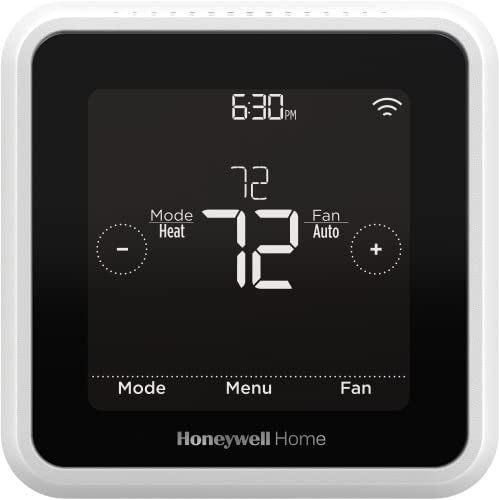
The hardware is a bit conservative: a rectangular body with a small monochrome LCD screen and soft-touch buttons. It’s not pretty, but it’s functional. The display shows temperature, humidity, system status, and a simple menu. The touchscreen in the Honeywell RTH9585 or RTH9600 is definitely nicer, but the T5 focuses on function over form.
Energy reports come monthly and show how much heating and cooling you’ve used, with tips on how to improve. The scheduling is flexible enough to handle shift workers or irregular routines. But like most Honeywell models, the T5 requires a C-wire, which limits its appeal for older homes. If you have the wiring, and you want geofencing without the price of an ecobee, the T5 delivers.

Pros
Cons
Best for: Anyone who likes the Google Nest Thermostat but wants a color that matches a light gray or off-white wall.
Check current price on Amazon →
The Google Nest Thermostat in Fog is exactly the same thermostat as the Charcoal version we covered first, just in a different color. The Fog finish is a light, muted beige-gray that disappears into pale walls and looks more like a piece of modern design than a white plastic rectangle. If you have warm-toned interior paint, the Fog color is likely a better match than the darker Charcoal.
Performance and features are identical: easy installation without a C-wire in most homes, capacitive touch control, HVAC monitoring, Savings Finder, and compatibility with Google Assistant and Alexa. The Nest Thermostat remains a top pick for its balance of simplicity, reliability, and smart features. The Fog version gives you one more aesthetic option.
Choosing a smart thermostat comes down to understanding your home’s wiring, your preferred voice assistant, and the features you actually use. Every model on this list will save energy compared to a non-programmable thermostat, but the right one for you depends on a few key factors.
Not all smart thermostats work with all heating and cooling systems. Most modern units work with conventional forced air (gas, oil, electric), heat pumps, and boilers. But some have limits: the ecobee Essential handles only 2-stage conventional and 2-stage heat pumps, while the Enhanced model covers 3-stage heat pumps and dual fuel setups. If you have a heat pump with electric backup or a zoned system (two separate thermostats for upstairs and downstairs), check the compatibility chart before buying. Some thermostats, like the Google Nest, include a compatibility checker on the company website.
The C-wire, or common wire, supplies constant power to the thermostat. Many older homes (and some newer ones) lack this wire. If your current thermostat has only two wires (typically red and white), you probably don’t have a C-wire. Some thermostats, like the Google Nest and the Emerson Sensi, can work without a C-wire by stealing power from the system. Others, like the Honeywell models and the Amazon Smart Thermostat, require a C-wire. A few come with a Power Extender Kit (ecobee Enhanced includes it; ecobee Essential sells it separately). If you don’t want to open your furnace to run a new wire, choose a model that doesn’t require a C-wire, or be prepared to buy an adapter.
Every smart thermostat on this list works with Alexa and Google Assistant, with two exceptions: the Amazon Smart Thermostat works only with Alexa, and the ecobee models also support Siri and HomeKit. If you live in an Apple HomeKit household, ecobee is your only option. If you use Google Assistant, the Nest Thermostat offers the tightest integration, including the ability to adjust the thermostat when you say “Hey Google, set the temperature to 70.” For Alexa diehards, the Amazon Smart Thermostat gives you deep integration with the Alexa app and Alexa+ routines.
The basic smart thermostat follows a simple schedule you set in the app. More advanced models use geofencing (your phone’s location) to automatically switch between home and away modes. The best ones incorporate occupancy sensors to detect when someone is physically in the house. The ecobee Enhanced uses built-in radar to preheat or precool before you arrive and to know when you’ve left. The Honeywell T5 relies on geofencing but not occupancy. If you have irregular hours, geofencing is a huge convenience. If you want true temperature balancing across rooms, you need a thermostat that supports remote sensors (ecobee and some Honeywell models, but not Google Nest).
Some people love a big color touchscreen that shows the weather forecast and can be customized to match the wall (Honeywell RTH9600). Others prefer a minimalist approach where the thermostat is just a white dot on the wall and all control happens via voice or phone (Google Nest or Amazon Smart Thermostat). Physical buttons can be easier to use in the dark than a touchscreen, but a touchscreen is more modern. Consider where your thermostat is located: if it’s in a hallway where you’ll glance at it daily, a nicer display has more value. If it’s in a basement utility room, you might never look at it.
All models on this list are ENERGY STAR certified, which means they meet efficiency standards. Some go further with monthly energy reports that show you how much energy you used and suggest ways to cut back. The ecobee and Honeywell models offer detailed reports; the Sensi and Nest offer lighter reporting. These reports can be genuinely helpful in identifying wasteful patterns, but they are not essential for basic savings.
Many smart thermostats require a C-wire (common wire) to power the unit. But some models, like the Google Nest Thermostat and the Emerson Sensi ST55, can work without one in most systems. If you don’t have a C-wire, check the thermostat’s specs carefully. The ecobee Enhanced includes a Power Extender Kit that can create a virtual C-wire, while others require you to buy an adapter.
Most smart thermostats are designed for DIY installation. The key is to verify that your system is compatible and that you have the right wiring. The Sensi and Amazon Smart Thermostat offer excellent app-based guides that walk you through every step. If you’re comfortable turning off your furnace and connecting a few wires, you can likely install any of these in under an hour.
The ecobee Smart Thermostat Essential and Enhanced both work with Amazon Alexa, Google Assistant, and Apple HomeKit (Siri). The Google Nest Thermostat works with Google Assistant and Alexa, but not with Siri. The Amazon Smart Thermostat only works with Alexa. If you need all three, ecobee is your best bet.
Yes, but the savings depend on how you use them. A smart thermostat can automatically turn down the temperature when you’re away or asleep, which reduces energy consumption. The ENERGY STAR certification indicates that the model meets efficiency standards. On average, ENERGY STAR certified thermostats save households about 8 to 16 percent on heating and cooling costs, roughly $50 per year. The ecobee models claim savings of up to 26 percent when used with features like scheduled away mode.
The ecobee Essential is the entry-level model with a smaller touchscreen, no built-in occupancy sensor, and limited compatibility with complex HVAC systems (2-stage conventional, 2-stage heat pump). The Enhanced model has a larger display, built-in radar occupancy sensing, supports 3-stage heat pumps and dual fuel, and includes a Power Extender Kit in the box.
Yes, but you need a thermostat that supports heat pump systems, including auxiliary heat staging. The Google Nest Thermostat, ecobee Enhanced, Honeywell RTH9600, and both Sensi models all work with heat pumps. The ecobee Essential works with 2-stage heat pumps, but not 3-stage. Always run a compatibility check on the manufacturer’s website before buying.
The Sensi and ecobee apps are widely regarded as the most intuitive and well-designed. The Google Home app is also good if you’re already using it for other devices. Honeywell’s app is functional but less polished. The Amazon Smart Thermostat is controlled entirely through the Alexa app, which is excellent if you live in an Alexa household.
The smart thermostat market has matured to the point where every model on this list is good enough for most people. But a few stand out. The Google Nest Thermostat remains the safest bet: it works without a C-wire in most homes, integrates with the two biggest voice platforms, and has a clean design that looks modern without being flashy. If you want the absolute best features, the ecobee Smart Thermostat Enhanced is the clear winner, with radar occupancy, room sensor support, and compatibility with all three voice assistants. For Alexa-only homes, the Amazon Smart Thermostat is a seamless choice that feels like a native part of the ecosystem.
If you need to avoid a C-wire, go with the Google Nest or the Emerson Sensi ST55. If you want a beautiful color display, the Honeywell RTH9600WF is the one. If you’re on a tight budget and just need basic remote control, the Sensi Lite ST25 delivers.
The best smart thermostat for you is the one that fits your wiring, works with your voice assistant, and has the features you’ll actually use. Every model here is ENERGY STAR certified and comes from a reputable brand. Pick the one that matches your home’s physical setup, and you’ll wonder how you ever lived without it.
This article contains Amazon affiliate links. We may earn a small commission on qualifying purchases at no extra cost to you.


