Physical Address
304 North Cardinal St.
Dorchester Center, MA 02124
Physical Address
304 North Cardinal St.
Dorchester Center, MA 02124

Find the best gaming desktop for your setup in 2026. Our roundup covers 10 top pre-built PCs from Skytech, Alienware, MSI, and more across every performance tier.
You have picked out the monitor, clicked through the peripherals, and settled on your game library. Now comes the hard part: the box in the middle. A pre-built gaming desktop has to balance component choices that actually work together, cooling that doesn't quit three hours into a session, and a chassis that doesn't feel like a toy. The market is flooded with builds that look great on paper but skimp on the power supply or RAM speeds in ways that show up right when you need them most.
These ten machines cover the real spread. There is the do-everything all-rounder that most people should buy, the no-compromise Intel brute for those who want the highest frame rates, the entry-level rig that actually runs modern games, and a couple of wildcards for storage hoarders and RGB fanatics. No two picks serve the same buyer, and that is the point. Here are the best gaming desktops you can buy right now.
TL;DR: The Skytech Gaming Azure 3 is the one most people should buy: a perfect balance of CPU, GPU, cooling, and memory for 1440p gaming. The MSI Codex Z2 doubles the storage and keeps the same GPU for a step up in capacity. The Alienware Aurora (RTX 5070) brings Dell's service and a 1000W Platinum PSU to the table. The Thermaltake LCGS View i570 is for Intel loyalists who want the i9-14900KF. And the YAWYORE R5 5600GT gets you in the door without breaking the bank.
| # | Product | CPU | GPU | RAM | Storage | Best For |
|---|---|---|---|---|---|---|
| 1 | Skytech Gaming Azure 3 | AMD Ryzen 7 7700X (5.4GHz) | NVIDIA RTX 5070 12GB | 32GB DDR5-6000 | 1TB Gen4 NVMe | The best all-rounder for 1440p gaming |
| 2 | MSI Codex Z2 | AMD Ryzen 7 8700F (5.0GHz) | NVIDIA RTX 5070 | 32GB DDR5 | 2TB NVMe | The storage-heavy alternative to the Skytech |
| 3 | Alienware Aurora ACT1250 (1000W) | Intel Core Ultra 7 265F | NVIDIA RTX 5070 | 32GB DDR5 | 1TB SSD | Premium build with Dell onsite service |
| 4 | Thermaltake LCGS View i570-170 | Intel Core i9-14900KF | NVIDIA RTX 5070 | 32GB DDR5-6000 | 1TB NVMe | Intel performance with liquid cooling |
| 5 | The Horizon Autherium Dragon | Intel Core i9 (5.4GHz OC) | NVIDIA RTX 5070 OC 12GB | 64GB DDR5 | 2TB NVMe + 8TB HDD | Extreme storage and RAM capacity |
| 6 | ZOTAC MEK | AMD Ryzen 7 9700X (5.5GHz) | NVIDIA RTX 5060 Ti 16GB | 32GB DDR5-6000 | 1TB NVMe | Great for content creation + gaming |
| 7 | CyberPowerPC Gamer Master | AMD Ryzen 7 8700F (4.1GHz) | NVIDIA RTX 5060 Ti 8GB | 16GB DDR5 | 1TB PCIe 4.0 | A solid entry into RTX 5000 series |
| 8 | Alienware Aurora ACT1250 (Air Cooled) | Intel Core Ultra 7 265F | NVIDIA RTX 5060 Ti | 16GB DDR5 | 1TB SSD | Alienware build quality at a lower spec |
| 9 | YAWYORE Ryzen 7 5700X | AMD Ryzen 7 5700X (4.6GHz) | NVIDIA RTX 5060 8GB | 32GB DDR4 | 1TB NVMe | 1080p gaming with a last-gen CPU |
| 10 | YAWYORE R5 5600GT | AMD Ryzen 5 5600GT (4.6GHz) | Integrated Radeon Vega | 16GB DDR4 | 1TB NVMe | Ultra-budget entry for esports and light gaming |

Pros
Cons
Best for: Gamers who want a turnkey 1440p machine with excellent cooling and a modern platform that will last for years.
Check current price on Amazon →
The Skytech Azure 3 nails the ingredients that matter most. The Ryzen 7 7700X is one of the best all-around gaming CPUs right now, and paired with the RTX 5070 you can push high frame rates at 1440p in demanding titles like Cyberpunk 2077 or Black Myth: Wukong. The 32GB of DDR5-6000 is both fast and enough to keep a browser with twenty tabs open while you game.
The cooling is where Skytech stands out. The 360mm AIO is overkill for the 7700X, which means the system runs quiet and the CPU never throttles even during long sessions. The 850W ATX 3.0 power supply uses the new 12VHPWR connector natively, which is a nice touch for future GPU upgrades. The case is the Skytech Azure—a white tempered glass mid-tower with three ARGB fans in front and one in the rear. It looks sharp on a desk, though the glossy white surface does show fingerprints.
The only real drawbacks are connectivity and peripherals. Wi-Fi 5 is a generation behind; if you have a Wi-Fi 6 router, you will want to use Ethernet or a USB adapter. And the free keyboard and mouse are the kind of low-cost accessories you will upgrade within a month. But for the core components and the build quality, the Azure 3 is the best-rounded pre-built in this roundup.
Pros
Cons
Best for: Gamers who need a lot of local storage and want the same GPU as the top pick, with a well-ventilated air-cooled setup.
Check current price on Amazon →
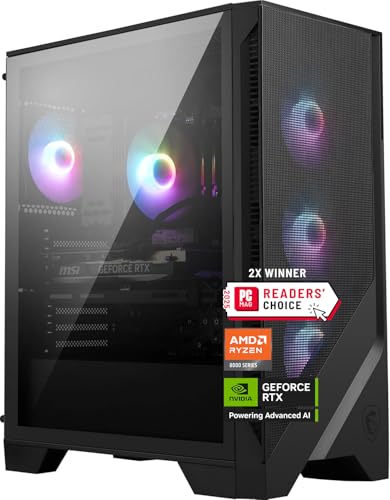
The MSI Codex Z2 matches the Skytech on the GPU and RAM but swaps the liquid cooler for a simple air cooler and doubles the storage. The 2TB NVMe drive is a real win if you install a dozen modern games—Call of Duty: Black Ops 6 alone eats over 200GB. You will not have to shuffle installs as often.
The Ryzen 7 8700F is a solid chip, though not quite as fast as the 7700X in single-threaded workloads. In practice you will not notice the difference in games. The four-fan cooling setup does a decent job, but under prolonged heavy load the CPU cooler can get a bit noisy. If you tend to play in short sessions, it is fine. For marathon weekends, the Skytech's AIO is quieter.
MSI includes the front-panel USB-C that is still missing from many cheaper pre-builts. The case itself is understated—black mesh front, a small MSI logo, and a side panel that is not tempered glass. It looks professional but won't win any decor awards. The Codex Z2 is a no-nonsense performer with the storage many gamers actually need.
Pros
Cons
Best for: Buyers who want the security of Dell's onsite warranty and a system that runs reliably for years with top-tier power delivery.
Check current price on Amazon →
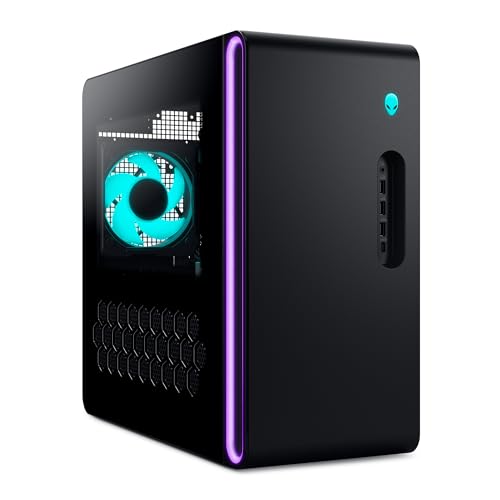
The Alienware Aurora has been a fixture in the pre-built space for good reason: the build quality is excellent, and Dell's support is a genuine differentiator. The 1000W Platinum PSU is overbuilt for the current components, but that means zero worry about power draw spikes from the RTX 5070, and plenty of headroom if you drop in a more demanding GPU down the line.
The Intel Core Ultra 7 265F is part of Intel's new architecture. It handles games and multitasking smoothly. The RTX 5070 performs identically to the ones in the Skytech and MSI builds. The real selling point is the service: if something goes wrong, Dell sends someone to your home. That peace of mind is worth something, especially for less technical buyers.
The Aurora chassis is a love-it-or-hate-it design. The clear side panel shows off the stadium lighting ring, which you can customize through Alienware Command Center. The downside is that the internal layout uses a custom motherboard and a front-mounted PSU, making standard ATX upgrades more awkward than in a typical tower. If you plan to keep the system stock, it is great. If you like tinkering, look elsewhere.

Pros
Cons
Best for: Gamers who prioritize raw CPU performance for high-FPS esports titles or CPU-heavy simulations.
Check current price on Amazon →
The Thermaltake LCGS View i570 is the Intel alternative to the AMD-based systems. The Core i9-14900KF is a beast in games like Counter-Strike 2 and Rainbow Six Siege where clock speed matters most. It also crushes productivity tasks like video encoding and 3D rendering.
The 240mm AIO is adequate but not luxurious for a CPU that can pull over 250W. In a well-ventilated room the system stays stable, but if you run all-core workloads for extended periods, the fans will ramp up noticeably. A 360mm AIO would have been safer. The RTX 5070 is the same capable card found in other builds, so gaming performance is on par.
The case is the Thermaltake View 170 TG, a mid-tower with a tempered glass front panel and a filtered PSU shroud. The vertical side-mount radiator position is a clever space saver. The system feels solidly constructed, with Thermaltake's own ToughRAM RGB memory and a clean cable management layout. This build is for people who want the absolute fastest Intel chip in a pre-built without building it themselves.

Pros
Cons
Best for: Gamers who hoard entire Steam libraries, run virtual machines, or do video editing and need massive storage and RAM without compromise.
Check current price on Amazon →
The Horizon Autherium Dragon is the most over-the-top system in this roundup, and that is exactly its appeal. The 64GB of RAM and 10TB of storage are stats that make other pre-builts look modest. The Core i9 is factory overclocked, and the RTX 5070 comes with a factory OC profile, so performance out of the box is slightly better than stock.
Build quality is impressive for a smaller integrator. The 360mm AIO keeps the CPU cool, and eight fans (including the GPU fans and PSU fan) move a lot of air. The case has a dragon emblem on the front panel and software-controlled ARGB lighting. It is not subtle.
The weakness is the HDD. An 8TB 7200RPM drive is fine for storing media and backup files, but installing a modern game on it will result in longer load times and potential texture pop-in in open-world titles. You want to keep games on the NVMe drive. Otherwise, the system delivers everything it promises. If you never want to think about storage again, this is the one.

Pros
Cons
Best for: Gamers and creators who need more VRAM than the standard 8GB cards offer, and want a unique case with a built-in status display.
Check current price on Amazon →
ZOTAC's MEK line focuses on a smaller footprint without sacrificing too much power. The Ryzen 7 9700X is a fast AM5 chip, and the 16GB version of the RTX 5060 Ti is rare in pre-builts—most manufacturers ship the 8GB variant. The extra VRAM helps in titles that like to fill memory, like Hogwarts Legacy with high-resolution textures, and it is a boon for 3D modeling or video editing.
The cooling solution is particularly good: a 360mm AIO with a motor that runs quietly even at higher pump speeds. The three 120mm RGB fans in the front pull air through the magnetic dust filter, and the rear exhaust keeps airflow balanced. The digital display on the front panel shows CPU and GPU temperatures, which is a nice touch for monitoring without software overlay.
Gaming performance is solid at 1440p, though you will get lower frame rates than the RTX 5070 builds in this list. If your priority is a system that does both gaming and content creation, the 16GB VRAM buffer gives you flexibility. The case is a compact, seamless tempered glass design that fits on smaller desks.
Pros
Cons
Best for: First-time desktop buyers who want a current-gen GPU and CPU combination without spending extra on RAM and storage they can upgrade later.
Check current price on Amazon →
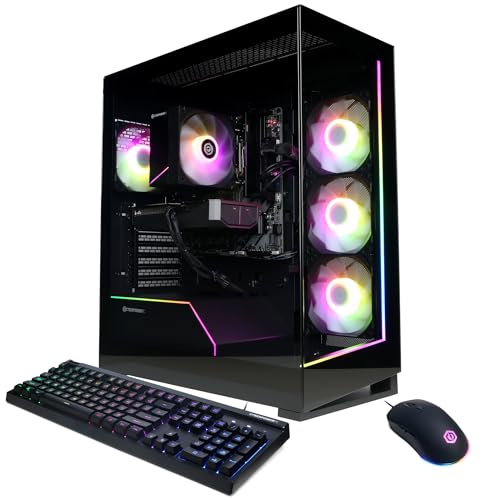
CyberPowerPC is one of the largest system integrators, and the Gamer Master is their entry-level offering with the new RTX 5000 series. The Ryzen 7 8700F is a surprisingly capable chip for the tier, and the RTX 5060 Ti handles 1080p max settings in most games and dips its toes into 1440p with some compromises.
The RAM situation is the weakest point. 16GB is enough for most games today, but you will find yourself closing background apps for demanding titles. The good news is that the B850 chipset motherboard has two open DDR5 slots, so a future upgrade to 32GB is simple. The 1TB SSD is PCIe 4.0 and plenty fast.
The build quality is typical CyberPowerPC: functional cable management, a tempered glass side panel, and RGB fans that you can control via the motherboard software. The included peripherals are basic. This system is a solid foundation that you can improve over time. It earns its spot for buyers who want to get into the RTX 5000 generation at the lowest possible entry point.

Pros
Cons
Best for: Gamers who want the Alienware brand and service but are comfortable with a mid-range GPU and plan to stick with 1080p gaming.
Check current price on Amazon →
This Alienware Aurora carries the same premium chassis and Dell support as the RTX 5070 version, but drops the GPU to the RTX 5060 Ti and the PSU to 500W. The result is a system that looks the part but does not have the performance headroom of its bigger sibling.
The Intel Core Ultra 7 265F is still a fast CPU, and the RTX 5060 Ti handles modern games at 1080p high settings without breaking a sweat. At 1440p you will need to lower settings in demanding titles. The air cooler is adequate for this CPU but will spin up more audibly under load compared to liquid-cooled alternatives.
The 500W Platinum PSU is efficient but leaves almost no room for a GPU upgrade—the RTX 5060 Ti draws around 150W, and a future card could easily exceed that. The single 16GB stick of DDR5 (likely one DIMM) limits memory bandwidth; upgrading to a second stick would improve performance. This system is for the buyer who values the Alienware aesthetics and support above raw specs.

Pros
Cons
Best for: Budget-conscious gamers who want a discrete GPU and 32GB RAM on a last-gen platform that still delivers good 1080p performance.
Check current price on Amazon →
The YAWYORE Ryzen 7 5700X build occupies a tricky middle ground. The CPU is on the AM4 platform, which is at the end of its life, but the 5700X is still a fast 8-core chip. The RTX 5060 is the most affordable RTX 5000 series card, and paired with 32GB of DDR4 RAM and a 1TB NVMe, the system can handle any game at 1080p.
The motherboard is an MSI B550M-A Pro, which is a reliable budget board. The RTX 5060 includes DLSS 4 and ray tracing, though you will need upscaling to hit high frame rates with ray tracing enabled. The 650W 80+ Bronze PSU is sufficient for these components but not particularly efficient.
The case uses shock-absorbing foam in shipping, which is thoughtful. Once unpacked, the build looks standard: a black mid-tower with a glass panel and RGB fans. The YAWYORE brand is not a household name, so service warranty is something to verify. For the components inside, this is a competent 1080p machine that leaves room to upgrade the GPU down the line.

Pros
Cons
Best for: Someone who needs a full desktop for school or work, wants to play light games like Fortnite and Valorant at 1080p, and plans to add a dedicated GPU later.
Check current price on Amazon →
The YAWYORE R5 5600GT is the only system in this roundup without a dedicated graphics card, and that places it in a completely different category. The integrated Radeon Vega graphics in the 5600GT are surprisingly capable for an APU—you can run CS2 at 1080p low settings and get playable frame rates, and League of Legends runs smoothly at medium.
The system includes a 550W Bronze PSU, which is enough to add a low-power GPU later. The case has five ARGB fans plus the CPU cooler fan, so airflow is excellent. The 16GB of DDR4 is fine for this class of machine.
This is not a gaming desktop in the traditional sense. It is an entry-level PC that happens to run light games well. If your gaming diet consists of esports and older titles, it works. For modern AAA games, you will need to add a GPU. The beauty is that you can buy this now, save up, and drop in an RTX 4060 or similar later without changing anything else.
Buying a pre-built gaming desktop means trading off component choices that affect performance for years. Here are the factors that actually matter.
The CPU dictates the upgrade path more than anything else. Modern options fall into two sockets: AMD's AM5 (Ryzen 7000/8000/9000 series) and Intel's LGA1700 (12th-14th Gen) or the new LGA1851 for Core Ultra 200-series. AM5 supports DDR5 and will receive new CPUs for at least two more years. LGA1700 is a dead end for upgrades—any new Intel CPU will require a new motherboard. For future-proofing, AM5 systems are preferred. The Skytech Azure 3 and ZOTAC MEK use AM5. The Alienware Aurora uses Intel Core Ultra 7 on LGA1851, which is new and should support at least one more generation.
The GPU is the most important component for gaming. The RTX 5070 is the sweet spot for 1440p high-refresh gaming. The RTX 5060 Ti is capable but better suited to 1080p or lighter 1440p. The RTX 5060 is firmly a 1080p card. The VRAM amount matters: 8GB is acceptable for now, but 12GB or 16GB gives more headroom for texture-heavy games and future releases. For integrated graphics, consider only for esports or if you plan to add a GPU later.
16GB is the minimum for a modern gaming PC. 32GB is the sweet spot—it lets you keep Discord, Chrome, and game overlays open without stuttering. DDR5 is faster than DDR4 and helps CPU-bound games, especially with Ryzen processors that benefit from fast memory. Pay attention to whether the RAM is dual-channel (two sticks) or single-channel (one stick). Single-channel 16GB performs worse than dual-channel 16GB.
An NVMe SSD is non-negotiable. All the systems here use NVMe, but speeds vary. Gen4 NVMe drives are common and fast enough. Some systems like the MSI Codex Z2 come with a single 2TB drive; others have 1TB. If you play many large games, 2TB is much more comfortable. The Horizon system adds an 8TB HDD, which is fine for media but slow for gaming—keep games on the NVMe.
Gaming generates heat, and heat reduces performance if not managed. Liquid cooling (AIO) is better than air cooling for high-end CPUs, especially Intel i7/i9 and Ryzen 7/9 chips. A 240mm AIO is adequate, but 360mm is better for sustained loads. Air coolers are fine for mid-range CPUs. The Skytech, Thermaltake, ZOTAC, and Horizon all use liquid cooling. The MSI and Alienware (both air-cooled) rely on case airflow. Check fan noise reviews if you are sensitive—some stock fans can be loud under load.
The PSU provides stable power and headroom for future upgrades. 80+ Gold or Platinum efficiency indicates quality. Wattage: A system with an RTX 5070 should have at least 750W, ideally 850W. The Alienware with 1000W Platinum is overbuilt. The CyberPowerPC and YAWYORE systems use 650W and 550W respectively, which is fine for their current components but limits upgrade options.
Bigger brands like Dell (Alienware), MSI, and Skytech offer more established support. Skytech and CyberPowerPC provide 1-year warranties and lifetime tech support. Smaller integrators like YAWYORE and Horizon offer longer parts warranties but may have slower support. If you are not comfortable troubleshooting, a brand with onsite service (Alienware) or a well-known name is safer.
No, not if you buy from a reputable integrator. The components are the same as DIY parts. Pre-builts often use the same motherboards, GPUs, and RAM you would buy yourself. The difference is that builders like Skytech and MSI have relationships with component suppliers and can get hardware at prices that individual buyers cannot match. You may pay a small premium for assembly and support, but you get a system that is tested and ready to play.
Yes, for most components. GPUs, RAM, and storage are usually easy to swap. Power supplies are replaceable but may require extra effort in cases with proprietary layouts. Alienware uses some non-standard parts that make upgrades trickier. AM5-based systems (like the Skytech Azure 3 and ZOTAC MEK) have the best upgrade paths because the socket will support future Ryzen CPUs.
For the RTX 5070 systems (Skytech, MSI, Alienware, Thermaltake, Horizon): 1440p at high to ultra settings with high refresh rates. You can also do 4K at medium settings. For RTX 5060 Ti systems (CyberPowerPC, Alienware air, ZOTAC MEK): 1080p ultra or 1440p medium. The ZOTAC with 16GB VRAM handles 1440p better than the 8GB versions. For the YAWYORE RTX 5060: 1080p high. The YAWYORE with integrated graphics is for 1080p low settings in esports titles.
16GB is enough for today's games, but many new titles recommend 32GB. Running a browser with multiple tabs, a streaming service, and a game in the background pushes the 16GB limit. If you can, choose a system with 32GB or one that has empty RAM slots for an easy upgrade. The CyberPowerPC and Alienware air-cooled models have 16GB but can be upgraded.
Not for mid-range CPUs. The Ryzen 5 5600GT and 5700X can be cooled with air without issue. The Ryzen 7 7700X and Intel Core i9-14900KF benefit from liquid cooling because they produce more heat. Liquid cooling also runs quieter at idle temperatures. The Skytech and Thermaltake systems use liquid cooling, while the MSI Codex Z2 uses air. For extended gaming sessions on high-end CPUs, liquid cooling is a real advantage.
If you plug in Ethernet, Wi-Fi is less important. But many desks are far from the router. The Skytech Azure 3 uses Wi-Fi 5, which is slower than modern standards. The MSI Codex Z2 has Wi-Fi but the standard is not specified. The ZOTAC MEK features Wi-Fi 6E and Bluetooth 5.3, which is the best wireless package here. For the others, you can add a USB Wi-Fi adapter if needed.
The Skytech Gaming Azure 3 is the desktop most people should buy. It strikes the best balance across CPU, GPU, memory, cooling, and build quality. The Ryzen 7 7700X and RTX 5070 handle everything you throw at them at 1440p, the 360mm AIO keeps temperatures in check, and the 850W PSU gives you room to grow.
If you need more storage out of the box, the MSI Codex Z2 offers the same GPU with double the drive space. If you are an Intel fan and want the absolute fastest single-core performance, the Thermaltake LCGS View i570 with its i9-14900KF is the choice. For buyers who value support above all else, the Alienware Aurora with 1000W PSU comes with Dell's onsite service. And for anyone on the tightest possible budget, the YAWYORE R5 5600GT gives you a usable platform that you can upgrade with a GPU later.
Still undecided? Go with the Skytech Azure 3. It is the most complete package, and it will serve you well for years of gaming.
This article contains Amazon affiliate links. We may earn a small commission on qualifying purchases at no extra cost to you.


