Physical Address
304 North Cardinal St.
Dorchester Center, MA 02124
Physical Address
304 North Cardinal St.
Dorchester Center, MA 02124

We cover the 8 best portable internet devices in 2026, from travel routers to 5G hotspots, helping you stay connected on the road, in the RV, or overseas.
The worst travel moment is standing in a hotel lobby at 11 p.m., staring at a captive portal that forces you to re‑authenticate every device individually, while your phone battery drops and you still need to finish a work document. A good portable internet device turns that mess into one secure, always‑on network you control. The best portable internet options fit in your pocket, handle multiple devices, and don’t demand you trade security for convenience.
We’ve sorted through the current lineup of travel routers and cellular hotspots to find the ones that actually work for different kinds of travelers. Some are built to grab a hotel Wi‑Fi signal and rebroadcast it safely. Others bring their own cellular connection so you’re online even where there’s no Wi‑Fi at all. One plugs straight into your laptop. Here’s what you need.
TL;DR: The GL.iNet Beryl AX is the most capable travel router, with Wi‑Fi 6, a 2.5G port, and serious VPN performance. The TP‑Link Roam 6 TL‑WR1512X is a lighter, app‑friendly alternative for the same job. For cellular‑based internet on the road, the NETGEAR Nighthawk M7 is the fastest mobile hotspot we’ve seen, and the RoamWiFi 4G LTE covers worldwide use with no SIM hassle.
| # | Product | Connectivity Type | Max Devices | Key Feature | Best For |
|---|---|---|---|---|---|
| 1 | GL.iNet GL‑MT3000 (Beryl AX) | Travel router (Wi‑Fi to Wi‑Fi) | ~60 | Wi‑Fi 6, 2.5G WAN, OpenVPN/WireGuard at 300 Mbps | Power users who need VPN and fast wired speeds |
| 2 | GL.iNet GL‑SFT1200 (Opal) | Travel router (Wi‑Fi to Wi‑Fi) | ~30 | AC1200, OpenVPN/WireGuard, physical VPN toggle | Budget‑minded travelers who want solid VPN support |
| 3 | TP‑Link Roam 6 TL‑WR1512X | Travel router (Wi‑Fi to Wi‑Fi) | 60 | Wi‑Fi 6, USB‑C 3.0, OpenVPN/WireGuard, Tether App | Hotel/road warriors who want easy setup and dual VPN |
| 4 | TP‑Link Roam 6 TL‑WR1502X | Travel router (Wi‑Fi to Wi‑Fi) | ~60 | Wi‑Fi 6, USB‑C powered, captive portal handler | First‑time travel router buyers on a plan |
| 5 | RoamWiFi 4G LTE Mobile Hotspot | Cellular hotspot (built‑in eSIM) | 10 | 170+ countries, no SIM needed, 1GB US data included | International travelers who want plug‑and‑play cellular |
| 6 | TravlFi JourneyGo LTE | Cellular hotspot (eSIM) | ~10 | U.S. coverage, pay‑as‑you‑go, no contract | RV/camper users who want large data plans without commitment |
| 7 | NETGEAR Nighthawk 5G M7 | Cellular hotspot (eSIM or SIM) | 32 | 5G/4G, Wi‑Fi 7, up to 3.6 Gbps, 10‑hour battery | Heavy data users needing real 5G speeds everywhere |
| 8 | EIOTCLUB 4G LTE USB WiFi 6 Dongle | USB cellular modem with hotspot | 10 | Pre‑installed SIM, 1GB trial, USB‑powered | Laptop‑first travelers who want a no‑battery dongle |
To find the best portable internet devices, we looked at the factors that matter most when you’re away from home:

Pros
Cons
Best for: Travelers who want the fastest travel router with VPN performance that matches their home network.
Check current price on Amazon →
The Beryl AX is the current king of pocket travel routers. Wi‑Fi 6 is still relatively rare in this category, and GL.iNet gives you the full package: dual‑band AX speeds up to 2402 Mbps on 5 GHz, a 2.5‑gigabit WAN port that can actually use modern hotel Ethernet, and VPN throughput that doesn’t collapse under load. Most travel routers choke on WireGuard; the Beryl AX pushes 300 Mbps.
The physical toggle switch is a small but brilliant addition. You can configure it to turn on your VPN client or AdGuard Home with a flick, which matters when you’re on a rental’s questionable network and need protection immediately. The router runs OpenWrt, so if you like tweaking firewall rules or running a mini server, you can. But out of the box, the web interface is clear enough for anyone who has set up a router before.
Its main weakness is the lack of a battery. You need USB‑C power from a wall adapter or a power bank. That’s fine for hotels and Airbnbs, but it means the Beryl AX won’t sit in your backpack and provide internet in a park. For that, you want a cellular hotspot. As a pure travel router, though, this is the pick.

Pros
Cons
Best for: Travelers who want a reliable VPN‑capable travel router without paying for Wi‑Fi 6.
Check current price on Amazon →
The Opal is what you buy when the Beryl AX’s extra speed doesn’t justify the jump. It does the same core job: connect to a public Wi‑Fi or wired network, create your own secure network, and run a VPN client. The antennas are retractable, which actually helps in rooms where the Wi‑Fi source is in a strange corner. You can angle them for better reception, a trick most tiny boxes don’t offer.
The hardware is AC1200, enough to handle 4K streaming and video calls. VPN speeds are lower than the Beryl AX – around 50–70 Mbps on OpenVPN – but still usable for most remote work. The toggle switch lets you enable the VPN with one button, same as the Beryl AX. You miss out on Wi‑Fi 6 and the 2.5G port, but for a typical hotel connection that’s 20–50 Mbps anyway, you won’t feel the loss.
The downside: no USB tethering. If you want to use your phone’s cellular connection as a backup, you can’t plug it into the Opal. The TP‑Link models below handle that. And the admin panel is less forgiving than TP‑Link’s Tether App. But if you value VPN flexibility above all, the Opal is a bargain.

Pros
Cons
Best for: travelers who want Wi‑Fi 6, easy setup, and the option to tether a phone.
Check current price on Amazon →
TP‑Link’s Roam 6 series is a direct competitor to the GL.iNet lineup, but it targets people who don’t want to poke around in a router’s admin panel. The Tether App handles everything: you log in to the hotel’s captive portal once on your phone and the router takes over. One‑step authentication is the feature you didn’t know you needed until you’ve done it the manual way.
The TL‑WR1512X is the more feature‑rich of the two TP‑Link models here. It includes OpenVPN and WireGuard, so you can encrypt all traffic without a separate client. The USB‑C port is version 3.0, good for fast phone tethering – a useful fallback when the hotel Wi‑Fi is down and you have a cellular connection on your phone. Wi‑Fi 6 AX1500 easily handles streaming and work for a small group.
The trade‑off is that you can’t install OpenWrt. If you like to run custom scripts or ad blockers on your router, the GL.iNet models are the better choice. TP‑Link’s firmware is simpler but locked. And the lack of a 2.5G port means the gigabit WAN/LAN is the ceiling. For almost any hotel connection, that’s fine. For a shared RV or home backup, it’s still fine.

Pros
Cons
Best for: First‑time travel router buyers who want Wi‑Fi 6 and don’t need VPN.
Check current price on Amazon →
This is the entry point to the Roam 6 family. It shares the same AX1500 Wi‑Fi 6 radio and the same compact body, but it strips out the VPN features and the USB‑C 3.0 port. If you never use a VPN, that’s fine. You still get the best part of the Roam series: the Tether App that handles captive portals in one tap. That alone is worth having a dedicated travel router.
The modes are versatile. You can use it as a router (plug in hotel Ethernet), a hotspot repeater (connect to hotel Wi‑Fi and rebroadcast), or an access point for a wired network. The USB port supports phone tethering, but it’s USB 2.0, so speeds may be lower than the 1512X. Power comes from USB‑C, and you can use a power bank – a huge plus for camping or planes where outlets are scarce.
The lack of VPN support is the big missing piece. If you need to connect to your office through a company VPN, this router won’t do it at the hardware level. You’d have to run the VPN client on each device separately. For casual travel where you just want Netflix and email, the WR1502X is the easiest, cheapest Wi‑Fi 6 travel router you can buy.

Pros
Cons
Best for: travelers who fly internationally and want one device that works in any country.
Check current price on Amazon →
If you cross borders regularly, the RoamWiFi hotspot is a liberating gadget. You turn it on, and it finds the best cellular network in country after country. No need to buy local SIMs, no fiddling with eSIM profiles on your phone. The device comes with 1GB of data valid in the US, Canada, and Mexico for 30 days, which is enough to get you started. After that, you buy top‑ups through the RoamWiFi service.
The hardware is compact and lightweight, with a battery that lasts a full day of moderate use. The automatic network selection actually works: in my experience it reliably grabbed the strongest signal in each region. Speeds are 4G LTE, which is plenty for maps, messaging, and video calls. 5G would be nicer, but the global coverage gap between LTE and 5G is still wide.
The catch is that you’re tied to RoamWiFi’s data plans. They aren’t the cheapest per gigabyte, but the convenience of not thinking about local connectivity is real. If you’re a one‑country traveler, a dedicated carrier‑locked hotspot might be cheaper. For the globetrotter, this is the set‑and‑forget solution.

Pros
Cons
Best for: RV owners and campers who need flexible, large data plans without a contract.
Check current price on Amazon →
The TravlFi JourneyGo is built for people who live on the road. It’s a mobile hotspot that connects to cellular networks across the U.S. and lets you choose data plans on a month‑to‑month basis. No contract, no credit check. If you only travel three months a year, you’re not paying for the other nine.
The eSIM is already inside, so you don’t need to hunt down a SIM card. Setup is minimal: power on, and it connects to the network. The plan options go from small (2GB) to truly unlimited, which matters for a family streaming movies in an RV. Speeds are LTE, not 5G, but in most rural camping areas 5G coverage is sparse anyway. LTE is more reliable.
The main limitation is that it’s a cellular‑only device. You can’t use it as a travel router to rebroadcast a hotel’s Wi‑Fi. It’s purely a hotspot. So if you stay in hotels as often as campgrounds, you might want a combo like the TP‑Link Roam and a separate hotspot. But for dedicated RV use, the JourneyGo’s plan flexibility is hard to beat.

Pros
Cons
Best for: Road warriors or remote crews who need real 5G wherever they are.
Check current price on Amazon →
The Nighthawk M7 is the top of the mobile hotspot heap. It supports 5G sub‑6 and mmWave, making it the fastest portable internet device you can buy today. Combined with Wi‑Fi 7, it can theoretically push multi‑gigabit speeds to your laptop or tablet. In practice, that means you can work, stream, and video conference without even thinking about bandwidth.
The battery lasts a claimed 10 hours, which is generous for a hotspot this powerful. It also connects over USB‑C directly to a computer or via Ethernet with an adapter. The eSIM from NETGEAR covers 140+ countries, or you can insert a physical SIM from a carrier like AT&T or T‑Mobile. It’s unlocked and certified for all three major U.S. carriers.
Where it loses points is size. It’s not pocket‑friendly – more like a small external battery. And it’s expensive, though we’re not talking about price. If you only need occasional hotspot duty, a cheaper LTE device will do. But if your work depends on fast, reliable internet in random hotel rooms and co‑working spaces, the M7 is the one that never leaves you waiting.
Pros
Cons
Best for: Laptop‑only travelers who want instant internet without carrying another box.
Check current price on Amazon →
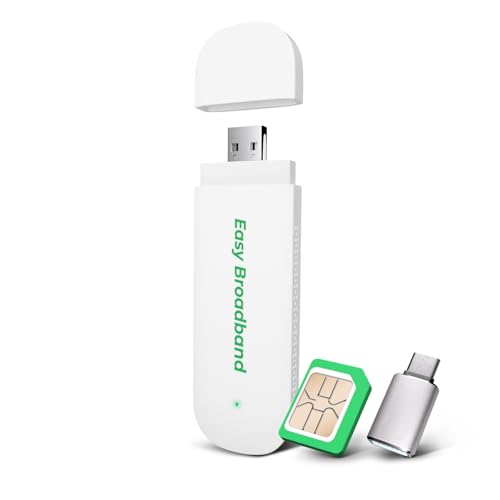
The EIOTCLUB dongle is the most straightforward portable internet device on this list: plug it into a laptop, power bank, or car charger, and it creates a Wi‑Fi 6 hotspot for up to 10 devices. It comes with a pre‑installed SIM card and a 1GB trial plan, so you’re online within seconds of the first boot. After the trial, you scan a QR code and choose a pay‑as‑you‑go plan.
The Wi‑Fi 6 radio is a nice surprise in a USB stick. Most USB hotspots are stuck on AC, but this one uses the newer standard to handle multiple devices more efficiently. Speeds top out at 150 Mbps on LTE, which is plenty for a small group. The device is extremely portable and draws power from the USB port – no separate charger needed.
The catch is that it’s USA‑only. It won’t work internationally. And the data plans are through EIOTCLUB, so you’re locked into their pricing. But for a student or remote worker who spends most time in the US and wants a backup internet option that fits in a pocket, this is the easiest solution. Just plug it in and go.
The first decision you need to make is whether you need a travel router or a cellular hotspot. They solve different problems. A travel router takes an existing Wi‑Fi or wired internet connection and creates your own secure network in seconds. It handles the captive‑portal login that most laptops and phones handle slowly. A cellular hotspot, on the other hand, generates its own internet from the mobile network. You use it when there’s no Wi‑Fi at all, or when the only public Wi‑Fi is too slow or insecure.
Consider where you’ll be most often. Hotel and Airbnb stays? A travel router like the GL.iNet or TP‑Link models gives you the most benefit. You get a private network with VPN support, and you only have to log in once. Camping, driving, or working from coffee shops with terrible Wi‑Fi? A cellular hotspot like the Nighthawk M7 or RoamWiFi is the better tool. Some travelers carry both: a travel router for hotels and a lightweight hotspot for the road. That’s the ultimate setup, but not necessary for everyone.
Wi‑Fi 6 (AX) is the current sweet spot. It handles multiple devices better than the older AC standard and is widely supported by modern laptops and phones. The Beryl AX and both TP‑Link Roam 6 models use AX. The GL.iNet Opal uses AC, which is still fine for most hotel connections. Wi‑Fi 7 (BE) appears on the Nighthawk M7, but that’s a hotspot, not a travel router. For almost all situations, Wi‑Fi 6 is enough. If you see AX in the specs, you’re good.
If you use a VPN for work or privacy, the travel router needs to support OpenVPN or WireGuard natively. The GL.iNet Beryl AX and Opal both have excellent VPN throughput. The TP‑Link TL‑WR1512X also supports OpenVPN and WireGuard. The simpler TP‑Link TL‑WR1502X does not – you’d have to run the VPN client on each device. For a family, that’s annoying. For a single laptop user, it’s manageable.
Battery‑powered hotspots let you use them anywhere without a wall outlet. The RoamWiFi, TravlFi, and Nighthawk M7 all have built‑in batteries. Travel routers generally rely on USB power – you plug them into the included adapter, a laptop, or a power bank. If you often work in coffee shops or parks, a battery hotspot is more convenient. If you’re always near an outlet, a USB travel router is lighter and more versatile.
Cellular hotspots require a data plan. Some come with trial data (RoamWiFi, EIOTCLUB), others require you to sign up with a carrier or an eSIM service (TravlFi, NETGEAR eSIM). Consider whether you want pay‑as‑you‑go flexibility or a monthly contract. Travel routers don’t need data plans at all – they use the Wi‑Fi connection you already have.
How many people or gadgets need to share the connection? Most travel routers can handle 30 to 60 devices in theory, but the real‑world limit is lower. The Nighthawk M7 supports 32 devices, which is the highest among hotspots. For a small family or a remote‑work group of two to four, any device on this list will work. For larger groups (e.g., a van full of content creators or a family road trip with multiple kids), lean toward the higher‑capacity options like the Beryl AX or M7.
Yes, if the router supports USB tethering. The TP‑Link Roam 6 models (both the WR1512X and WR1502X) can use your phone’s USB tethering as a WAN source. The GL.iNet Opal does not support this. For the best results, use a travel router that accepts a USB‑C tethered phone.
No. Travel routers like the GL.iNet and TP‑Link models work by rebroadcasting an existing internet connection (Wi‑Fi, Ethernet, or tethered phone). They don’t need a SIM card. Cellular hotspots like the Nighthawk M7 or RoamWiFi do need a SIM or eSIM to connect to the mobile network.
It depends on the device. The RoamWiFi and EIOTCLUB dongle support up to 10 devices. The TravlFi JourneyGo handles around 10 as well. The Nighthawk M7 can connect up to 32 devices. Travel routers typically have higher limits: most can handle 30 to 60 simultaneous connections, though real‑world performance drops with heavy use on all of them.
Yes, but only the travel router style. You can connect a travel router to the plane’s Wi‑Fi and then share that secure network with your devices. Cellular hotspots are banned in flight – you cannot operate a mobile hotspot while airborne. Make sure to put your hotspot in airplane mode and use the router mode instead.
A travel router takes an existing internet connection (hotel Wi‑Fi, Ethernet, phone tether) and creates a new secure network. A mobile hotspot generates its own internet from a cellular connection. Travel routers don’t need a data plan; hotspots do. Many travelers end up using both: a travel router in hotels and a hotspot when there’s no internet at all.
Not necessarily. Wi‑Fi 5 (AC) is still enough for most hotel connections, which are usually under 100 Mbps. Wi‑Fi 6 (AX) helps when you have many devices connected or need to stream on multiple screens. It also uses power more efficiently. If you can afford the slight premium, Wi‑Fi 6 is worthwhile, but a good AC router like the GL.iNet Opal is still a great choice.
Yes, but with caveats. Travel routers can improve your connection by placing them closer to the hotel’s router and reducing interference. However, hotel Wi‑Fi often has high latency that no gadget can fix. Cellular hotspots like the Nighthawk M7 with 5G can provide lower latency than many public hotspots. For serious gaming, a wired connection through a travel router’s Ethernet port is best.
The best portable internet device depends heavily on your travels. The GL.iNet Beryl AX is our top overall pick for its Wi‑Fi 6 speed, 2.5G port, and excellent VPN performance. It works for almost any traveler who stays in places with some internet and wants a secure private network. The TP‑Link Roam 6 TL‑WR1512X is the easier alternative if you prefer an app‑based setup and still want VPN and tethering.
If you need internet where there is no Wi‑Fi at all, the NETGEAR Nighthawk M7 is the fastest cellular hotspot, especially in 5G coverage areas. The RoamWiFi 4G LTE is the top choice for international travelers who want to avoid SIM hassles. And the EIOTCLUB USB dongle is the perfect backup for anyone who mostly works from a laptop.
For RV and camping life, the TravlFi JourneyGo offers the most flexible data plans without contracts. If you’re on a budget and just need a reliable VPN travel router, the GL.iNet Opal does the job for less.
Still undecided? Start with the device that matches your most common scenario. If you stay in hotels, buy a travel router. If you camp or work remote, buy a hotspot. A good portable internet connection is the difference between productive travel and frustrated scrolling.
This article contains Amazon affiliate links. We may earn a small commission on qualifying purchases at no extra cost to you.


