Physical Address
304 North Cardinal St.
Dorchester Center, MA 02124
Physical Address
304 North Cardinal St.
Dorchester Center, MA 02124

Our roundup covers 7 top 64GB RAM kits for desktop and laptop, from DDR4 to DDR5, to help you pick the best for gaming, video editing, and multitasking.
Your video editing timeline is piling up with 4K clips. Your virtual machines are grinding to a crawl. Or you just want to alt-tab out of a game without a single stutter. That is the moment you start shopping for 64GB of RAM. The jump from 32GB to 64GB unlocks a level of multitasking that no amount of processor speed can make up for alone. Whether you are building a new AM5 or Intel system, or maxing out an older DDR4 board, the right 64GB RAM kit can make or break your workflow.
In this roundup, we cover seven kits spanning both DDR4 and DDR5, desktop DIMMs and laptop SODIMMs, and everything from no-frills workhorses to show-stopping RGB-equipped memory. Most are 64GB kits, but we also include a 32GB option for those whose workloads are lighter. The picks range from the tightest-timings DDR5 for AMD’s latest platforms to the most reliable laptop upgrade you can install.
TL;DR: The G.SKILL Flare X5 is the one most AM5 builders should buy: fast CL30 timings and no unnecessary RGB. The G.SKILL Trident Z5 Neo RGB adds lighting without sacrificing latency. The G.SKILL Trident Z5 Royal Neo is the flashiest, with a mirrored heatspreader and slightly tighter secondaries. The Crucial 64GB SODIMM kit is the obvious choice for laptop upgrades. If you need DDR4, the G.SKILL Trident Z RGB 3600MHz remains a strong pick for older platforms.
| # | Product | Type | Speed | Latency | Best For |
|---|---|---|---|---|---|
| 1 | G.SKILL Flare X5 | DDR5, Desktop | 6000 MT/s | CL30-40-40-96 | AM5 DDR5 builders who want the best balance of speed and stability |
| 2 | G.SKILL Trident Z5 Neo RGB | DDR5, Desktop | 6000 MT/s | CL30-40-40-96 | AM5 DDR5 builders who want RGB without latency compromises |
| 3 | G.SKILL Trident Z5 Royal Neo | DDR5, Desktop | 6000 MT/s | CL30-36-36-96 | Enthusiasts who want the prettiest AM5-exclusive DDR5 with tight secondaries |
| 4 | CORSAIR Vengeance RGB RS | DDR5, Desktop | 6000 MHz | CL40-50-50-96 | Users on Intel or AMD who need a dual-platform RGB kit |
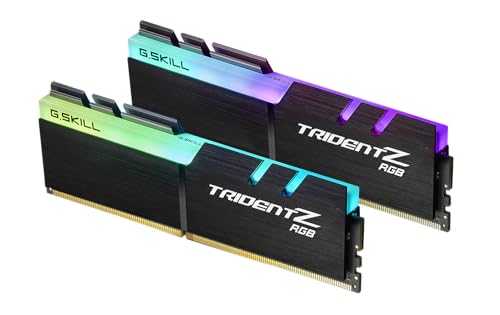
| 5 | G.SKILL Trident Z RGB | DDR4, Desktop | 3600 MT/s | CL18-22-22-42 | DDR4 systems that need high-speed 64GB with RGB |
| 6 | CORSAIR Vengeance LPX | DDR4, Desktop | 3200 MHz | CL16-20-20-38 | Small-form-factor builds or users who only need 32GB |
| 7 | Crucial 64GB DDR4 SODIMM | DDR4, Laptop | 3200 MHz | CL22 | Laptop upgrades to 64GB |

Pros
Cons
Best for: AM5 builders who want the fastest, most stable 64GB DDR5 kit without paying for lighting.
Check current price on Amazon →
The Flare X5 is G.SKILL’s dedicated AMD EXPO line, and it shows. At 6000 MT/s with CL30, it matches the sweet spot that AMD’s Ryzen 7000 and 9000 series controllers handle best. The kit runs at 1.40V, which is low enough to stay cool even in tight cases. The matte black heatspreader is low profile, so it fits under massive dual-tower coolers like the Noctua NH-D15 without interference. That is a real advantage over taller RGB sticks.
Some builders will miss the lighting, but that is the trade-off. The Flare X5 delivers exactly the performance you want from a 64GB DDR5 kit for a Ryzen rig, and it does so without gimmicks. If you are building an all-black AM5 system and want to set it and forget it, this is the one.

Pros
Cons
Best for: AM5 users who want the same performance as the Flare X5 but with customizable RGB lighting.
Check current price on Amazon →
The Trident Z5 Neo RGB shares the exact same base specs as the Flare X5. Same frequency, same primary timings, same voltage. The difference is the heatspreader. G.SKILL’s Trident Z5 design is taller and features a distinctive fin-like top with a luminous RGB bar. It sits about 44mm tall, which is something to check against your cooler’s front fan clearance. But the lighting is excellent. The diffuser spreads colour evenly across the whole length of the bar, and the individual LEDs are fully controllable through most motherboard software.
If you have a windowed case and value aesthetics, the Trident Z5 Neo RGB gives up nothing in speed while adding visual flair. It is the go-to kit for a showpiece AMD build.

Pros
Cons
Best for: Enthusiasts building a high-end AMD rig who want the most beautiful memory kit with the lowest possible latency.
Check current price on Amazon →
The Trident Z5 Royal Neo takes the Neo formula and dials up the glitz. The heatspreader is a mirrored silver finish that catches light from every angle, and the RGB bar is covered in a faceted crystal-like acrylic that refracts the LEDs into a jewel effect. Under the hood, the primary timings are the same CL30 as the other two, but the secondary timings are tightened from 40-40-96 to 36-36-96. That can shave a few nanoseconds off real-world latency, noticeable mainly in memory-sensitive benchmarks and cache-heavy workloads.
The catch is height. The Royal Neo is the tallest of the G.SKILL DDR5 kits, so it will not fit under large air coolers. You will need a liquid cooler or a case with enough clearance. And the mirror finish demands careful handling. But if you want the fastest 64GB kit for AM5 and you are building a machine that sits on your desk, not under it, the Royal Neo is the endgame.

Pros
Cons
Best for: Users who switch between Intel and AMD platforms, or who build a system that might change CPU family down the road.
Check current price on Amazon →
Corsair’s Vengeance RGB RS is a DDR5 kit designed for broad compatibility. It ships with both AMD EXPO and Intel XMP profiles, so you can drop it into either a Ryzen 7000 system or a 14th Gen Intel build and get rated speeds with a single BIOS toggle. That is genuinely useful if you are not locked into one camp.
The trade-off is latency. At CL40, these sticks are noticeably slower than the CL30 G.SKILL kits we covered above. In gaming that might be a handful of frames; in memory-bound productivity tasks the gap opens up. The RGB is handled through Corsair’s iCUE software, which gives you full per-LED control but also requires yet another background service. The panoramic diffuser looks fine but does not match the crispness of the Trident Z5 bar. On the plus side, the onboard voltage regulation helps maintain stability at high frequencies, and the gray finish is a refreshing change from the sea of black memory.
The Vengeance RGB RS is a solid choice if you value platform flexibility above all else. For a dedicated AM5 build, stick with the Flare X5 or Trident Z5 Neo.
Pros
Cons
Best for: Anyone maxing out a DDR4 build be it Intel 12th/13th Gen or AMD AM4 who wants 64GB with RGB.
Check current price on Amazon →
DDR4 is no longer the bleeding edge, but it still powers millions of capable machines. The Trident Z RGB at 3600 MHz CL18 is about as good as DDR4 gets. The speed aligns perfectly with the Infinity Fabric on Ryzen 5000, and it performs admirably on Intel 12th and 13th Gen boards in gear-1 mode. The RGB strip runs the full length of the aluminium heatspreader and looks vibrant in a tempered-glass case.
The main limitation is that DDR4 is a dead end for new builds. If you are building fresh from scratch, go DDR5. But if you already have a solid AM4 or LGA1700 platform and just need more memory, this kit is a straightforward upgrade. Some early batches had XMP issues on specific motherboards, but those have been resolved through BIOS updates. It remains one of the most popular 64GB DDR4 kits for a reason.

Pros
Cons
Best for: Small-form-factor builders who need reliable 32GB RAM and cannot accommodate tall heatspreaders.
Check current price on Amazon →
This is the only 32GB kit on our list, and it earns its spot because of its unique form factor. The Vengeance LPX stands just 34mm tall, which is short enough to fit under low-profile air coolers in Mini-ITX cases like the Cooler Master NR200 or the Fractal Ridge. The hand-sorted memory chips give it decent overclocking headroom for a 3200 MHz kit, and the heatspreader does a fine job keeping temperatures in check.
If your build or workload truly demands 64GB, you will need to pair this with an identical second kit or choose one of the 2x32GB options from our list. But for many gamers and daily users, 32GB is still plenty. The Vengeance LPX is the go-to when every millimetre of clearance matters.

Pros
Cons
Best for: Anyone who needs to upgrade their laptop’s RAM to 64GB with a no-hassle, guaranteed-compatible kit.
Check current price on Amazon →
Laptop memory is a different beast. Crucial’s 64GB SODIMM kit runs at 3200 MHz with CL22, which is standard for DDR4 notebook memory. The green PCB is nothing to look at, but it does not need to be. What matters is compatibility. Crucial provides a system scanner that tells you exactly which modules your laptop supports, and if the kit is not compatible you can return it. That is a level of confidence no other brand matches.
The kit is dual-rank at 2Rx8, which means it achieves full bandwidth. Most laptops with Intel 11th Gen and newer, or AMD Ryzen 5000 and newer, will handle 3200 MHz without issues. For older machines, it steps down automatically to 2933 or 2666 MHz. If you are maxing out a laptop for video editing, virtual machines, or heavy data analysis, this is the kit to buy.
Choosing the right 64GB RAM kit comes down to four factors: platform, form factor, speed, and cooling. Here is what to look for.
Desktop memory uses DIMMs; laptops use SODIMMs. They are not interchangeable. If you are upgrading a laptop, you need SODIMM modules. Desktops always use standard DIMMs. Also note that most consumer motherboards have four slots. A 2x32GB kit leaves two slots open for a future 128GB upgrade. A 4x16GB kit fills all slots and makes upgrading later harder. For most people, 2x32GB is the right choice.
For DDR5, 6000 MT/s is the sweet spot for AMD Ryzen and Intel Core processors. Faster speeds like 6400 or 6800 can offer gains, but they often require higher voltage and may cause instability on some memory controllers. Latency is measured in CL (CAS latency). Lower CL means lower response time. The best DDR5 kits achieve CL30 at 6000 MT/s. For DDR4, 3600 MT/s with CL18 is the optimal balance. Higher speeds like 4000 MT/s exist, but they rarely run stable on consumer boards.
Intel uses XMP (Extreme Memory Profile), AMD uses EXPO (Extended Profiles for Overclocking). Many DDR5 kits now support both, but dedicated AMD EXPO kits like the G.SKILL Flare X5 are specifically validated on AM5 boards. If you use an Intel board, look for XMP or dual‑profile support. On laptops, memory runs at JEDEC speeds and is not overclocked, so XMP/EXPO do not apply.
Memory height matters when you install a large air cooler. Low-profile sticks (under 35mm) clear even dual-tower coolers. Tall RGB modules (44mm or more) block the front fan of many coolers and may require moving that fan upward or switching to liquid cooling. Also consider whether your case has good airflow over the RAM. Heatspreaders are cosmetic on most kits; the real cooling comes from case fans. If you are building a compact system, the low-profile CORSAIR Vengeance LPX is a safe bet.
Dual‑rank memory modules (two banks of chips on each DIMM) offer better performance than single‑rank because they allow the memory controller to interleave access. Most 32GB DDR5 sticks are dual‑rank. All the 2x32GB kits in this roundup are dual‑rank, which is ideal for maximum bandwidth.
Mixing RAM kits is risky. Even identical specs from different batches can cause instability. It is always best to buy a matched kit. If you must add more later, buy an identical kit or replace the old one.
For pure gaming, 32GB is often enough. 64GB becomes useful when you stream, run a heavy modded game, or keep a dozen browser tabs open while gaming. For professional workloads like video editing, VMs, or 3D rendering, 64GB is the new baseline.
Yes. Ryzen processors use a unified memory architecture (Infinity Fabric) that ties the memory clock to the fabric clock. 6000 MT/s DDR5 or 3600 MT/s DDR4 aligns perfectly with the fabric on most Ryzen chips. Faster or slower speeds can cause performance penalties.
No. DDR4 and DDR5 are physically and electrically incompatible. The notch position is different, and the voltage regulation is built into the DIMM on DDR5. You must choose the correct generation for your motherboard.
Enter the BIOS (usually by pressing Del or F2 during boot). Look for an overclocking menu and select the XMP or EXPO profile. Save and exit. The RAM will then run at its rated speed. If the system fails to boot, reset the CMOS and try a lower frequency.
Most laptops with a removable bottom panel have two SODIMM slots. Some ultra-thin models have soldered RAM or only one slot. Check the manufacturer’s specifications or use Crucial’s system scanner to find out before buying.
A QVL (Qualified Vendor List) assures the manufacturer has tested that specific kit. It reduces the chance of incompatibility. We recommend checking the list for your motherboard before purchasing, especially for high‑speed DDR5 kits.
If you are building a new AM5 desktop, the G.SKILL Flare X5 is our top pick. It delivers the best combination of speed, latency, and stability for Ryzen systems, and its low profile means you can pair it with the best air coolers without thinking about clearance. If you want RGB, the Trident Z5 Neo RGB gives you the same performance with lighting. For an Intel or flexible dual‑platform build, the CORSAIR Vengeance RGB RS is a solid choice despite higher latency.
On the DDR4 side, the G.SKILL Trident Z RGB 3600MHz is the kit to max out an older platform. The CORSAIR Vengeance LPX is indispensable for SFF builds, even though it is only 32GB. And for laptop users, the Crucial 64GB SODIMM kit is the safest, most reliable upgrade you can buy. The Trident Z5 Royal Neo is the indulgence for anyone who wants their PC to look as good as it performs.
No matter which kit you choose, 64GB will change how you work and play. The difference between hitting the memory ceiling and having headroom is night and day. Pick the one that matches your platform and your build, and you will not look back.
This article contains Amazon affiliate links. We may earn a small commission on qualifying purchases at no extra cost to you.


