Physical Address
304 North Cardinal St.
Dorchester Center, MA 02124
Physical Address
304 North Cardinal St.
Dorchester Center, MA 02124

Best 240 Hz 1440p Monitors (November 2026): 10 picks from SANSUI and Alienware, from ultrawide VA to 27-inch QD-OLED, WOLED and fast IPS esports panels.

A monitor that says "240Hz" on the box does not always deliver 240Hz on your desk. Several models only reach their top refresh rate over DisplayPort and fall back to 144Hz on HDMI, and the panel type (VA, IPS, WOLED or QD-OLED) changes motion clarity, black levels and long-term care. Buyers who skip these details end up with a console that cannot use the full refresh rate, or a glossy OLED in a room full of window glare. Choosing among the Best 240 Hz 1440p Monitors comes down to panel type, screen shape and which ports carry the full refresh rate.
The short answer: the SANSUI 34-inch Ultrawide VA suits players who want a 21:9 screen with 240Hz on all four video inputs, the KTC H32S25E 32-inch Curved suits anyone who wants the biggest 16:9 canvas with a tight 1000R curve, and the KTC 27M1 Pro suits tinkerers who want an overclockable IPS panel with a pivoting stand. The rest of the list covers glare-free and glossy OLEDs, an ultrawide QD-OLED, and two proven IPS options for tighter budgets.
TL;DR: top picks at a glance
- Best overall: the SANSUI 34-inch Ultrawide VA, a 3440×1440 curved panel with 240Hz available over both HDMI 2.1 and DisplayPort 1.4.
- Best for glare-free OLED: Samsung Odyssey OLED G6 G61SH, a 27-inch QD-OLED with a glare-free finish and the lowest listed weight at 8.38 lb.
- Best for ultrawide OLED: Alienware AW3425DW, a 34.2-inch QD-OLED with 1800R curvature and 1000 nits peak HDR brightness.
- Best for budget IPS: Acer Nitro XV272U, a 27-inch IPS with built-in speakers and a stand that tilts, swivels, pivots and adjusts in height.
| # | Product | Best for | Panel | Screen size | Weight |
|---|---|---|---|---|---|
| 1 | SANSUI 34-inch Ultrawide VA | Ultrawide gaming | Fast VA | 34 inches | Not listed |
| 2 | KTC H32S25E 32-inch Curved | Big curved screen | Not listed | 32 inches | 13.0 lb |
| 3 | KTC 27M1 Pro | Overclocked pivot IPS | Fast IPS | 27 inches | 12.3 lb |
| 4 | AOC Q27G41ZE | Value esports IPS | IPS | 27 inches | Not listed |
| 5 | Samsung Odyssey OLED G6 G61SH | Glare-free OLED | QD-OLED | 27 inches | 8.4 lb |
| 6 | ASUS ROG XG27AQDMG | Burn-in coverage | WOLED | 26.5 inches | 14.8 lb |
| 7 | LG UltraGear 27GX704A | PC and console OLED | OLED | 27 inches | 15.9 lb |
| 8 | LG UltraGear 27GR83Q | HDMI 2.1 IPS | IPS | 27 inches | 13.7 lb |
| 9 | Alienware AW3425DW | Ultrawide OLED | QD-OLED | 34.2 inches | 20.0 lb |
| 10 | Acer Nitro XV272U | Budget IPS with speakers | IPS | 27 inches | 11.5 lb |

Pros:
Cons:
Best for: Players who want an ultrawide 1440p screen with 240Hz on every input and a console or second PC to connect.
Check current price on Amazon →
The SANSUI 34-inch Ultrawide VA earns the top slot through connection flexibility rather than a single headline spec. Its two HDMI 2.1 ports and two DisplayPort 1.4 ports all support 240Hz at 2K, which is rare in this group: the KTC H32S25E 32-inch Curved and Acer Nitro XV272U both drop to 144Hz on HDMI. The 3440×1440 resolution keeps the same 1440 vertical pixels as the 27-inch models, so frame rates should be close to what a 2560×1440 monitor demands, with more width on top.
Feature depth is generous for this class. AI Crosshair, AI Bluelight, Sniper Scope, a Visual Enhance mode (AIPQ) and Ultra Vivid presets are built in, and variable refresh rate for Xbox, PlayStation and Switch works only when connected through HDMI 2.1. The metal stand and the VESA 100x100mm pattern are sensible, although the tilt range of -5° to 15° is the only adjustment. The seller also offers a 30-day money-back and replacement window with lifetime technical support, which is more helpful than a long hardware warranty for a lesser-known brand.
It is the wrong choice if you want OLED black levels or very fast pixel response, in which case the Alienware AW3425DW is the ultrawide to look at. It is also wrong for small desks or pivot-ready setups, where the LG UltraGear 27GR83Q or the KTC 27M1 Pro fit better.

Pros:
Cons:
Best for: PC players who want a large 16:9 curved screen and will connect it over DisplayPort.
Check current price on Amazon →
The KTC H32S25E 32-inch Curved is the largest standard-ratio screen in the list. At 32 inches with a 1000R curve, it fills the field of view more than the 27-inch AOC Q27G41ZE or Acer Nitro XV272U, and it keeps a normal 16:9 shape that most games and desktop apps expect. Its 122% sRGB gamut figure and 4000:1 contrast ratio are the main color claims, and anti-blue-light mode is included for long sessions.
The compromise is pixel density. The same 2560×1440 pixels are spread across a bigger surface, so text is less crisp than on a 27-inch monitor, and you will sit a little farther back. The weight of 13.0 lb and a stand that only tilts mean wall or arm mounting via the VESA pattern is a sensible upgrade.
Avoid this model if your source is an HDMI-only device, since only DisplayPort gets you to 240Hz; the LG UltraGear 27GR83Q supports 240Hz over HDMI 2.1 instead. If you want height and pivot adjustment out of the box, the KTC 27M1 Pro is the better KTC.
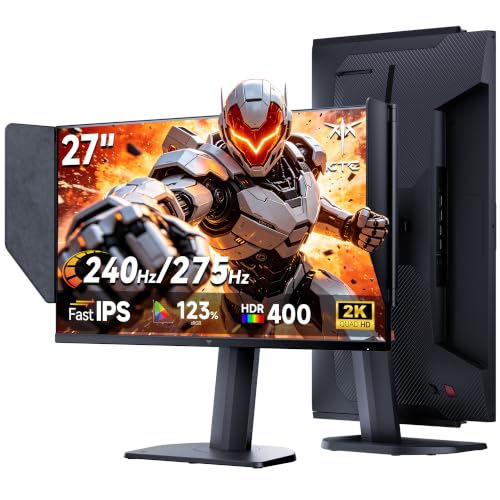
Pros:
Cons:
Best for: Tinkerers and competitive players who want a 27-inch IPS with overclock headroom and a rotatable stand.
Check current price on Amazon →
The KTC 27M1 Pro is the most flexible 27-inch IPS here. A native 240Hz panel with a 275Hz overclock gives it more headroom than the 260Hz overclock on the AOC Q27G41ZE, and Adaptive Sync with a 1ms MPRT rating targets competitive shooters. The full-adjustment stand is a clear step over the tilt-only stands on the AOC and the two other KTC and SANSUI models.
It trades detail for options. The available information on ports is thin (HDMI and DisplayPort, with no version numbers), so confirm your cable path before assuming 240Hz from a console. The speakers are a convenience, not a substitute for headphones.
Choose the Acer Nitro XV272U if you want documented port specs and bundled cables, or the Samsung Odyssey OLED G6 G61SH if contrast and motion clarity matter more than overclock headroom.

Pros:
Cons:
Best for: Esports players who want a no-fuss 27-inch IPS with G-SYNC Compatible support and a 3-year warranty.
Check current price on Amazon →
The AOC Q27G41ZE stays on the list for its focus. It combines a 27-inch IPS panel, 0.3ms MPRT and a native 240Hz refresh with a 260Hz overclock, and then stops there. Its three-sided frameless body with a textured black and red finish is the only styling flourish. Against the Acer Nitro XV272U, it adds G-SYNC Compatible support and a stated 3-year warranty, but loses the speakers and the full ergonomic stand.
It is the wrong pick for a bright room that needs HDR punch, since 300 nits is limited. Look at the LG UltraGear 27GR83Q for DisplayHDR 400 and a taller adjustable stand, or the LG UltraGear 27GX704A for real HDR performance.

Pros:
Cons:
Best for: Players with a bright room who want OLED motion and contrast without mirror-like reflections.
Check current price on Amazon →
The Samsung Odyssey OLED G6 G61SH stands out for its finish. Glossy OLEDs such as the ASUS ROG XG27AQDMG and LG UltraGear 27GX704A look punchy in a dim room but reflect lamps and windows, while Samsung's glare-free treatment keeps the screen readable in daylight. Pairing 0.03ms response with a 240Hz QD-OLED panel and a Pantone Validated screen gives it strong gaming and creative-adjacent credentials.
Its gaps are in documentation. Brightness numbers and port types are not stated, so buyers who care about HDR peaks should compare against the Alienware AW3425DW (1000 nits peak HDR) or the LG UltraGear 27GX704A (1300 nits peak). If you want a documented burn-in warranty, the ASUS ROG XG27AQDMG is the clearer choice.

Pros:
Cons:
Best for: Buyers who want OLED but worry about burn-in and want written warranty coverage.
Check current price on Amazon →
The ASUS ROG XG27AQDMG is the safest-feeling OLED purchase because the burn-in coverage is spelled out. Third-generation WOLED brings brighter full-white windows and clearer text than earlier generations, and the DisplayWidget software lets you tune settings from the desktop. It is also marketed for PS5 and Xbox use.
At 26.5 inches it is slightly smaller than the 27-inch rivals, and its 14.8 lb weight sits in the middle. The missing port details are the main hole: the LG UltraGear 27GX704A is clear about dual HDMI 2.1 and USB 3.2. Pick the Samsung Odyssey OLED G6 G61SH if your room is bright.

Pros:
Cons:
Best for: Console and PC players who want an OLED with plenty of ports and strong peak brightness.
Check current price on Amazon →
The LG UltraGear 27GX704A is the best-documented OLED on the list. The 1.5M:1 contrast and TrueBlack 400 certification are backed by actual brightness figures (275 nits standard, 1300 nits peak), and the USB hub adds a practical desk benefit. Compared with the ASUS ROG XG27AQDMG, it gives clearer port information but not a documented burn-in warranty.
Choose the Samsung Odyssey OLED G6 G61SH if reflections are your biggest problem, and the Alienware AW3425DW if you want an ultrawide. For those needing a mic on the headphone jack, the LG UltraGear 27GR83Q offers a 4-pole connection.

Pros:
Cons:
Best for: Players on HDMI 2.1 hardware who use a wired headset with a mic and want a proven IPS panel.
Check current price on Amazon →
The LG UltraGear 27GR83Q is a pragmatic IPS choice. It matches the KTC H32S25E 32-inch Curved in resolution and refresh rate but extends 240Hz to HDMI as well, and it provides more documented gaming tools than the AOC Q27G41ZE.
It does not compete on contrast with OLED, so the LG UltraGear 27GX704A is the step-up pick in the same family. If you want speakers and a swivel stand, the Acer Nitro XV272U covers that ground.

Pros:
Cons:
Best for: Players who want the best-looking ultrawide 1440p panel and have the desk space.
Check current price on Amazon →
The Alienware AW3425DW is the high-end counterpart to the SANSUI 34-inch Ultrawide VA. Both use 3440×1440 at 240Hz, but QD-OLED adds 0.03ms response, infinite contrast and a color-accuracy spec that VA cannot reach. The gentler 1800R curve is easier on mixed desktop work than the SANSUI's 1500R.
It ranks ninth because of cost and practicality, not image quality, and the missing port details leave questions. For something lighter and cheaper to place, consider the Samsung Odyssey OLED G6 G61SH.

Pros:
Cons:
Best for: Budget-minded players on DisplayPort who want speakers and a fully adjustable stand.
Check current price on Amazon →
The Acer Nitro XV272U is the budget IPS in the list. It puts a good stand, cables and speakers in the box, which makes it easier to set up than the AOC Q27G41ZE. Its 99% sRGB and HDR400 labels place it in a similar color tier to the LG UltraGear 27GR83Q.
Skip it if you game on a console through HDMI, since the cap there is 144Hz. The LG UltraGear 27GR83Q and the SANSUI 34-inch Ultrawide VA both keep 240Hz on HDMI 2.1.
The core trade-off is between image quality, shape and connectivity. OLED gives the best contrast and motion, IPS and VA cost less, and ultrawide or large screens change how much desk and GPU you need.
Before choosing, check these project details:
IPS panels such as the Acer Nitro XV272U, AOC Q27G41ZE, KTC 27M1 Pro and LG UltraGear 27GR83Q offer wide viewing angles and strong color at a lower price. The SANSUI 34-inch Ultrawide VA uses a Fast VA panel, a different approach aimed at curved ultrawide viewing.
OLED options include the Samsung Odyssey OLED G6 G61SH and Alienware AW3425DW (QD-OLED), and the ASUS ROG XG27AQDMG (WOLED). All three list 0.03ms response. If burn-in worries you, favor documented coverage like ASUS's 3-year warranty or care features such as Samsung's OLED Safeguard.
A 27-inch 16:9 panel is the baseline for any 1440p gaming monitor, balancing pixel density with desk footprint. The KTC H32S25E 32-inch Curved adds size at lower density, while the SANSUI 34-inch Ultrawide VA and Alienware AW3425DW add width at the same 1440 vertical pixels.
If you want more pixels than 1440p, a 4K monitor raises GPU demands and makes 240Hz harder to feed. Staying at 1440p lets mid-range graphics cards keep frame rates close to the refresh ceiling.
Any 240Hz monitor should be checked for which input delivers the full rate. The LG UltraGear 27GX704A and LG UltraGear 27GR83Q use HDMI 2.1, and the SANSUI 34-inch Ultrawide VA supports 240Hz on HDMI 2.1 and DisplayPort. The Acer Nitro XV272U and KTC H32S25E 32-inch Curved need DisplayPort for 240Hz.
If your GPU or console cannot reach those frame rates anyway, a 144Hz gaming monitor can be enough. Otherwise match the cable to the panel and enable the high refresh rate in your operating system.
The Samsung Odyssey OLED G6 G61SH, KTC 27M1 Pro, LG UltraGear 27GX704A and Acer Nitro XV272U offer height, tilt, swivel and pivot. The AOC Q27G41ZE and SANSUI 34-inch Ultrawide VA are tilt-focused, so a VESA arm helps if you need more.
Warranty details vary. The AOC Q27G41ZE and Samsung Odyssey OLED G6 G61SH list 3-year coverage, and the ASUS ROG XG27AQDMG adds burn-in coverage. The SANSUI 34-inch Ultrawide VA offers a 30-day money-back window and lifetime technical support.
It is worth it for fast shooters and racing games where your GPU can hold frame rates well above 144. The extra refresh rate shortens the time between frames, and OLEDs like the Samsung Odyssey OLED G6 G61SH make that clarity easier to see. If your hardware cannot reach high frame rates, the gain is small.
On some models, yes. The Acer Nitro XV272U and KTC H32S25E 32-inch Curved only reach 240Hz over DisplayPort and drop to 144Hz on HDMI. The LG UltraGear 27GR83Q, LG UltraGear 27GX704A and SANSUI 34-inch Ultrawide VA support 240Hz over HDMI 2.1 as well.
OLED monitors include care features, but burn-in remains a consideration. The Samsung Odyssey OLED G6 G61SH uses thermal modulation, the LG UltraGear 27GX704A runs automatic pixel care cycles, and the ASUS ROG XG27AQDMG adds a custom heatsink. ASUS also lists a 3-year warranty with burn-in coverage, which is the clearest written protection here.
The LG UltraGear 27GX704A is a strong choice with dual HDMI 2.1 ports. The SANSUI 34-inch Ultrawide VA also offers two HDMI 2.1 ports, and its variable refresh support for Xbox, PlayStation and Switch works only over HDMI 2.1. The ASUS ROG XG27AQDMG is marketed for PS5 and Xbox, though its ports are not listed.
Choose an ultrawide such as the SANSUI 34-inch Ultrawide VA or Alienware AW3425DW if you want immersion in racing, RPG and productivity use and have a wide desk. Choose a 27-inch like the LG UltraGear 27GR83Q or Acer Nitro XV272U for a compact footprint and easier mounting. Both formats keep 1440 vertical pixels, so GPU load is similar.
The KTC 27M1 Pro and Acer Nitro XV272U list built-in speakers, with the Acer using two 2W units. The SANSUI 34-inch Ultrawide VA lists no speakers, and the AOC Q27G41ZE provides audio out only. Headphone jacks on the LG UltraGear 27GR83Q (4-pole) and LG UltraGear 27GX704A (3-pole) serve headset users.
Best 240 Hz 1440p Monitors for most buyers start with SANSUI 34-inch Ultrawide VA: a 34-inch 3440×1440 curved Fast VA panel with 240Hz over two HDMI 2.1 and two DisplayPort 1.4 inputs, 1ms MPRT and HDR400. Its main weakness is the stand, which only tilts, and it has no speakers. The KTC H32S25E 32-inch Curved is the pick for a large 16:9 curved screen if you stay on DisplayPort.
For alternatives by use case, the KTC 27M1 Pro suits tinkerers who want a 275Hz overclock and a pivoting stand, and the AOC Q27G41ZE suits esports players who want G-SYNC Compatible IPS with a 3-year warranty. The LG UltraGear 27GR83Q is the IPS to choose for HDMI 2.1 and a 4-pole headset jack, and the Acer Nitro XV272U is the budget option with speakers and a fully adjustable stand.
For specialist picks, the Samsung Odyssey OLED G6 G61SH is the glare-free OLED, the ASUS ROG XG27AQDMG has the clearest burn-in coverage, the LG UltraGear 27GX704A brings the strongest brightness figures and ports, and the Alienware AW3425DW is the ultrawide OLED for those with space. If you are still undecided, pick by connection first: match 240Hz to the cable you will actually use, then choose the panel type that suits your room.


