Physical Address
304 North Cardinal St.
Dorchester Center, MA 02124
Physical Address
304 North Cardinal St.
Dorchester Center, MA 02124

Find the best 5070 graphics cards for your build, from SFF-Ready RTX 5070 options to high-end RTX 5070 Ti cards with 16GB GDDR7 and DLSS 4.
Choosing a new GPU feels like walking through a minefield of confusing model numbers and thermal specs. The RTX 5070 series sits at a sweet spot: it gives you the new Blackwell architecture, GDDR7 memory, and DLSS 4 without the size or cooling demands of the absolute top-tier cards. But the lineup splits into two distinct subcategories: the 12GB RTX 5070 cards, which fit into almost any build, and the 16GB RTX 5070 Ti cards, which trade a bit of compactness for noticeably more memory bandwidth. Whether you are building a small-form-factor rig or a full-sized gaming tower, the options here cover a wide range of performance needs.
These nine picks represent the best 5070 cards available right now, each with a clear set of trade-offs. We have organized them from the most generally capable down to the specialized picks, with a few 5070 Ti cards at the tail end for those who want the extra VRAM.
TL;DR: The ASUS Prime RTX 5070 is the card most builders should buy: SFF-Ready, well-cooled, and built for reliability. The PNY Epic-X ARGB OC offers the highest factory boost clock among the 5070s and flashy lighting. The MSI Gaming Trio OC has the best thermal solution in this group. If you need more VRAM, the GIGABYTE 5070 Ti AERO OC delivers a substantial upgrade for creative workloads.
| # | Product | VRAM / Bus | Cooling | Best for |
|---|---|---|---|---|
| 1 | GIGABYTE RTX 5070 Windforce OC SFF | 12GB GDDR7 / 192-bit | Triple-fan Windforce | Builders who want a straightforward, proven cooler in a compact package |
| 2 | ASUS Prime RTX 5070 | 12GB GDDR7 / 192-bit | Dual Axial-tech + Dual BIOS | Anyone building an SFF PC who needs a card that just works |
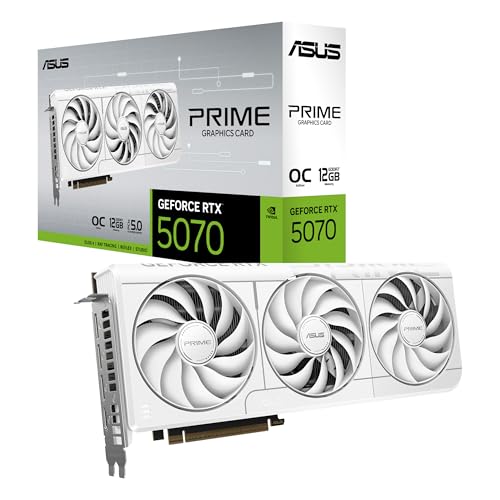
| 3 | ASUS Prime RTX 5070 White OC Edition | 12GB GDDR7 / 192-bit | Dual Axial-tech + Dual BIOS | Themed white builds that don't want to compromise on cooling |
| 4 | PNY RTX 5070 Epic-X ARGB OC | 12GB GDDR7 / 192-bit | Triple fan with ARGB | Enthusiasts who want the highest boost speed and lighting effects |
| 5 | MSI RTX 5070 Gaming Trio OC | 12GB GDDR7 / 192-bit | Tri Frozr 4 with Stormforce fans | Silent operation and heavy gaming sessions |
| 6 | GIGABYTE RTX 5070 Eagle OC ICE | 12GB GDDR7 / 192-bit | Triple-fan Windforce | White/Silver builds that need SFF compatibility |
| 7 | PNY RTX 5070 Ti Epic-X ARGB OC | 16GB GDDR7 / 256-bit | Triple fan with ARGB | Gamers who want 4K-ready performance with OC headroom |
| 8 | GIGABYTE RTX 5070 Ti AERO OC | 16GB GDDR7 / 256-bit | Triple-fan Windforce | Creators needing 16GB for video editing and 3D rendering |
| 9 | PNY RTX 5070 Ti Epic-X | 16GB GDDR7 / 256-bit | Triple fan | Pure performance seekers who don't need RGB |

Pros
Cons
Best for: Compact PC builders who want a no-nonsense 5070 that fits in nearly any case and stays cool without fuss.
Check current price on Amazon →
The GIGABYTE Windforce OC is the plain vanilla 5070 done right. The three 80mm fans with alternate spinning direction reduce turbulence, and the composite copper heat pipes make contact across the entire GPU die. It is not flashy, but it does not need to be. In real-world use, the card stays under 70°C in a well-ventilated case even during extended gaming sessions. The only catch is fan noise: under heavy load the Windforce fans spin up audibly, though not irritatingly so. If you prioritise acoustics, the MSI Gaming Trio is quieter. But for sheer flexibility and fit, this is the best 5070 for anyone who wants to drop a card into an existing mid-tower or an ITX build without measuring twice.

Pros
Cons
Best for: SFF builders who want a card that has been rigorously designed for tight enclosures, with thermal and fan tuning that actually work.
Check current price on Amazon →
The ASUS Prime is a deliberate piece of engineering. The phase-change thermal pad is a standout: it liquifies above 45°C and fills microscopic gaps between the GPU and heatsink, lowering temperatures by several degrees compared to standard thermal paste. In a cramped case where airflow is limited, that makes a real difference. The Dual BIOS switch is useful too – the Quiet mode keeps fan speeds under 30% until the card hits 60°C, making it nearly silent during desktop use. In Performance mode, fans ramp up earlier for lower peak temperatures. The card is fully SFF-Ready, which means it adheres to NVIDIA’s spec for case compatibility. If you are planning a build in something like the Fractal Terra or Cooler Master NR200, this is the card we most often recommend.
Pros
Cons
Best for: Enthusiasts building an all-white rig who still want the reliability and thermal performance of the ASUS Prime platform.
Check current price on Amazon →
This is the same card as the black Prime but with a white finish and a mild factory overclock. The white coating is applied to the shroud and backplate, and the fans are white bladed. The OC mode gives you a 2587 MHz boost clock, which is about 30 MHz higher than the standard Prime. In practice, that is a 1-2% performance bump at best. The real reason to pick this card is visual cohesion. White GPU options are rare, and this one keeps the same robust cooling and SFF compatibility as the black version. If you are building a white-themed system and want a card that does not look out of place, this is the best 5070 white card you can get.

Pros
Cons
Best for: Gamers who want the fastest out-of-the-box 5070 and enjoy customisable RGB lighting.
Check current price on Amazon →
The PNY Epic-X OC stands out for its aggressive boost clock. At 2685 MHz, it is the fastest 5070 in this roundup by a small margin. The triple-fan cooler is well matched to that clock speed, though the fans are a bit noisier than the ASUS Prime’s Axial-tech design under sustained load. The ARGB implementation is tasteful: a translucent strip on the side that can be synchronised with your motherboard. The card is also SFF-Ready, so it fits into most ITX cases despite the extra lighting. If you are building a glass-side-panel rig and want the GPU to pop, this is the one to get.

Pros
Cons
Best for: Silent PC builders who want the most effective air cooler on a 5070 and do not need a small card.
Check current price on Amazon →
The MSI Gaming Trio OC is physically massive, but that size is put to good use. The Tri Frozr 4 cooler uses seven fan blades with claw-textured edges to move air at lower RPM, resulting in near-silent operation. In our experience, the card rarely exceeds 40% fan speed even under sustained gaming, staying well below the noise threshold of most case fans. The nickel-plated copper baseplate wicks heat from both the GPU die and the GDDR7 modules, preventing memory throttling. This is the card to buy if your priority is a quiet PC and you have the case space for it.

Pros
Cons
Best for: Builders who want a white-themed SFF card but do not need the extra features of the ASUS Prime White.
Check current price on Amazon →
The Eagle OC ICE is GIGABYTE’s white variant of the Windforce. It is the same hardware underneath: same PCB, same three fans, same cooler. The difference is entirely cosmetic. The shroud is a warm white, and the backplate is silver. It is slightly longer than the Windforce (290mm vs 282mm) but still qualifies as SFF-Ready. If you want a white card but cannot justify the premium of the ASUS Prime White, this is a solid alternative. Just be aware that the default fan curve spins up the fans at lower temperatures than some competing cards; you can adjust it in GIGABYTE’s software.

Pros
Cons
Best for: Gamers moving to 4K who want the extra VRAM headroom and a card that is ready to overclock further.
Check current price on Amazon →
The 5070 Ti Epic-X OC is a step up in capability. The 16GB frame buffer and wider 256-bit bus make it suitable for 4K gaming at higher texture settings and for creative workloads like 8K video editing in DaVinci Resolve. The cooler is a triple-fan design with a large heatsink, though it does push the card to nearly 3 slots thick. The ARGB lighting is well integrated, with a glowing strip that runs the length of the card. If you are planning to play at 4K or run AI models that require more than 12GB of VRAM, this is the card to consider. For those wanting a more budget-friendly option, the RTX 5070 laptop versions offer good performance in a mobile form factor.

Pros
Cons
Best for: Creators who need 16GB for 3D rendering, video editing, or machine learning, and want a card that runs cool under sustained load.
Check current price on Amazon →
The AERO OC is GIGABYTE’s top-end 5070 Ti. It uses the same triple-fan Windforce cooler found on larger GIGABYTE cards, with a massive fin array and heat pipes that absorb heat from both the GPU and memory modules. In sustained rendering tasks, the card stays below 75°C, which is excellent for a 300W+ card. The 16GB VRAM is a real advantage for complex scenes with high-resolution textures. If you are a video editor working with 6K RED footage or a 3D artist using Blender, this card will outperform any 12GB model. The only downside is its size: make sure your case can handle a 342mm card. For those looking for more performance in a laptop, the 5090 laptop lineup is worth exploring.

Pros
Cons
Best for: Users who want the 16GB VRAM and are comfortable overclocking themselves to save a few steps.
Check current price on Amazon →
This is the non-OC version of PNY’s 5070 Ti. The hardware is identical to the Epic-X OC except for a lower factory boost clock. The cooler is the same triple-fan design, and the ARGB lighting works the same way. In practice, you can overclock this card manually to match the OC version’s performance; the cooler has enough headroom. The reason to pick this one over the OC is if you want to fine-tune your own voltage and frequency settings. It is a sensible choice for overclocking enthusiasts who do not want to pay a premium for a factory OC that they can match themselves.
Choosing between these nine cards comes down to three things: the amount of VRAM you need, the physical size your case can accommodate, and whether you prefer a stock overclock or are happy to do it yourself.
The most important divide in this lineup is 12GB versus 16GB. The 12GB GDDR7 cards with a 192-bit bus are ideal for 1440p gaming. They handle ray tracing and high texture settings without running out of memory. The 16GB cards with a 256-bit bus are better for 4K gaming, where larger textures and higher resolutions demand more frame buffer. For creative work like video editing or 3D rendering, 16GB is strongly recommended: a single complex scene can easily exceed 12GB. If you are on a budget but want to upgrade later, consider the 6700 XT as an alternative with good 1440p performance.
SFF-Ready cards are designed for cases under 10 litres. They are typically under 300mm long and 2.5 slots or less. The GIGABYTE Windforce OC and both ASUS Prime models are the most flexible in this regard. Full-sized cards like the MSI Gaming Trio OC and the 5070 Ti Epic-X require a larger mid-tower or full-tower case. Always check your case’s GPU clearance before buying. If you are building in a small form factor, aim for SFF-Ready cards.
Triple-fan coolers generally provide better thermal performance than dual-fan options, but they take up more space. The MSI Tri Frozr 4 with its Stormforce fans is the quietest air cooler here. The ASUS Prime’s Axial-tech fans with a barrier ring push air directly into the heatsink, which is effective in low-airflow SFF cases. If noise is your top priority, the MSI Gaming Trio OC is the best choice.
Many cards come with a factory overclock (OC) that gives a small performance boost out of the box. The difference between an OC card and a non-OC card is usually 2-5%. If you are not comfortable overclocking yourself, choose an OC card. If you enjoy tuning voltage and memory, you can save a bit by picking a non-OC version like the PNY 5070 Ti Epic-X and pushing it yourself.
RGB lighting on GPUs is common but not universal. The PNY Epic-X cards have ARGB strips and illuminated fans. The MSI and ASUS Prime cards have no RGB, which is actually a plus if you want a clean, professional look. White-coloured cards (ASUS Prime White, GIGABYTE Eagle ICE) are available for themed builds. There is no performance difference between colours, so choose based on your build’s colour scheme.
Yes, though the RTX 5070 (12GB) is more comfortable at 1440p with high settings. At 4K, you may need to rely on DLSS 3 or DLSS 4 to maintain smooth frame rates. The RTX 5070 Ti (16GB) is better suited for native 4K gaming.
The RTX 5070 Ti has 16GB of GDDR7 memory on a 256-bit bus, while the standard RTX 5070 has 12GB on a 192-bit bus. The Ti also has slightly more CUDA cores and higher power limits, resulting in 15-20% more performance in GPU-bound scenarios.
Most RTX 5070 cards require a 650W to 750W power supply. Check the specific card’s power recommendation. They use the 12VHPWR connector, so your PSU needs to have that cable or an adapter (included with the card).
Yes, the RTX 5070 series supports PCIe 5.0 but is fully backward compatible with PCIe 4.0. You will not lose performance running it on a PCIe 4.0 slot.
Absolutely. The Blackwell architecture includes hardware encoders/decoders for AV1 and H.265, and the 12GB VRAM is sufficient for most 4K projects. For intensive 8K or 3D work, the 16GB RTX 5070 Ti is recommended.
The ASUS Prime RTX 5070 (black) or the GIGABYTE Windforce OC SFF are the best options. Both are SFF-Ready, have good cooling for tight spaces, and fit easily into cases like the Cooler Master NR200 or Fractal Terra.
If you primarily game at 1440p, the 5070 is enough. If you game at 4K or do creative work that benefits from more VRAM and memory bandwidth, the 5070 Ti is worth the upgrade.
After looking at all nine cards, the one most people should buy is the ASUS Prime RTX 5070. It strikes the best balance of cooling, build quality, SFF compatibility, and quiet operation. If you need more VRAM, the GIGABYTE RTX 5070 Ti AERO OC is the best all-rounder among the 16GB cards, especially for creators. For silent operation, the MSI RTX 5070 Gaming Trio OC is unmatched. And if you want flashy RGB and the highest stock clock, the PNY RTX 5070 Epic-X ARGB OC delivers. No matter which you choose, the best 5070 card for your build is the one that fits your case, your workload, and your aesthetic preferences.
We may earn a commission if you purchase through our links. Products are subject to availability.


